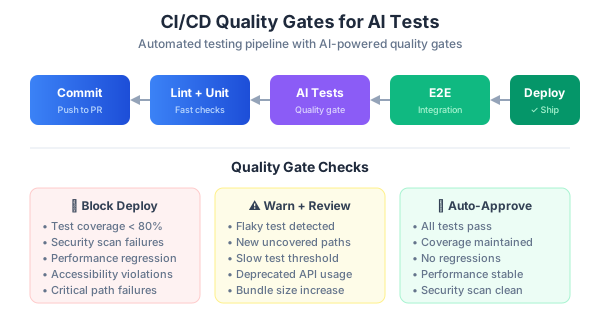
Tests that only run on your laptop don’t count. I’ve seen teams with 500 tests that nobody runs because they’re slow, flaky, or not integrated into the deployment pipeline. The tests from Part 1 (Playwright E2E) and Part 2 (DeepEval + Ragas for AI quality) only matter if they block bad code from shipping.
This is Part 3 of my series on AI-powered quality engineering. I’ll show the GitHub Actions pipeline I use for a Next.js + PostgreSQL + AI application — with quality gates at every stage.
The Pipeline Architecture
My pipeline has five parallel jobs. Each is a quality gate — if any fails, the PR can’t merge:
- Unit & Integration Tests — Jest/Vitest with coverage thresholds
- E2E Tests — Playwright browser tests
- Visual Regression — Playwright screenshot comparison
- Performance Budget — Lighthouse scores
- AI Quality — DeepEval hallucination and faithfulness checks
Running them in parallel cuts total pipeline time from 20+ minutes to under 8.
The Complete GitHub Actions Workflow
# .github/workflows/quality-gates.yml
name: Quality Gates

on:
  push:
    branches: [main]
  pull_request:
    branches: [main]

env:
  NODE_VERSION: '20'

jobs:
  # Gate 1: Unit & Integration Tests
  unit-tests:
    runs-on: ubuntu-latest
    services:
      postgres:
        image: pgvector/pgvector:pg16
        env:
          POSTGRES_DB: testdb
          POSTGRES_USER: testuser
          POSTGRES_PASSWORD: testpass
        ports:
          - 5432:5432
        options: >-
          --health-cmd pg_isready
          --health-interval 10s
          --health-timeout 5s
          --health-retries 5
    steps:
      - uses: actions/checkout@v4
      - uses: actions/setup-node@v4
        with:
          node-version: ${{ env.NODE_VERSION }}
          cache: 'npm'
      - run: npm ci
      - run: npm test -- --coverage
        env:
          DATABASE_URL: postgresql://testuser:testpass@localhost:5432/testdb
      - name: Upload coverage
        uses: actions/upload-artifact@v4
        with:
          name: coverage-report
          path: coverage/

  # Gate 2: E2E Tests with Playwright
  e2e-tests:
    runs-on: ubuntu-latest
    steps:
      - uses: actions/checkout@v4
      - uses: actions/setup-node@v4
        with:
          node-version: ${{ env.NODE_VERSION }}
          cache: 'npm'
      - run: npm ci
      - run: npx playwright install --with-deps chromium
      - run: npx playwright test --project=e2e
        env:
          CI: true
      - name: Upload Playwright Report
        if: ${{ !cancelled() }}
        uses: actions/upload-artifact@v4
        with:
          name: playwright-report
          path: playwright-report/
          retention-days: 14

  # Gate 3: Visual Regression
  visual-tests:
    runs-on: ubuntu-latest
    steps:
      - uses: actions/checkout@v4
      - uses: actions/setup-node@v4
        with:
          node-version: ${{ env.NODE_VERSION }}
          cache: 'npm'
      - run: npm ci
      - run: npx playwright install --with-deps chromium
      - run: npx playwright test --project=visual
      - name: Upload diff screenshots
        if: failure()
        uses: actions/upload-artifact@v4
        with:
          name: visual-diffs
          path: test-results/

  # Gate 4: Performance Budget
  performance:
    runs-on: ubuntu-latest
    steps:
      - uses: actions/checkout@v4
      - uses: actions/setup-node@v4
        with:
          node-version: ${{ env.NODE_VERSION }}
          cache: 'npm'
      - run: npm ci
      - run: npm run build
      - name: Start server
        run: npm run start &
      - name: Wait for server
        run: npx wait-on http://localhost:3000 --timeout 30000
      - run: npx playwright install --with-deps chromium
      - run: npx playwright test --project=lighthouse

  # Gate 5: AI Response Quality
  ai-quality:
    runs-on: ubuntu-latest
    steps:
      - uses: actions/checkout@v4
      - uses: actions/setup-python@v5
        with:
          python-version: '3.11'
          cache: 'pip'
      - run: pip install deepeval ragas
      - run: deepeval test run tests/ai/test_quality.py -n 4
        env:
          OPENAI_API_KEY: ${{ secrets.OPENAI_API_KEY }}
A few things worth noting. The pgvector/pgvector:pg16 service image gives you a real PostgreSQL with the vector extension — same as production. The --with-deps chromium flag installs only Chromium (not all browsers), cutting install time by 60%. Artifacts upload on !cancelled() so you get reports even when tests fail.
Performance Budget Tests
I use playwright-lighthouse to enforce Lighthouse scores as a quality gate:
npm install --save-dev playwright-lighthouse// tests/performance/homepage.perf.spec.ts
import { test } from '@playwright/test';
import { playAudit } from 'playwright-lighthouse';
import { chromium } from 'playwright';
test('homepage meets performance budget', async () => {
const browser = await chromium.launch({
args: ['--remote-debugging-port=9222'],
});
const page = await browser.newPage();
await page.goto('http://localhost:3000');
await playAudit({
page,
port: 9222,
thresholds: {
performance: 85,
accessibility: 90,
'best-practices': 85,
seo: 85,
},
reports: {
formats: { html: true, json: true },
name: 'homepage',
directory: './lighthouse-results',
},
});
await browser.close();
});
test('blog page meets performance budget', async () => {
const browser = await chromium.launch({
args: ['--remote-debugging-port=9223'],
});
const page = await browser.newPage();
await page.goto('http://localhost:3000/blog');
await playAudit({
page,
port: 9223,
thresholds: {
performance: 80,
accessibility: 90,
'best-practices': 85,
seo: 85,
},
reports: {
formats: { html: true },
name: 'blog',
directory: './lighthouse-results',
},
});
await browser.close();
});If any Lighthouse score drops below the threshold, the PR is blocked. This caught a 3MB unoptimized image that would have tanked the performance score from 92 to 54.
Visual Regression Tests
Playwright’s built-in toHaveScreenshot() is surprisingly good. The key is configuring it correctly for CI:
// tests/visual/pages.visual.spec.ts
import { test, expect } from '@playwright/test';

test.describe('Visual Regression', () => {
  test('homepage', async ({ page }) => {
    await page.goto('/');
    await page.waitForLoadState('networkidle');

    await expect(page).toHaveScreenshot('homepage.png', {
      fullPage: true,
      maxDiffPixels: 200,
      mask: [
        page.locator('.timestamp'),
        page.locator('.dynamic-content'),
      ],
    });
  });

  test('blog listing', async ({ page }) => {
    await page.goto('/blog');
    await page.waitForLoadState('networkidle');

    await expect(page).toHaveScreenshot('blog-listing.png', {
      fullPage: true,
      maxDiffPixels: 150,
    });
  });

  test('blog post', async ({ page }) => {
    await page.goto('/blog/hello-world');
    await page.waitForLoadState('networkidle');

    await expect(page).toHaveScreenshot('blog-post.png', {
      fullPage: true,
      maxDiffPixels: 100,
      mask: [page.locator('time')],
    });
  });
});
Critical best practices:
- Generate baselines in CI, not locally. macOS and Linux render fonts differently. If you generate baselines on a Mac and compare in CI (Linux), every test fails.
- Use
maskfor timestamps, user avatars, and dynamic content that changes between runs. - Set
maxDiffPixelsto allow minor anti-aliasing differences. Zero tolerance means constant false positives. - Update snapshots intentionally with
npx playwright test --update-snapshotswhen you deliberately change the UI.
Add a manual snapshot update workflow for when UI changes are intentional:
# .github/workflows/update-snapshots.yml
name: Update Visual Snapshots

on:
  workflow_dispatch:
    inputs:
      commit_message:
        description: 'Commit message'
        default: 'chore: update visual snapshots'

permissions:
  contents: write

jobs:
  update:
    runs-on: ubuntu-latest
    steps:
      - uses: actions/checkout@v4
      - uses: actions/setup-node@v4
        with:
          node-version: 20
      - run: npm ci
      - run: npx playwright install --with-deps chromium
      - run: npx playwright test --project=visual --update-snapshots
      - name: Commit snapshots
        run: |
          git config user.name "github-actions[bot]"
          git config user.email "github-actions[bot]@users.noreply.github.com"
          git add '**/*.png'
          git commit -m "${{ github.event.inputs.commit_message }}" || echo "No changes"
          git push
Load Testing AI Endpoints with k6
AI endpoints have different performance characteristics than regular APIs — they’re slower, more expensive, and have variable latency. I use k6 to verify they handle load:
// tests/load/ai-endpoint.js
import http from 'k6/http';
import { check, sleep } from 'k6';

export const options = {
  stages: [
    { duration: '30s', target: 10 },
    { duration: '1m', target: 10 },
    { duration: '30s', target: 0 },
  ],
  thresholds: {
    http_req_duration: ['p(95)<5000'],  // 5s for AI responses
    http_req_failed: ['rate<0.05'],
  },
};

export default function () {
  const payload = JSON.stringify({
    query: 'What features does the Pro plan include?',
  });

  const res = http.post('http://localhost:3000/api/chat', payload, {
    headers: { 'Content-Type': 'application/json' },
  });

  check(res, {
    'status 200': (r) => r.status === 200,
    'has response': (r) => {
      const body = JSON.parse(r.body);
      return body.answer && body.answer.length > 0;
    },
    'under 5s': (r) => r.timings.duration < 5000,
  });

  sleep(2);
}
Run it:
k6 run tests/load/ai-endpoint.jsThe thresholds are deliberately generous — p(95)<5000 means 95% of AI responses must complete within 5 seconds. LLM calls are inherently slower than database queries. Set realistic thresholds or every run fails.
Branch Protection Rules
Quality gates are useless without enforcement. In GitHub, go to Settings > Branches > Branch protection rules and enable:
- Require status checks to pass before merging — select all five jobs
- Require branches to be up to date before merging — prevents merge conflicts
- Require pull request reviews — at least one approval
This means a PR with failing visual regression, slow performance, or hallucinating AI responses literally cannot be merged.
Handling Flaky Tests
Flaky tests destroy trust in the pipeline. My rules:
- Retries in CI only —
retries: process.env.CI ? 2 : 0in Playwright config. If a test needs retries locally, fix it. - Trace on first retry —
trace: 'on-first-retry'captures a full Playwright trace when a test fails the first time and retries. This trace shows exactly what happened. - Video on failure —
video: 'retain-on-failure'records video but only saves it when the test fails. Saves storage. - Quarantine flaky tests — If a test flakes more than twice in a week, move it to a separate project that doesn’t block merging. Fix it within the sprint.
The Cost Reality
This pipeline isn’t free. Monthly costs for my team of 5:
- GitHub Actions — ~$50/month (Ubuntu runners, parallel jobs)
- OpenAI API for DeepEval — ~$30/month (GPT-4o-mini for evaluation metrics)
- k6 Cloud (optional) — free tier is enough for most teams
- Percy/Applitools (if used) — free tier covers ~5000 snapshots/month
Total: roughly $80/month. The alternative — shipping bugs to production and debugging them at 2am — costs significantly more.
Series Navigation
- Part 1: Setting up Playwright MCP and building the automation framework
- Part 2: Testing AI agents, LLM outputs, and vector search accuracy with DeepEval and Ragas
- Part 3: CI/CD quality gates — GitHub Actions pipelines with performance budgets (you are here)
- Part 4: The Tech Lead’s playbook for quality culture
In Part 4, the final post, I’ll cover the Tech Lead’s playbook: how to choose which tests to write first, how to get your team to actually adopt this workflow, monitoring production quality with Checkly, and advanced patterns like testing knowledge base accuracy and embedding quality over time.