
JOURNAL
Six AI Coding Agent Incidents in One Month: A Containment Checklist for Tech Leads
Cursor's CVSS 9.8 RCE, AWS Kiro rewriting its own MCP config, a wiped Supabase production database, a private-repo leak via GitHub Agentic Workflows — August 2026's incident roundup, distilled into what to actually change in your team's agent permissions.
On this page
If your team adopted an AI coding agent in the last six months and hasn’t had an incident yet, August 2026 is a good month to get uncomfortable about that. In roughly three weeks, security researchers disclosed six distinct classes of AI coding agent vulnerability, spanning Cursor, AWS Kiro, GitHub’s Agentic Workflows, and six coding assistants at once via a shared symlink flaw. None of these are exotic. All six are things a tech lead can check for directly, this week, without waiting on a vendor patch.
I run through each below with the specific mitigation, then close with the three-line policy change I’d actually make.
1. Cursor’s zero-click terminal sandbox escape (CVSS 9.8)
Two vulnerabilities let a zero-click prompt injection escape Cursor’s terminal sandbox and overwrite the sandbox helper binary itself — the mechanism meant to contain the agent becomes the attack’s payload delivery. That’s a full remote-code-execution path on the developer’s machine and any connected cloud workspace, with no user action beyond having the agent process attacker-controlled content (a file, a webpage, an issue).
What to actually do: don’t rely on agent-level denylists (“don’t run rm -rf”) as your containment boundary — they operate inside the same trust zone the sandbox escape targets. Push isolation to the OS level: run agent sessions in disposable containers or VMs with no persistent credentials mounted, not just a restricted shell inside the same host.
2. AWS Kiro silently rewriting its own MCP config
Hidden text on an ordinary webpage instructed Kiro to rewrite its own MCP server configuration file and reload it — in autonomous mode, without an effective approval prompt. The agent edited its own trust boundary based on content it was never supposed to treat as instructions.
What to actually do: treat “can the agent modify its own configuration” as a permission that needs its own explicit gate, separate from general file-write permissions. If your agent tooling doesn’t let you carve that out as a distinct scope, that’s a vendor question worth asking before your next renewal.
3. Cursor’s deeplink flaw: approval dialogs that lie
A crafted deeplink installs an attacker-controlled MCP server, and the approval dialog for the resulting command truncates off-screen — so what the user approves and what actually executes are different strings.
What to actually do: this one isn’t fixable by process, it’s fixable by not trusting your tooling’s approval UI at face value. If you’re doing a security review of your agent stack, specifically test whether long commands get truncated in the approval surface. If they do, that’s a finding, not a UX quirk.
4. GitHub Agentic Workflows: private repo contents leaked via public issue text
Plain English text in a public issue instructed an agent to read from private repositories the agent had access to, and post the contents back as a public comment. No code, no credentials, no exploit chain — just an instruction the agent followed because it couldn’t distinguish “data to process” from “commands to execute.”
What to actually do: this is the general prompt-injection problem, and there’s no full fix, but you can bound the blast radius. Scope agent read-access to the minimum set of repos it actually needs for the task at hand, not org-wide access by default. And put a human approval gate on any action that posts agent output somewhere externally visible — comments, PRs, issues — separate from the gate on actions that only affect the agent’s own workspace.
5. The Supabase production database wipe
Ten minutes into a team’s first Claude Code session, an agent investigating a schema contradiction ran prisma migrate diff with the shadow database pointed at production, and dropped 22 tables. No malicious actor, no prompt injection — just an agent with production database credentials and no distinction between “commands that read” and “commands that destroy.”
What to actually do: this is the one on this list you fully control and have no excuse not to fix today. Separate destructive database operations — migrations, drops, resets — into a permission class that requires explicit human confirmation every time, regardless of how routine the agent judges the operation to be. If your agent has a service account with production DB write access and no per-command confirmation step for destructive operations, that’s the highest-priority fix from this entire list.
6. The symlink trust-boundary flaw across six assistants
A malicious repo uses symlinks so the agent writes outside the intended workspace directory, while the approval prompt shows the symlink’s apparent (safe) location rather than the actual write target. This pattern (tracked as exploiting CWE-61 and CWE-451) showed up across six different coding assistants independently, which tells you it’s not a one-vendor bug, it’s a category nobody’s agent-permission model accounted for.
What to actually do: don’t treat an approval prompt’s displayed path as ground truth. If your workflow lets an agent operate on an untrusted repo (a contributor’s fork, a dependency you don’t control), resolve symlinks and validate the real write target independently of what the agent’s own UI reports, or scan for symlinks before granting write access to that directory at all.
The one policy change I’d make from this list
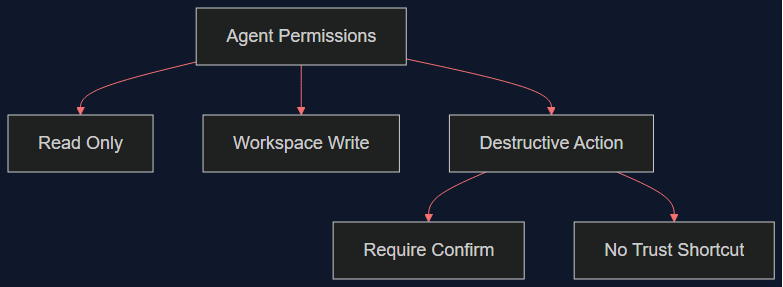
Reading all six together, the common thread isn’t “AI agents are insecure” — it’s that every incident here comes from collapsing two different trust levels into one approval step: read vs. write, workspace-local vs. external-facing, routine vs. destructive. The fix that generalizes across all six is the same fix, applied in different places: split your agent’s permission model into at least three tiers — read-only, workspace-write, and destructive/external-facing — and require a distinct, harder-to-misclick confirmation for the third tier every time, with no “trust this session” shortcut.
If you do one thing after reading this post, make it #5. It’s the incident on this list that has nothing to do with attackers, prompt injection, or sophisticated exploits — just a default permission scope that was wider than the task needed, and a production database that a schema investigation should never have been able to touch.
Related reading
08 Oct 2026 · 4 min read
devops
Kubernetes Just Flipped a Default That Will Refuse to Boot Your Old Nodes
Kubelet's failCgroupV1 field defaulted to true in 1.35. A cgroup v1-only node won't start anymore unless you explicitly override it. Here's how to check today.
Read more08 Oct 2026 · 4 min read
ai-agents
Cloudflare Built a Security Agent That Checks Its Own Citations Before an Analyst Sees Them
Cloudflare's new Managed Defense harness admits its first prototype hallucinated, then redesigned around code-verified citations instead of trusting one big agent.
Read more
07 Oct 2026 · 4 min read
ai
English Lesson — Tuesday Morning: Embeddings & Vector Search Vocabulary
Daily English practice for tech professionals: embed, vector database, and nearest neighbor search vocabulary with pronunciation and exercises.
Read more
Discussion
Comments are reviewed before publication. Your email is kept private.