
JOURNAL
Angular Monorepo Dev Experience — Hot Reload, Local Libraries, and Team Git Workflows
Post J — Day-to-day developer experience in an Nx Angular monorepo: library watch mode, Nx affected for daily work, trunk-based development, feature flags for parallel work, and avoiding common multi-team blockers.
On this page
A well-structured monorepo is invisible. Developers start tasks, make changes, see them reflected immediately, commit, and move on. A poorly configured one is a daily source of friction: slow rebuilds, unclear ownership, mysterious circular dependency errors, and merge conflicts in shared code.
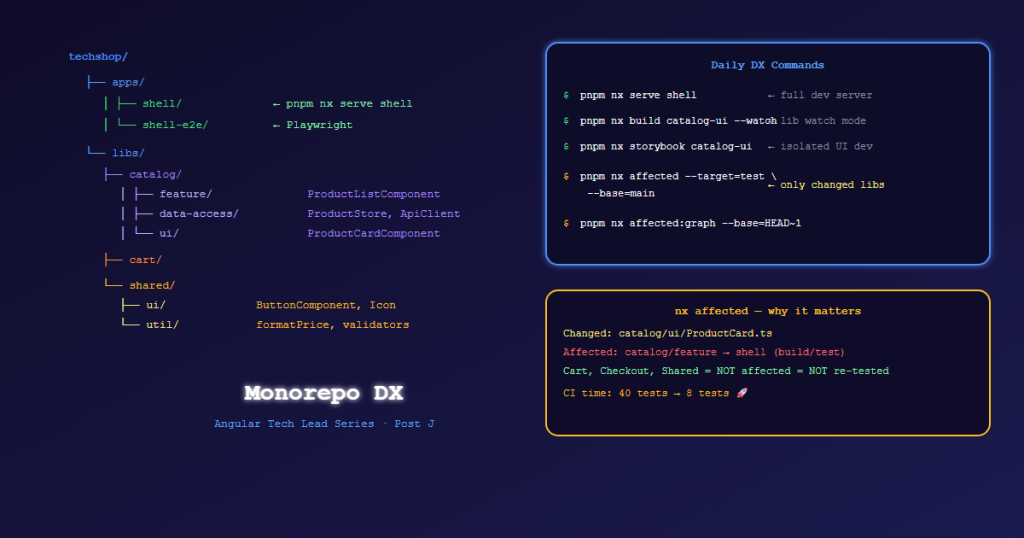
This post covers the day-to-day DX commands and workflows that keep the TechShop team productive.
The Daily Development Commands
# Start the full app (app shell + API proxy)
pnpm nx serve shell

# Start just the library in watch mode (for isolated component development)
pnpm nx build catalog-ui --watch

# Run tests only for what you changed
pnpm nx affected --target=test --base=main

# Lint only affected libs
pnpm nx affected --target=lint --base=main

# Generate the full dependency graph (opens browser)
pnpm nx graph

# What does changing cart/data-access affect?
pnpm nx affected:graph --base=HEAD~1
Library Watch Mode — Isolated Component Development
When working on a shared UI library, run it in isolation rather than through the full app:
# Storybook for shared UI library (instant feedback loop)
pnpm nx storybook catalog-ui

# Or serve just the library test harness
pnpm nx test catalog-ui --watch
With --watch, Nx reruns tests only for files that changed — not the entire library. This keeps the feedback loop under 500ms for most changes.
Nx Affected — Daily, Not Just CI
nx affected is typically shown as a CI optimization. It’s equally powerful for local development:
# Which tests do I need to run after my change?
pnpm nx affected --target=test --base=main --head=HEAD

# Which apps would my library change break?
pnpm nx affected --target=build --base=main

# Run all affected tasks in parallel (adjust parallelism to your CPU)
pnpm nx affected --targets=lint,test,build --parallel=3
The --base=main comparison means: “compared to the main branch, what did I change?” — perfect for feature branch work.
Sharing Code Without Breaking Teammates
The most common multi-team blocker: Alice needs to add a field to ProductCardComponent for the catalog team, but Bob’s cart team already uses it.
The wrong approach: Alice modifies ProductCardComponent directly, breaking Bob’s build.
The right approach — additive changes only:
- Alice adds an optional
input()with a default value - Existing usages in Bob’s code continue to work (no required input added)
- Alice’s new feature uses the new optional input
- Later, if the team agrees, old usages can be updated
// Old
export class ProductCardComponent {
  product = input.required<Product>();
}

// ✅ Additive — Bob's existing usage unchanged
export class ProductCardComponent {
  product = input.required<Product>();
  showWishlistButton = input(false);         // optional, default false ← Alice's addition
  badgeLabel = input<string | null>(null);   // optional, default null
}
Trunk-Based Development in the Monorepo
Short-lived branches (1–2 days) merged directly to main. This is the recommended approach for Nx monorepos.
Why: Long-lived feature branches accumulate merge conflicts in project.json, tsconfig.json, and shared libs — the most expensive conflicts to resolve.
main ──┬── feat/catalog-filter (1 day) ──> merge
       ├── fix/cart-qty-validation (4 hours) ──> merge
       └── feat/checkout-payment (2 days) ──> merge
For features that take longer than 2 days: use feature flags, not long branches.
Feature Flags Pattern
// libs/shared/util-feature-flags/src/lib/feature-flags.service.ts
@Injectable({ providedIn: 'root' })
export class FeatureFlagsService {
  private flags = signal<FeatureFlags>({
    newCheckoutFlow: false,
    b2bPricing: false,
    aiProductSearch: false,
  });

  isEnabled(flag: keyof FeatureFlags): boolean {
    return this.flags()[flag];
  }

  // Load from API/environment on init
  async loadFlags() {
    const flags = await inject(FlagsApiClient).getFlags().get();
    this.flags.set(flags as FeatureFlags);
  }
}

interface FeatureFlags {
  newCheckoutFlow: boolean;
  b2bPricing: boolean;
  aiProductSearch: boolean;
}
Usage in templates:
@if (flags.isEnabled('newCheckoutFlow')) {
  <app-new-checkout />
} @else {
  <app-checkout />  <!-- Old checkout stays safe behind flag -->
}
Alice can merge newCheckoutFlow code to main with the flag disabled. Testers enable it via API/admin. When confirmed stable, the flag is enabled for all users. Old code is deleted in a cleanup PR.
Git Commit Convention — Enforced by Commitlint
pnpm add -D @commitlint/cli @commitlint/config-conventional
// commitlint.config.js
export default {
  extends: ['@commitlint/config-conventional'],
  rules: {
    'scope-enum': [2, 'always', [
      'catalog', 'cart', 'checkout', 'orders', 'auth', 'shared', 'infra', 'deps'
    ]],
  }
};
# Git hooks (runs pre-commit)
git commit -m "feat(catalog): add product filter by price range"  # ✅
git commit -m "fixed some stuff"                                   # ❌ lint fails
# .husky/commit-msg
pnpm commitlint --edit $1
Valid scopes match your Nx library domains — making the commit history self-documenting.
Avoiding the Common Multi-Team Blockers
| Problem | Root Cause | Fix |
|---|---|---|
Merge conflict in package.json |
Two teams added deps at same time | Use pnpm lockfile merge driver |
| Circular dependency error | Team A imports Team B imports Team A | nx graph + boundary rules (Post A) |
| Shared component broke my build | Breaking change without notice | Additive-only pattern + semver signals |
| My test passes locally, fails CI | Environment difference | Dev uses same Postgres version as CI via docker-compose.dev.yml |
nx affected shows everything affected |
Changed a root config file | Keep root config changes separate PRs |
References
- Nx Affected — nx.dev
- Nx Workspace — Getting Started
- Trunk-Based Development — trunkbaseddevelopment.com
- Commitlint — commitlint.js.org
- Feature Flags — Martin Fowler
Part of the Angular Tech Lead Series — Back to main series overview
Related reading
28 Sep 2026 · 3 min read
english-lesson
English Lesson — Monday Morning: Git & Version Control Vocabulary
Daily English practice for tech professionals. Morning session covering Git and version control vocabulary with pronunciation guide, exercises, and real-world examples.
Read more
07 Sep 2026 · 6 min read
ai-agents
GitSpawn: How a Git Config Setting Turns Your AI Coding Agent Into an Attacker
A single Git performance setting, core.fsmonitor, lets a malicious repository run arbitrary code the moment an AI coding agent looks at it — before you've typed a prompt or clicked 'trust this folder.' A Tech Lead's breakdown of the exploit and the fix.
Read more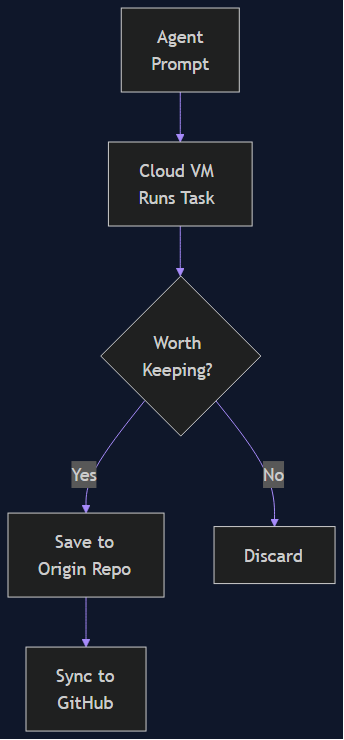
05 Sep 2026 · 4 min read
agentic coding
Cursor Origin: When Your Git Forge Is Built for Agents First, Humans Second
Cursor shipped Origin — a waitlist-only Git forge that lets cloud agents push code without ever touching GitHub. A technical lead's read on what it means when 35% of merged PRs are already agent-authored.
Read more
Discussion
Comments are reviewed before publication. Your email is kept private.