
JOURNAL
Angular 21 SSR Storefront: Server-Side Rendering, Route-Level Hydration, and SEO
Part 7 of 11 — Build an Angular 21 SSR ecommerce storefront. Route-level rendering modes, hydration with event replay, SEO meta tags, structured data, and performance tuning for Core Web Vitals.
On this page
Ecommerce depends on search traffic. A product page that crawlers can’t index doesn’t exist to Google. A checkout page with a 3-second API-dependent first paint loses customers before they’ve seen the price.
Angular 21’s SSR story has matured significantly. Route-level rendering modes, stable hydration with event replay, and @defer for progressive loading give you the tools to build a storefront that’s both Google-friendly and performant. This is Part 7 of the Angular Ecommerce Playbook.
📊 Download: SSR Rendering Flow Diagram (draw.io)
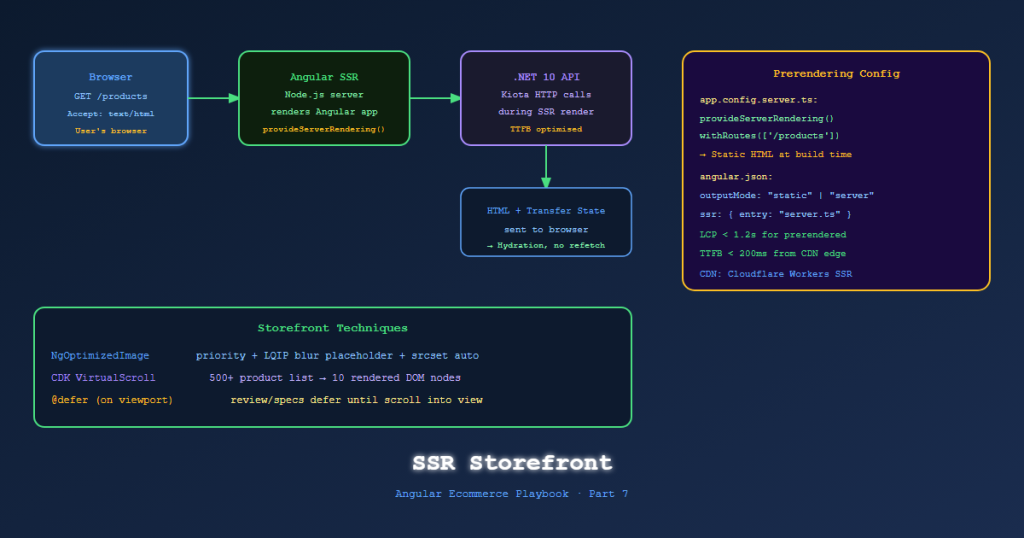
Angular 21 SSR Architecture
Angular’s SSR uses Angular Universal (now fully integrated into the Angular CLI). In Angular 21, there’s no separate package — SSR is a first-class CLI feature.
# Add SSR to the existing project
ng add @angular/ssr

# Or generate a new project with SSR from the start
ng new techshop-storefront --ssr
This generates:
app.config.ts— client configurationapp.config.server.ts— server-only configurationserver.ts— Express server entry point- Updated
app.routes.tswithRenderModeimports
Route-Level Rendering Modes
This is Angular 21’s killer SSR feature for ecommerce. Each route can have a different rendering strategy:
// app.config.server.ts — server-side configuration
import { ApplicationConfig, mergeApplicationConfig } from '@angular/core';
import { provideServerRendering, RenderMode, ServerRoute } from '@angular/ssr';
import { appConfig } from './app.config';

const serverRoutes: ServerRoute[] = [
  {
    // Home page — SSG (built once, served as static HTML — fastest TTFB)
    path: '',
    renderMode: RenderMode.Prerender,
  },
  {
    // Product catalog — SSR (personalized pricing, real-time stock)
    path: 'products',
    renderMode: RenderMode.Server,
  },
  {
    // Product detail — SSR with dynamic params (SEO critical)
    path: 'products/:slug',
    renderMode: RenderMode.Server,
  },
  {
    // Cart — CSR only (session data, no SEO benefit)
    path: 'cart',
    renderMode: RenderMode.Client,
  },
  {
    // Checkout — CSR only (auth required, no indexing)
    path: 'checkout/**',
    renderMode: RenderMode.Client,
  },
  {
    // Account — CSR only
    path: 'account/**',
    renderMode: RenderMode.Client,
  },
  {
    // Static pages — SSG (prerendered at build time)
    path: 'about',
    renderMode: RenderMode.Prerender,
  },
  {
    // Everything else — SSR default
    path: '**',
    renderMode: RenderMode.Server,
  },
];

const serverConfig: ApplicationConfig = {
  providers: [
    provideServerRendering(),
    provideServerRoutesConfig(serverRoutes),
  ],
};

export const config = mergeApplicationConfig(appConfig, serverConfig);
The performance rationale:
| Route | Mode | Reason |
|---|---|---|
/ |
Prerender (SSG) | Static, same for all users, fastest delivery |
/products/:slug |
Server (SSR) | SEO critical, stock varies, personalized pricing |
/cart |
Client (CSR) | Pure session state, no crawlers access |
/checkout/** |
Client (CSR) | Auth-gated, compliance (no server logging of payment data) |
/about, /faq |
Prerender (SSG) | Marketing content, never changes |
Hydration with Event Replay
Angular 21 ships withEventReplay() as stable. This solves the “interaction before hydration” problem — a user clicking “Add to Cart” while the page is still hydrating (common on slow mobile connections).
// app.config.ts
import { provideClientHydration, withEventReplay } from '@angular/platform-browser';

export const appConfig: ApplicationConfig = {
  providers: [
    provideZonelessChangeDetection(),
    provideClientHydration(
      withEventReplay() // Captures events pre-hydration, replays post-hydration
    ),
    // ...
  ],
};
What happens without withEventReplay():
- Server renders HTML — user sees product page
- User clicks “Add to Cart” at 200ms
- Angular hydrates components at 800ms
- The 200ms click is lost — user has to click again
- Customer frustration
With withEventReplay():
- Server renders HTML — user sees product page
- User clicks “Add to Cart” at 200ms — event is queued
- Angular hydrates at 800ms
- Queued “Add to Cart” click is replayed
- Cart updates correctly — seamless experience
SEO: Meta Tags and Structured Data
Dynamic Meta Tags per Product
// libs/catalog/feature-product-detail/src/lib/product-detail.component.ts
import { Component, inject, input, OnInit } from '@angular/core';
import { Meta, Title } from '@angular/platform-browser';

@Component({
  selector: 'ts-product-detail',
  standalone: true,
  // ...
})
export class ProductDetailComponent implements OnInit {
  readonly product = input.required<Product>();
  private readonly meta = inject(Meta);
  private readonly title = inject(Title);

  ngOnInit(): void {
    const p = this.product();

    // Open Graph + Twitter Card + standard meta
    this.title.setTitle(`${p.name} — TechShop`);

    this.meta.updateTag({ name: 'description', content: p.description.slice(0, 160) });

    // Open Graph (Facebook, LinkedIn, WhatsApp previews)
    this.meta.updateTag({ property: 'og:title', content: p.name });
    this.meta.updateTag({ property: 'og:description', content: p.description.slice(0, 160) });
    this.meta.updateTag({ property: 'og:image', content: p.images[0]?.url ?? '' });
    this.meta.updateTag({ property: 'og:url', content: `https://techshop.com/products/${p.slug}` });
    this.meta.updateTag({ property: 'og:type', content: 'product' });
    this.meta.updateTag({ property: 'product:price:amount', content: p.price.toString() });
    this.meta.updateTag({ property: 'product:price:currency', content: 'USD' });

    // Twitter Card
    this.meta.updateTag({ name: 'twitter:card', content: 'summary_large_image' });
    this.meta.updateTag({ name: 'twitter:title', content: p.name });
    this.meta.updateTag({ name: 'twitter:image', content: p.images[0]?.url ?? '' });
  }
}
Structured Data (JSON-LD) for Google Shopping
Google Shopping and rich results require Product structured data. In Angular SSR, inject it in the <head> during server rendering:
// libs/shared/seo/src/lib/json-ld.service.ts
import { Injectable, inject } from '@angular/core';
import { DOCUMENT } from '@angular/common';

@Injectable({ providedIn: 'root' })
export class JsonLdService {
  private readonly doc = inject(DOCUMENT);

  setProduct(product: Product): void {
    const schema = {
      '@context': 'https://schema.org',
      '@type': 'Product',
      name: product.name,
      description: product.description,
      sku: product.id,
      image: product.images.map(img => img.url),
      offers: {
        '@type': 'Offer',
        url: `https://techshop.com/products/${product.slug}`,
        priceCurrency: 'USD',
        price: product.price,
        availability: product.isInStock
          ? 'https://schema.org/InStock'
          : 'https://schema.org/OutOfStock',
        seller: { '@type': 'Organization', name: 'TechShop' },
      },
    };

    // Remove existing schema script if any
    this.doc.querySelector('#product-jsonld')?.remove();

    const script = this.doc.createElement('script');
    script.id = 'product-jsonld';
    script.type = 'application/ld+json';
    script.text = JSON.stringify(schema);
    this.doc.head.appendChild(script);
  }
}
With SSR, the JSON-LD is in the HTML when Google crawls it — no JavaScript execution required by the crawler.
TransferState: Avoid Duplicate HTTP Requests
Without transfer state, SSR fetches product data on the server, renders HTML, then the hydrated client fetches product data again on startup. The user sees a flash and the API gets hit twice.
// In the product detail component
import { inject } from '@angular/core';
import { TransferState, makeStateKey } from '@angular/core';

const PRODUCT_KEY = makeStateKey<Product>('product');

@Component({ /* ... */ })
export class ProductDetailComponent implements OnInit {
  private transferState = inject(TransferState);
  private api = inject(TechShopApiClient);
  private isPlatformBrowser = inject(PLATFORM_ID);

  readonly productResource = resource({
    request: () => ({ slug: this.slug() }),
    loader: async ({ request }) => {
      // Check TransferState (populated by server) before making HTTP call
      const cached = this.transferState.get(PRODUCT_KEY, null);
      if (cached) {
        this.transferState.remove(PRODUCT_KEY); // Consume once
        return cached;
      }

      // Server or client fetch
      const product = await this.api.products.bySlug(request.slug).get();

      // If on server, store in TransferState for client to pick up
      if (isPlatformServer(this.isPlatformBrowser)) {
        this.transferState.set(PRODUCT_KEY, product);
      }

      return product;
    }
  });
}
Angular 21 has built-in HTTP caching via withHttpTransferCache() in provideClientHydration() — but resource() requires manual TransferState handling (as shown above). The Angular team is improving this integration in 2026.
Performance: Core Web Vitals Targets
For an ecommerce storefront, Core Web Vitals targets:
| Metric | Target | Angular 21 Technique |
|---|---|---|
| LCP (Largest Contentful Paint) | < 2.5s | SSR + NgOptimizedImage with priority |
| CLS (Cumulative Layout Shift) | < 0.1 | Pre-set image dimensions, skeleton loaders |
| INP (Interaction to Next Paint) | < 200ms | Zoneless + OnPush + Signals |
| TTFB (Time to First Byte) | < 800ms | SSG for static, CDN edge for SSR |
// NgOptimizedImage — priority for LCP image
@Component({
  imports: [NgOptimizedImage],
  template: `
    <img
      [ngSrc]="product().images[0].url"
      [alt]="product().name"
      width="600"
      height="600"
      priority          <!-- Preloads this image — drives LCP improvement -->
      sizes="(max-width: 768px) 100vw, 50vw"
    />
  `
})
// Skeleton loader pattern for CLS prevention
@Component({
  template: `
    @if (productResource.isLoading()) {
      <ts-product-skeleton />  <!-- Same dimensions as real content — prevents CLS -->
    } @else {
      <ts-product-card [product]="productResource.value()!" />
    }
  `
})
The SSR Deployment
Angular SSR requires a Node.js server. For TechShop, we deploy to Azure Container Apps with a custom Express server:
// server.ts (generated by ng add @angular/ssr, customized)
import { APP_BASE_HREF } from '@angular/common';
import { CommonEngine } from '@angular/ssr/node';
import express from 'express';
import { fileURLToPath } from 'node:url';
import { dirname, join, resolve } from 'node:path';
import bootstrap from './src/main.server';

export function app(): express.Express {
  const server = express();
  const serverDistFolder = dirname(fileURLToPath(import.meta.url));
  const browserDistFolder = resolve(serverDistFolder, '../browser');

  server.set('view engine', 'html');
  server.set('views', browserDistFolder);

  // Serve static assets from /browser
  server.get('**', express.static(browserDistFolder, {
    maxAge: '1y',
    index: false,
  }));

  // All regular routes use the Angular SSR engine
  server.get('**', (req, res, next) => {
    const { protocol, originalUrl, baseUrl, headers } = req;
    commonEngine.render({
      bootstrap,
      documentFilePath: join(browserDistFolder, 'index.html'),
      url: `${protocol}://${headers.host}${originalUrl}`,
      publicPath: browserDistFolder,
      providers: [{ provide: APP_BASE_HREF, useValue: baseUrl }],
    })
      .then(html => res.send(html))
      .catch(next);
  });

  return server;
}
The Angular SSR + .dockerignore + GitHub Actions deployment is covered in detail in Part 10 (CI/CD).
References
- Angular SSR — Official Guide
- Route-Level Rendering Modes — angular.dev
- withEventReplay() — angular.dev
- Angular TransferState
- NgOptimizedImage — angular.dev
- Core Web Vitals — web.dev
- JSON-LD Structured Data — Google
- Angular Universal — GitHub
- Draw.io Diagram: SSR Rendering Flow
This is Part 7 of 11 in the Angular Ecommerce Playbook. ← Part 6: State Management | Part 8: GitHub Copilot Workflow →
Related reading
14 Sep 2026 · 5 min read
ai
Your Vector Database Benchmark Is Lying to You (Mine Was Too)
Qdrant released a 10-billion-document benchmark dataset on September 1, 2026, built from over a quadrillion brute-force distance calculations. I ran our production filter patterns against the old 1M-vector benchmark we'd been trusting. The gap explains a slowdown we never diagnosed.
Read more
30 Aug 2026 · 4 min read
cloudflare
Cloudflare Cut DNS Cache Memory by 56% — The Rust Layout Tricks Worth Stealing
On Aug 27, Cloudflare shipped five memory-layout optimizations to Big Pineapple, their DNS cache, cutting per-entry memory by 56% and freeing ~100TB fleet-wide. A Tech Lead's walkthrough of the actual techniques — struct packing, arena allocation, string interning — and where they pay off in ordinary backend services, not just DNS resolvers at Cloudflare scale.
Read more
19 Aug 2026 · 5 min read
agentic coding
750 Tokens/Second: What Cerebras' Wafer-Scale Inference Actually Changes for Agent UX
OpenAI's GPT-5.6 Sol Ultrafast, powered by Cerebras' Wafer-Scale Engine, hits 750 output tokens/second — 14x standard inference. I dug into why on-chip SRAM beats HBM for this, and what it means for how we design latency-sensitive agent products.
Read more
Discussion
Comments are reviewed before publication. Your email is kept private.