
JOURNAL
Part 4/6: Running agents in parallel across models and providers
One git worktree and branch per task, Claude Code and Codex running in parallel through agent-task.sh, a two-family review with a refute pass, and every provider behind one LiteLLM gateway with a written routing policy.
On this page
Prefer to watch first? The whole series in one video (25 minutes) walks the full loop on the sample repo.
By the end of Part 3 you had an approved spec, a task table and one agent working through it in one folder. While the agent writes the repository layer, you wait; while you review, the agent waits. And every task goes to the same model, even when another model would do it cheaper or catch different mistakes.
This part is about running several agents at once without them stepping on each other, and about using more than one model family and provider on purpose. The tools are plain: git worktrees, two shell scripts in the sample repo and a LiteLLM gateway config. The hard part is deciding when to split work and how to read what comes back.
What you will have at the end
- A rule for when parallel agents save time and when they do not.
- Worktrees where each task gets its own folder, branch and
node_modules. scripts/agent-task.shunderstood flag by flag, and two tasks of spec 0002 run in parallel, one with Claude Code and one with Codex.- Machine-readable output from both tools, including structured JSON.
scripts/cross-review.shrunning a two-family review with a refute pass.- A LiteLLM gateway in front of your providers, and a clear view of what each CLI can do through it.
- A routing policy table: which model does which job, and why.
Prerequisites
- The sample repo cloned and green:
pnpm checkpasses onmain. See Part 2 for the setup, including trusting the workspace in Claude Code and the Codex project. - Spec 0002 approved and a task file
docs/tasks/0002-daily-click-stats.mdwritten by the planner, as in Part 3. The repo ships the spec but not this task file; you create it in Part 3. - Claude Code and Codex CLI installed and logged in. On Windows, run the scripts from Git Bash.
- For the gateway section: Python with pip, and API keys for the providers you want to route to.
When parallel work pays off, and when it does not
Running two agents at once does not make either of them faster. It helps only when the tasks do not need each other. In my daily work the bottleneck is rarely the agent. It is my review time and the merge. Three questions decide it:
- Do the tasks touch different files? That is why the task table from Part 3 has a Files column. For spec 0001 the planner wrote: “T1-T3 touch the same files, so they run in sequence in one worktree. T4 can run in parallel once T3’s response shape is fixed.” Two agents editing one file in two branches give you a merge conflict to resolve by hand.
- Is the interface between them fixed? The README update for spec 0002 can run alongside the code because the spec’s Behaviour table already fixes the response shape. A route cannot be written in parallel with a repository method whose signature nobody has decided.
- Can you afford to verify both? Every parallel branch is one more diff to read. The machine part is cheap: the full gate (lint, typecheck, 13 tests) runs in about a second locally. Your attention is the expensive part.
A simple rule I follow: split by files, not by steps. “Repository layer” and “README” are good parallel tasks. “Write the test” and “make the test pass” are not; they are steps of one task.
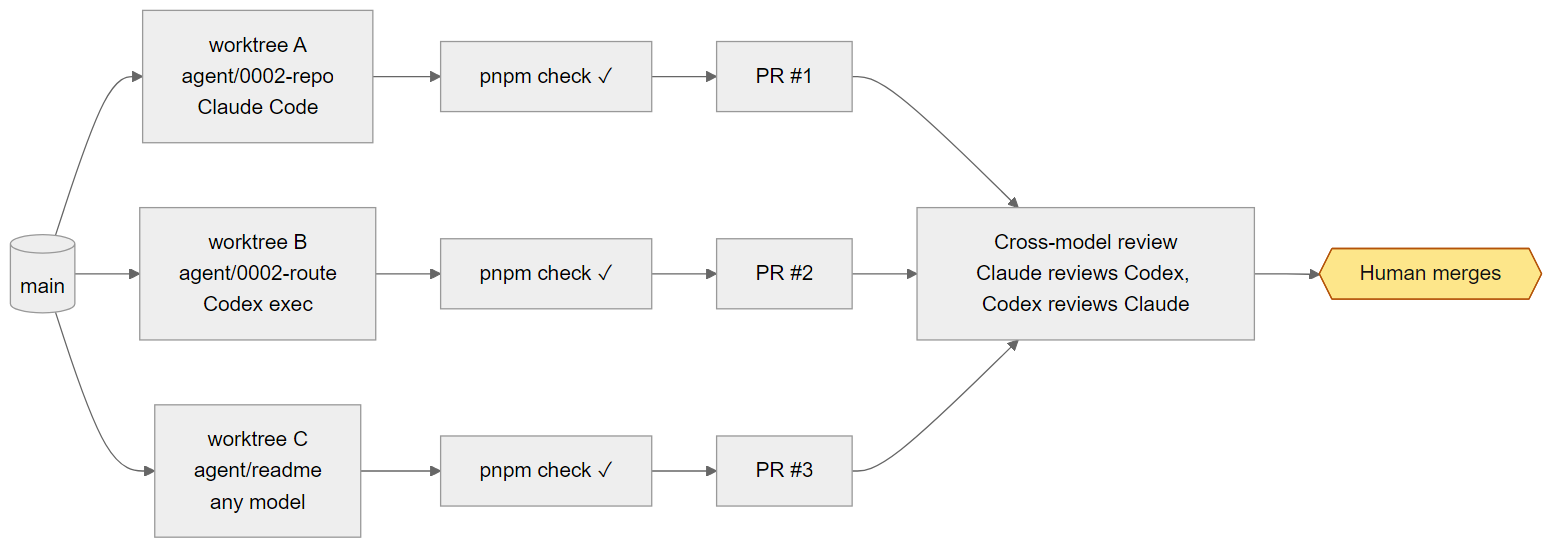
Git worktrees: one task, one folder, one branch
A git worktree is an extra working folder attached to the same repository. All worktrees share one .git object store, so creating one is fast. Each has its own branch, index and files on disk, so two agents in two worktrees cannot overwrite each other’s files.
The commands
# create a worktree in .worktrees/x on a new branch agent/x, starting from main
git worktree add .worktrees/x -b agent/x main

# see all worktrees and which branch each one has
git worktree list

# remove the folder when the branch is merged (or abandoned)
git worktree remove .worktrees/x
git branch -d agent/x
Why a branch per task? Git does not let two worktrees check out the same branch, and that is a feature: one task gives one diff to review, one PR in Part 5, and a clean way to throw the task away. The agent/ prefix shows which branches still need a human look.
The sample repo keeps worktrees in .worktrees/ and ignores it in .gitignore, together with agent-runs/ and .claude/worktrees/.
Claude Code’s built-in worktrees
For interactive work you do not need to type the git commands. claude -w <name> creates .claude/worktrees/<name> on a branch called worktree-<name> and starts the session inside it:
claude -w 0002-daysI use claude -w when I sit with an agent on one task in a separate terminal tab. For headless runs started by a script I use plain git worktree add, so Claude Code and Codex runs share one naming scheme (.worktrees/<name>, agent/<name>). Pick one convention per repo so cleanup stays simple.
Windows: never share node_modules
A new worktree has no node_modules. The tempting shortcut is to link the main checkout’s node_modules into the worktree. Do not do this. In Git Bash on Windows, ln -s creates a junction, and git worktree remove follows the junction and deletes the real tree it points to. You lose the main checkout’s dependencies.
Install per worktree instead. pnpm keeps one content-addressed store per machine and links from it, so a second install is mostly local file work:
cd .worktrees/x
pnpm install --frozen-lockfile --prefer-offline
--frozen-lockfile fails instead of silently changing pnpm-lock.yaml, so an agent never starts from different dependency versions than main. --prefer-offline uses the local store when it can.
Check: create a throwaway worktree, install, run the gate, remove it.
git worktree add .worktrees/try -b agent/try main
(cd .worktrees/try && pnpm install --frozen-lockfile --prefer-offline && pnpm check)
git worktree list
git worktree remove .worktrees/try
git branch -d agent/try
ls node_modules | head -3
Expected: pnpm check passes inside the worktree, git worktree list shows two lines (the main folder and .worktrees/try [agent/try]), and after the removal the main checkout’s node_modules is still there.
scripts/agent-task.sh, line by line
This script is the unit of parallel work in the sample repo. It takes a tool (claude or codex), a task name and a prompt, and runs one task headless in its own worktree. Here it is in full.
scripts/agent-task.sh
#!/usr/bin/env bash
# Run one task headless in its own git worktree, with Claude Code or Codex.
#
#   scripts/agent-task.sh claude 0002-repo "Do T1 and T2 from docs/tasks/0002-daily-click-stats.md"
#   scripts/agent-task.sh codex  0002-docs "Update the README API section for spec 0002"
#
# Result: branch agent/<name>, worktree .worktrees/<name>, log and summary in agent-runs/<name>/.
# Nothing is pushed. Read agent-runs/<name>/summary.md, then review the branch.
set -euo pipefail

tool="${1:?usage: agent-task.sh claude|codex <name> <prompt>}"
name="${2:?missing task name}"
task="${3:?missing prompt}"

root="$(git rev-parse --show-toplevel)"
tree="$root/.worktrees/$name"
runs="$root/agent-runs/$name"
mkdir -p "$runs"

if [ ! -d "$tree" ]; then
  git -C "$root" worktree add -q "$tree" -b "agent/$name" main
fi
cd "$tree"
pnpm install --frozen-lockfile --prefer-offline >/dev/null

prompt="$task

Follow AGENTS.md. Work only inside this worktree. Run the task's check command and then pnpm check.
Commit your work on this branch with a Conventional Commits message, staging files explicitly.
End with a summary in three sections: Done and verified (with commands), Done but not verified, Skipped."

case "$tool" in
  claude)
    claude -p "$prompt" \
      --model sonnet \
      --permission-mode acceptEdits \
      --allowedTools "Read,Edit,Write,Glob,Grep,Bash(pnpm *),Bash(git status),Bash(git diff *),Bash(git add *),Bash(git commit *)" \
      --max-turns 40 \
      --max-budget-usd 3 \
      --output-format json >"$runs/claude.json"
    node -e 'const r=require(process.argv[1]);console.log(r.result);console.error(`cost_usd=${r.total_cost_usd}`)' \
      "$runs/claude.json" >"$runs/summary.md"
    ;;
  codex)
    codex exec "$prompt" \
      --sandbox workspace-write \
      --json \
      -o "$runs/summary.md" >"$runs/codex.jsonl"
    ;;
  *)
    echo "unknown tool: $tool (use claude or codex)" >&2
    exit 1
    ;;
esac

if pnpm check >"$runs/check.log" 2>&1; then
  echo "check: PASS" >>"$runs/summary.md"
else
  echo "check: FAIL (see check.log)" >>"$runs/summary.md"
fi

echo "== agent/$name =="
cat "$runs/summary.md"
Setup: arguments, paths, worktree, install
set -euo pipefailstops at the first failing command, unset variable or failed pipe. If the agent command itself fails, the final check does not run; look at the raw output inagent-runs/<name>/.${1:?usage: ...}makes all three arguments required.rootis the top of the repo you run from. Run the script from the main checkout so every run logs to the sameagent-runs/.- The worktree is created only if missing, always from local
main, so pullmainfirst. Running again with the same name reuses the worktree and branch, which is how you send a follow-up instruction. pnpm install --frozen-lockfile --prefer-offlineruns inside the worktree.
The prompt wraps your task with fixed instructions: follow AGENTS.md, stay inside the worktree, run the task’s check and pnpm check, commit with a Conventional Commits message staging files explicitly, and end with the three-part summary. AGENTS.md already says this; repeating it costs a few tokens and makes the run less dependent on how carefully the agent read that file.
The Claude Code call
| Flag | Value in script | What it does |
|---|---|---|
-p | the prompt | Headless: runs the task and exits, no interactive UI. Since v2.1.302, any tool that needs approval is denied unless it is allowed. |
--model | sonnet | Executor model. Opus is the default in Claude Code; for a well-specified task Sonnet is enough and cheaper. |
--permission-mode | acceptEdits | File edits are accepted without asking. Other tools still need to be allowed. |
--allowedTools | Read,Edit,Write,Glob,Grep,Bash(pnpm *),Bash(git status),Bash(git diff *),Bash(git add *),Bash(git commit *) | The full list of what the agent may do. No git push, no curl, no other shell commands. Anything else is denied in -p mode. |
--max-turns | 40 | Upper bound on agent turns, so a confused run stops. |
--max-budget-usd | 3 | Stops the run when the estimated cost reaches 3 USD. It is a client-side estimate, not a billing limit. |
--output-format | json | Prints one JSON object at the end with .result, .total_cost_usd and .session_id, saved to claude.json. |
Bash(git add *) would also match git add -A; the guard hook from Part 2 blocks that, and git push, as a second line of defence. But Claude Code ignored .claude/settings.json, permissions and hooks, until the workspace was trusted. A worktree is a new folder: test that the hook fires there before you rely on it.
After the run, a one-line node -e reads claude.json, writes .result (the agent’s final message) to summary.md and prints cost_usd=... to stderr. That means the cost appears in your terminal but is not saved in the summary. It is still in claude.json if you need it later.
The Codex call
| Flag | Value in script | What it does |
|---|---|---|
exec | the prompt | Non-interactive run. The default sandbox for exec is read-only. |
--sandbox | workspace-write | Lets Codex write inside the working folder, which is the worktree. This replaces the old --full-auto, which is no longer supported. |
--json | (on) | Streams JSONL events to stdout, saved to codex.jsonl. |
-o | $runs/summary.md | Short for --output-last-message: writes the agent’s final message to the file. |
There is no --model here. Codex takes the model from the project .codex/config.toml (gpt-6.1-sol, medium effort, network_access = false) when the project is trusted, otherwise from ~/.codex/config.toml. A worktree path may not be trusted like your main checkout, so if the model matters, add -c model=... to the script.
Caps: turns, budget, sandbox
Every unattended run needs a stop condition that does not depend on the agent deciding to stop. For Claude the script uses 40 turns and an estimated 3 USD. For Codex the limit is the sandbox: writes only inside the worktree and, with the project config applied, no network; there is no turn or cost cap. For a wall-clock cap on either, wrap the call, for example timeout 30m scripts/agent-task.sh .... Set caps from experience: run a task once with generous caps, see what it used, set the cap a bit above. A run that hits the cap usually means the task was too big or the spec unclear.
The summary file and the final pnpm check
The last block is the part I trust most. After the agent finishes, the script runs pnpm check itself, in the worktree, and appends check: PASS or check: FAIL (see check.log) to summary.md. The agent’s summary says what it believes it did. This line says what the gate says, independent of the agent. When the two disagree, the gate wins.
Each run leaves one folder:
| File | Tool | Content |
|---|---|---|
agent-runs/<name>/claude.json | claude | Raw JSON result: final message, cost estimate, session id |
agent-runs/<name>/codex.jsonl | codex | Raw event stream, one JSON object per line |
agent-runs/<name>/summary.md | both | Agent’s final summary plus the check: line |
agent-runs/<name>/check.log | both | Full output of pnpm check in the worktree |
Running two tasks of spec 0002 in parallel
Spec 0002 adds daily click stats. Two pieces of it are independent by files: the storage side (the link_clicks table in src/db.ts and the upsert in src/repo.ts) and the README API section. The README can be written from the spec’s Behaviour table, which already fixes the request and the response shape. The usage comment at the top of the script uses exactly these two as examples.
Open your task file from Part 3 and use its task numbers. If your planner numbered the storage tasks differently from T1 and T2, change the prompt to match. Then, from the main checkout, in two terminals:
# terminal 1: storage layer with Claude Code (Sonnet)
scripts/agent-task.sh claude 0002-repo "Do T1 and T2 from docs/tasks/0002-daily-click-stats.md"

# terminal 2: README with Codex
scripts/agent-task.sh codex 0002-docs "Update the README API section for spec 0002"
If you prefer one terminal, background both and wait. Each run writes its own files, so the outputs do not mix:
scripts/agent-task.sh claude 0002-repo "Do T1 and T2 from docs/tasks/0002-daily-click-stats.md" >/dev/null 2>&1 &
scripts/agent-task.sh codex  0002-docs "Update the README API section for spec 0002" >/dev/null 2>&1 &
wait
What you should find afterwards:
.worktrees/0002-repoon branchagent/0002-repo, with one or more commits touchingsrc/db.ts,src/repo.tsand the tests your task file named..worktrees/0002-docson branchagent/0002-docs, with a commit touchingREADME.md.agent-runs/0002-repo/withclaude.json,summary.md,check.log.agent-runs/0002-docs/withcodex.jsonl,summary.md,check.log.- Nothing pushed.
git branch -rshows no new remote branches.
Then review each branch the same way, starting from the summary and ending at the diff:
cat agent-runs/0002-repo/summary.md
git log --oneline main..agent/0002-repo
git diff --stat main...agent/0002-repo
git diff main...agent/0002-repo
Read “Done but not verified” and “Skipped” first; they tell you where to look hardest. To ask for a fix, run the script again with the same name and a new prompt. For Codex you can also continue the last session from inside the worktree with codex exec resume --last "<prompt>".
Check:
tail -n 1 agent-runs/0002-repo/summary.md agent-runs/0002-docs/summary.md
git worktree list
git branch --list 'agent/*'
Expected: the last line of each summary is check: PASS; git worktree list shows the main folder plus .worktrees/0002-repo [agent/0002-repo] and .worktrees/0002-docs [agent/0002-docs]; both agent/ branches exist locally. If a summary ends in check: FAIL (see check.log), open that check.log before you read anything the agent wrote.
Pushing and opening the PR stays with you. That is Part 5. When a branch is merged, clean up with git worktree remove .worktrees/0002-repo and git branch -d agent/0002-repo.
Reading headless output in scripts
Once you run agents from scripts, you need their output as data, not as text on a screen. Both tools give you a machine-readable form.
Claude Code: –output-format json
With --output-format json, claude -p prints one JSON object when it finishes. The three fields I use:
.result: the agent’s final message. This is whatagent-task.shwrites tosummary.md..total_cost_usd: the client-side cost estimate for the run. Good for a per-task cost log; not a replacement for your provider’s billing..session_id: identifies the session. I record it next to the summary so a branch can be traced back to the exact run.
jq -r '.result' agent-runs/0002-repo/claude.json
jq '.total_cost_usd' agent-runs/0002-repo/claude.json
jq -r '.session_id' agent-runs/0002-repo/claude.json
Codex: –json and -o
codex exec --json writes JSONL to stdout, one JSON event per line. The script saves it to codex.jsonl and uses -o for the final message. I read the -o file and open the JSONL only to debug, for example when a run took longer than usual.
Structured results with –output-schema
A free-text summary is fine for a human. If another script has to decide what to do next (open a PR, retry, alert you), ask for a fixed structure. Codex supports this directly: codex exec --output-schema <file> takes a JSON Schema, and the final message follows it.
Note: the schema below is an example for this post, not a file in the repo. Adapt the fields to what your next step needs.
task-result.schema.json (example)
{
  "type": "object",
  "properties": {
    "status": { "type": "string", "enum": ["done", "partial", "blocked"] },
    "check_passed": { "type": "boolean" },
    "files_changed": { "type": "array", "items": { "type": "string" } },
    "skipped": { "type": "array", "items": { "type": "string" } }
  },
  "required": ["status", "check_passed", "files_changed", "skipped"],
  "additionalProperties": false
}
codex exec "Report on the work on this branch compared to main, per AGENTS.md" \
--sandbox read-only \
--output-schema task-result.schema.json \
-o agent-runs/0002-docs/result.json
jq -r '.status' agent-runs/0002-docs/result.jsonFor Claude Code, .result is still free text. If you need a fixed shape, ask for JSON in the prompt, parse .result with a real parser and treat a parse failure as a failed run. Never feed agent output to the next step without validating it.
Cross-model review
An agent reviewing its own work tends to agree with itself. A second model from the same family often shares the same blind spots. The repo’s AGENTS.md requires “AI review from two model families” for schema, auth, workflow and dependency changes, and spec 0002 adds a table, so it qualifies. scripts/cross-review.sh runs that review locally, before you open a PR.
scripts/cross-review.sh
#!/usr/bin/env bash
# Review the current branch with two model families, then keep only findings both can defend.
#
#   scripts/cross-review.sh            # reviews main...HEAD
#   scripts/cross-review.sh origin/main
#
# Output: agent-runs/review-<branch>/{codex.md,claude.md,final.md}
set -euo pipefail

base="${1:-main}"
branch="$(git rev-parse --abbrev-ref HEAD)"
out="agent-runs/review-${branch//\//-}"
mkdir -p "$out"

review_prompt="Review the changes in 'git diff $base...HEAD' in this repo.
Follow the 'Code Review Rules' section of AGENTS.md and the spec the change implements in docs/specs/.
Output one finding per line: [high|medium|low] file:line: problem. Failure scenario: input -> wrong output.
If there are no findings, output exactly: NO FINDINGS. Do not edit any file."

codex exec "$review_prompt" --sandbox read-only -o "$out/codex.md" >/dev/null

claude -p "$review_prompt" \
  --model opus \
  --permission-mode plan \
  --allowedTools "Read,Glob,Grep,Bash(git diff *),Bash(git log *)" \
  --max-turns 20 \
  --output-format text >"$out/claude.md"

claude -p "Two reviewers from different model families reviewed 'git diff $base...HEAD'.

Codex findings:
$(cat "$out/codex.md")

Claude findings:
$(cat "$out/claude.md")

For each finding, read the code and try to refute it. You may run 'pnpm vitest run <file>' to check.
Output only findings you could not refute, merged and de-duplicated, highest severity first,
each with the model(s) that raised it. Then one line per refuted finding with the reason." \
  --model opus \
  --allowedTools "Read,Glob,Grep,Bash(git diff *),Bash(pnpm vitest *)" \
  --max-turns 30 \
  --output-format text >"$out/final.md"

cat "$out/final.md"
It runs three passes:
- Codex reviews in a read-only sandbox; its final message goes to
codex.md. - Claude Opus reviews the same diff with the same prompt, in plan mode with read-only tools, into
claude.md. - A refute pass: Opus gets both lists and tries to disprove each finding by reading the code and, if useful, running
pnpm vitest run <file>. Surviving findings come first, merged, highest severity first, tagged with the model that raised them; then one line per refuted finding with the reason. This isfinal.md.
Why two families and a refute pass? Two independent reviewers raise more real problems than one, but also more false alarms. The refute pass is the filter: “can you prove this is not wrong?” is a question a model answers more carefully than “what could be wrong?”. Because the prompt demands a failure scenario for every finding, the refuter has something concrete to test. Claude Code has the same idea inside one family as the reviewer and refuter subagents.
Two details. The refute pass has Bash(pnpm vitest *) but no Write, so unlike the refuter subagent it can run existing tests but not write a throwaway one. And the reviewers’ findings are pasted into the third prompt as claims to check, not instructions; keep it that way if you edit it.
Run it from inside the worktree whose branch you want to review. The worktree has its own copy of the scripts, and the output path is relative, so the files land in that worktree’s agent-runs/ (ignored by git there too):
cd .worktrees/0002-repo
scripts/cross-review.sh
ls agent-runs/review-agent-0002-repo/
How I read final.md:
- A high finding raised by both models is almost always real. Fix it first.
- A finding from one model that survived the refute pass deserves a careful read of the cited line. This is where cross-family review earns its cost.
- Skim the refuted lines. If the reason is “already handled in X”, check X.
NO FINDINGSfrom both on a change that adds a table should make you suspicious. Check the diff was not empty because of a wrong base.
Check:
ls agent-runs/review-agent-0002-repo/
wc -l agent-runs/review-agent-0002-repo/*.md
Expected: three files, claude.md, codex.md and final.md, none of them empty. Each line in the first two is either a finding in the [severity] file:line: format or exactly NO FINDINGS.
Multiple providers through one gateway
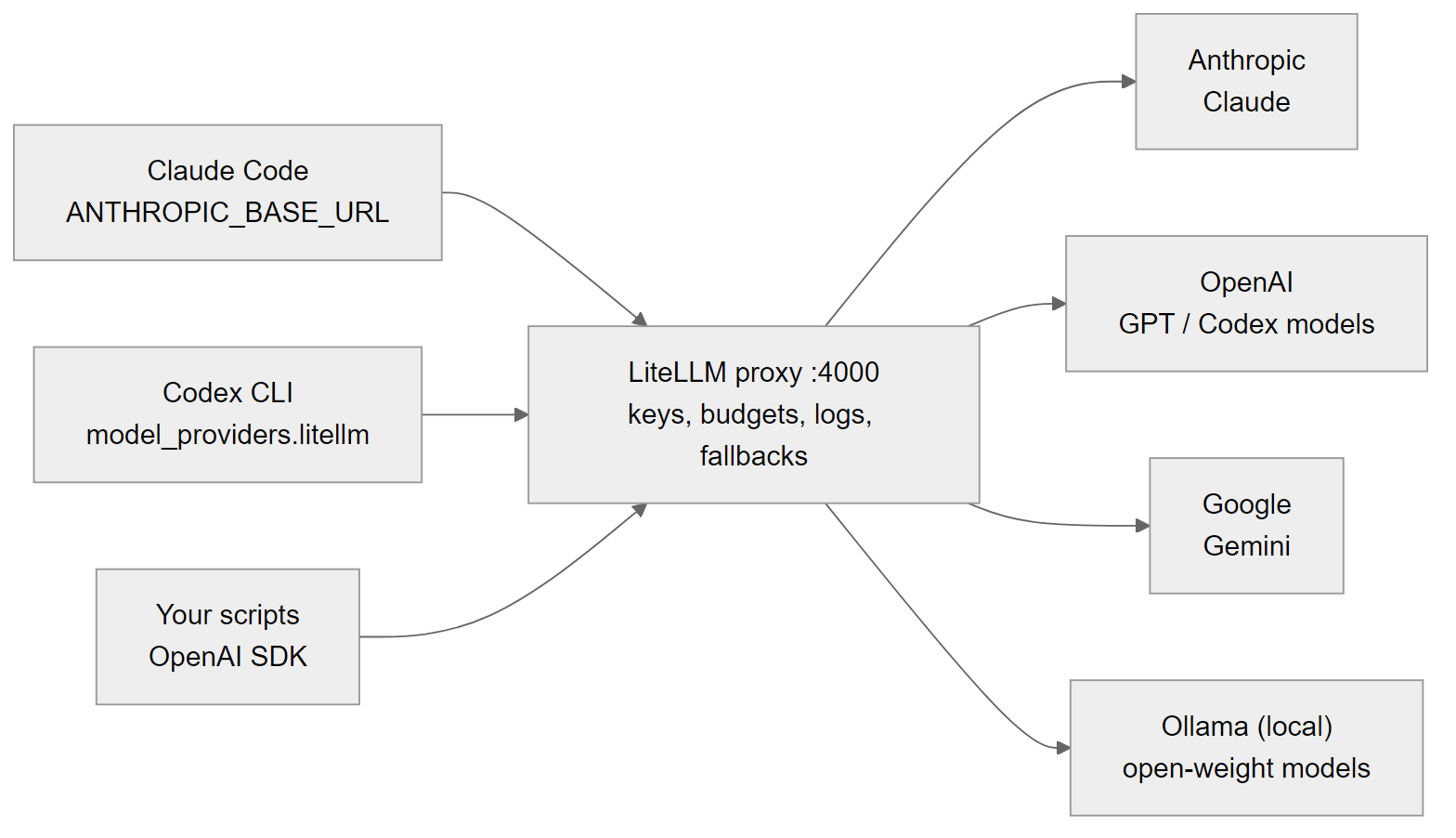
So far each tool talks to its own vendor with its own key. With a team, several machines and scripts that call models directly, you want one place where keys live, spend is capped, requests are logged and a failing provider falls back to another. The sample repo uses a LiteLLM proxy for that.
gateway/litellm.config.yaml
# One gateway for every agent and script: keys stay here, budgets and logs in one place.
# Run:  pip install 'litellm[proxy]' && litellm --config gateway/litellm.config.yaml --port 4000
# Model ids change often: check each provider's model page and update the right-hand side.

model_list:
  - model_name: claude-opus-5-5
    litellm_params:
      model: anthropic/claude-opus-5-5
      api_key: os.environ/ANTHROPIC_API_KEY
  - model_name: claude-sonnet-5-5
    litellm_params:
      model: anthropic/claude-sonnet-5-5
      api_key: os.environ/ANTHROPIC_API_KEY
  - model_name: claude-haiku-5-5
    litellm_params:
      model: anthropic/claude-haiku-5-5
      api_key: os.environ/ANTHROPIC_API_KEY
  - model_name: gpt-6.1-sol
    litellm_params:
      model: openai/gpt-6.1-sol
      api_key: os.environ/OPENAI_API_KEY
  - model_name: gemini-flash
    litellm_params:
      model: gemini/gemini-3.8-flash
      api_key: os.environ/GEMINI_API_KEY
  - model_name: local-coder
    litellm_params:
      model: ollama_chat/qwen3-coder
      api_base: http://localhost:11434

router_settings:
  fallbacks:
    - claude-sonnet-5-5: [gpt-6.1-sol]
    - gemini-flash: [claude-haiku-5-5]

general_settings:
  master_key: os.environ/LITELLM_MASTER_KEY
Each entry in model_list maps a name your clients use (left, model_name) to a real provider model (right, litellm_params.model). Keys come from environment variables on the gateway machine, never from the clients. router_settings.fallbacks says where to retry when a model fails. master_key is the token clients present to the gateway. As the header says, model ids change often; check each provider’s model page and update the right-hand side.
pip install 'litellm[proxy]'
litellm --config gateway/litellm.config.yaml --port 4000
Set ANTHROPIC_API_KEY, OPENAI_API_KEY, GEMINI_API_KEY and LITELLM_MASTER_KEY in the gateway’s environment first. Keep the gateway bound to localhost or a private network; it holds every key you have.
Check:
curl -s localhost:4000/v1/models -H "Authorization: Bearer $LITELLM_MASTER_KEY" | jq -r '.data[].id'Expected: the six names from model_list: claude-opus-5-5, claude-sonnet-5-5, claude-haiku-5-5, gpt-6.1-sol, gemini-flash, local-coder.
Claude Code through the gateway
Claude Code reads two environment variables for a gateway: ANTHROPIC_BASE_URL (where to send requests) and ANTHROPIC_AUTH_TOKEN (the token to send).
export ANTHROPIC_BASE_URL=http://localhost:4000
export ANTHROPIC_AUTH_TOKEN="$LITELLM_MASTER_KEY"
claude -p "Which command is the full gate in this repo?" --model sonnet
Note: Anthropic does not support routing Claude Code to non-Claude models through a gateway. Use the gateway for Claude-family routing, logging, budgets and key management. This affects the repo’s config: the fallback claude-sonnet-5-5: [gpt-6.1-sol] would send a failed Claude Code request to GPT. It is meant for your own scripts. If Claude Code shares the gateway, remove that fallback or give Claude Code its own Claude-only model names.
Check: the command above should answer with pnpm check. To prove the request really went through the gateway, stop the LiteLLM process and run it again: now it should fail to connect. Start the gateway again afterwards.
Codex through the gateway
Codex cannot take a provider from the project config (.codex/config.toml may not set model_provider, model_providers or base URLs). It goes in a profile file instead.
examples/codex/litellm.config.toml
# Codex profile that sends requests through a local LiteLLM proxy (gateway/litellm.config.yaml).
# Copy to ~/.codex/litellm.config.toml, then run
#   LITELLM_KEY=sk-... codex --profile litellm
# Codex only speaks the OpenAI Responses API (wire_api = "responses"); test that your
# gateway route supports it before relying on it.

model = "gpt-6.1-sol"
model_provider = "litellm"

[model_providers.litellm]
name = "LiteLLM gateway"
base_url = "http://localhost:4000/v1"
env_key = "LITELLM_KEY"
wire_api = "responses"
Copy it to ~/.codex/litellm.config.toml and run codex --profile litellm with LITELLM_KEY set to a gateway key. The important line is wire_api = "responses": it is the only supported value, so the provider must speak the OpenAI Responses API. Not every gateway route does. Test it with one small question before you put it into a script, and if it fails, use Codex directly with its own login for that model.
Check: start LITELLM_KEY=... codex --profile litellm in the repo and ask “Which command is the full gate, and which file holds all SQL?”. Expected: pnpm check and src/repo.ts, the same answer Codex gave with its own login in about 8.5k tokens. An error while the gateway is running means the route does not support the Responses API.
Bedrock, Vertex and OpenRouter
If your company already buys models through a cloud account, Claude Code can use it directly, without a separate gateway:
# Amazon Bedrock
export CLAUDE_CODE_USE_BEDROCK=1
export AWS_REGION=us-east-1

# Google Vertex AI
export CLAUDE_CODE_USE_VERTEX=1
export CLOUD_ML_REGION=us-east5
export ANTHROPIC_VERTEX_PROJECT_ID=your-project-id

# OpenRouter
export ANTHROPIC_BASE_URL=https://openrouter.ai/api
export ANTHROPIC_AUTH_TOKEN="$OPENROUTER_API_KEY"
export ANTHROPIC_API_KEY=""
Region and project values above are placeholders; use the ones your account is enabled for. For OpenRouter, ANTHROPIC_API_KEY must be set explicitly to an empty string, so a key left in your shell does not get used instead. The same caveat as with LiteLLM applies: point Claude Code at Claude models only.
Local models for sensitive data
Some code or data should not leave the machine at all. For that, run an open-weight model with Ollama. Codex supports it with codex --oss (oss_provider = "ollama" in your config); give the model a context window of 64k tokens or more. The gateway’s local-coder entry points at the same Ollama on localhost:11434 for your own scripts.
The trade-off is real: a local model on a laptop is slower and weaker than hosted frontier models. I use it where the data rule matters more than quality, such as summarising logs that contain customer data, not for main implementation work.
| Need | Option | Config |
|---|---|---|
| One place for keys, logs, budgets | LiteLLM proxy | gateway/litellm.config.yaml, litellm --config ... --port 4000 |
| Claude Code through the gateway | Base URL + token (Claude models only) | ANTHROPIC_BASE_URL, ANTHROPIC_AUTH_TOKEN |
| Codex through the gateway | Custom provider in a profile (Responses API) | ~/.codex/litellm.config.toml, codex --profile litellm |
| Claude on company AWS | Amazon Bedrock | CLAUDE_CODE_USE_BEDROCK=1, AWS_REGION |
| Claude on company GCP | Google Vertex AI | CLAUDE_CODE_USE_VERTEX=1, CLOUD_ML_REGION, ANTHROPIC_VERTEX_PROJECT_ID |
| One bill across vendors | OpenRouter | ANTHROPIC_BASE_URL=https://openrouter.ai/api, ANTHROPIC_AUTH_TOKEN, ANTHROPIC_API_KEY="" |
| Data must stay on the machine | Ollama, local model | codex --oss, oss_provider = "ollama"; local-coder in the gateway |
| Stronger second review | Codex profile | examples/codex/deep-review.config.toml, codex --profile deep-review |
A routing policy: which model does which job
Having many models available is only useful if you decide in advance which one does what. Otherwise every task goes to the default, or worse, to whichever model someone tried last. Part 1 introduced the roles. This is the concrete policy I use with the sample repo. The “why” column is my reasoning, not a benchmark.
| Task type | Model | Why |
|---|---|---|
| Planner (spec to task table) | claude-opus-5-5 in plan mode; claude-fable-5-2 for the hardest designs | Mistakes here multiply across every task; worth the strongest model, and plan mode cannot edit. |
| Executor (one task in a worktree) | claude-sonnet-5-5 via agent-task.sh claude, or gpt-6.1-sol via agent-task.sh codex | The task is small and specified; a mid-tier model plus a hard check is enough. |
| Reviewer | claude-opus-5-5 (reviewer subagent, cross-review.sh) | Finding real bugs needs depth; review runs once per branch, so cost stays bounded. |
| Second reviewer | gpt-6.1-sol, high effort (deep-review profile) | A different family has different blind spots; required by AGENTS.md for schema, auth, workflow and dependency changes. |
| Refuter | claude-sonnet-5-5 (subagent) or claude-opus-5-5 (script) | Disproving a concrete claim is a narrower job than finding it. |
| Triage (label, summarise, route) | claude-haiku-5-5 or gemini-flash via the gateway | High volume, low stakes; speed and price matter most. |
| Local | local-coder (Ollama), codex --oss | Data that must not leave the machine. |
Write your version of this table down in the repo and put the model choices into the scripts, as agent-task.sh and cross-review.sh do. A policy that lives only in your head does not survive a busy week.
Best practices for parallel runs
- One task per worktree. One branch, one diff, one summary. A second unrelated task gets a second worktree.
- Cap every unattended run. Turns and budget for Claude, the sandbox for Codex, a wall-clock
timeoutfor overnight runs. - Never push from agents. The allowed tools leave out
git push, the hook blocks it,AGENTS.mdforbids it. Pushing is the moment a human says “I have read this”. - The summary must stand alone. You will read five in a row, without chat history. The three-section format and the
check:line exist for that. - Rebuild the environment by script. Worktree, install and check come from
agent-task.sh, so a failed run can be deleted and rerun from the same starting point. - Merge in dependency order. Storage before route, rebase the rest, and run
pnpm checkafter each merge.
Common mistakes
- Linking
node_modulesinto a worktree. On Windows the link is a junction, andgit worktree removedeletes the real folder behind it. - Splitting tasks that share files. The time saved goes into resolving conflicts. Check the Files column first.
- Starting from a stale
main. The script branches from localmain. Pull first. - Trusting the hook without testing it in the worktree. While building this repo, Claude Code ignored all of
.claude/settings.json, permissions and hooks, until the workspace was trusted; a testgit add -Awent through. After trusting, the hook blocked it. A worktree is a new folder, so check again, and keep--allowedToolstight. - Testing hooks with the wrong input. The format hook did nothing when given a Git Bash path (
/d/...) but works with the path Claude actually sends. Test with the exact JSON the tool sends. - Reading the summary instead of the gate. “All tests pass” means nothing next to
check: FAIL. - Running Claude Code on non-Claude models through the gateway. Not supported by Anthropic; watch for fallbacks like
claude-sonnet-5-5: [gpt-6.1-sol]. - Assuming Codex works with any gateway route. It needs the Responses API. Test once.
- Leaving old worktrees around. After merging,
git worktree removeandgit branch -d.
Checklist
- Parallel tasks touch different files and have a fixed interface between them.
mainis pulled and green before the batch.- Each task runs through
scripts/agent-task.shfrom the main checkout, in its own worktree andagent/branch. - Each worktree has its own
node_modules; no links. - The guard hook fires inside a worktree (tested once).
- Every
summary.mdends withcheck: PASSbefore you read the diff. - Two-family changes have a
final.md, and every surviving finding is fixed or answered. - No branch was pushed by an agent.
- Gateway: Claude Code goes only to Claude models; the Codex route is tested.
- The routing policy is written down and the scripts follow it.
- Merged worktrees and branches are removed.
In Part 5 the branches leave your machine: CI runs the same gate, and Claude and Codex review every pull request in GitHub Actions.
Series
- Architecture and model roles
- Repo setup for Claude Code and Codex
- Spec, plan, tasks
- Parallel work and multiple providers
- CI/CD with AI review
- Operating it: cost, security, learning
- Part 7: Applying the agent workflow to a real project
The sample repo for the whole series is github.com/luonghongthuan/agentic-shortlink. Clone it and run every step yourself; the reference solution for spec 0002 is on branch solution/0002-daily-stats.
Related reading
· 18 min read
agentic coding
Part 7: Applying the agent workflow to a real project
I brought the series workflow into LingoLive AI, a live product repo, with the agent-repo-setup tool: audit, apply and verify in six steps. Two surprises: every merge to main deploys production, and a security review found three holes in the hooks themselves.
Read more· 21 min read
agentic coding
Part 6/6: Operating the workflow: cost, security, learning loop and measuring
The last part: where agent money goes and how to cap it, a threat table mapped to files in the repo, a learning loop that turns every correction into a rule, skill, hook or test, five metrics that show whether agents help, and spec 0002 shipped end to end.
Read more· 25 min read
agentic coding
Part 5/6: CI/CD with AI review on GitHub Actions
Move the merge decision onto GitHub Actions in a fixed order: deterministic CI first, AI review from Claude and Codex second, a human last. Every workflow file explained, plus branch protection, SHA-pinned actions, the security traps and how to switch it on in your fork.
Read more
Discussion
Comments are reviewed before publication. Your email is kept private.