
BÀI VIẾT
Quan Sát AI Agent 2026: Làm Thế Nào Để Biết Agent Đang Thực Sự Làm Gì
Khi AI agent thay thế workflow của con người, hệ thống observability của bạn phải tiến hóa theo. Hướng dẫn thực tiễn về tracing LLM calls, multi-agent chains, và tool use với OpenTelemetry — từ góc nhìn Tech Lead đã thực chiến.
Trong bài viết
Quan Sát AI Agent 2026: Làm Thế Nào Để Biết Agent Đang Thực Sự Làm Gì
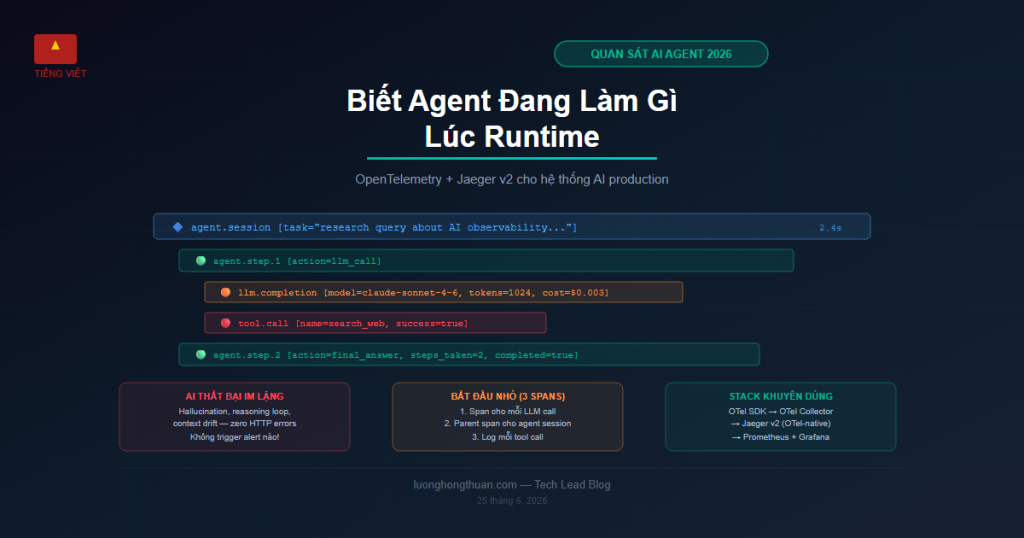
Sự thật khó chịu: Hầu hết các team deploy AI agents năm 2026 không biết agents của họ thực sự đang làm gì lúc runtime. Họ tin vào output. Họ bỏ qua quá trình.
Tôi đã dành 18 tháng qua xây dựng các hệ thống AI production — retrieval pipelines, multi-agent workflows, tool-calling chains. Một điều trở nên rõ ràng rất nhanh: cách AI thất bại hoàn toàn khác với cách phần mềm truyền thống thất bại, và observability tooling của chúng ta chưa theo kịp.
Bài viết này là thứ tôi ước mình được đọc trước khi bắt đầu.
Tại Sao Observability Truyền Thống Thất Bại Với AI Agents
Trong hệ thống microservices truyền thống, một request thất bại vì:
- Service trả về status code không phải 200
- Database query timeout
- Null pointer exception
- Latency vượt SLA
Những cái này có tính xác định, có thể bắt được, có thể alert với standard tooling. Thêm Prometheus metrics và OpenTelemetry traces là xong.
AI agents thất bại theo cách khác:
- Hallucinated tool calls — agent gọi function với arguments trông hợp lý nhưng sai
- Reasoning loops — agent bị kẹt suy luận vòng tròn mà không gọi tool nào
- Context drift — sau 20 tool calls, agent đã “quên” task ban đầu
- Silent degradation — output dần kém chính xác hơn mà không có error signal
- Emergent coordination failure — trong multi-agent systems, các agents tạo ra output cá nhân hợp lệ nhưng kết hợp lại incoherent
Không cái nào trong số này tạo ra HTTP errors. Không cái nào trigger alerts hiện tại. Chúng chỉ im lặng tạo ra câu trả lời sai.
Bạn Thực Sự Cần Observe Cái Gì
Trước khi chọn tools, hãy định nghĩa những gì muốn monitor. Với AI agent systems, tôi theo dõi 4 layers:
Layer 1: Infrastructure (như trước)
- Token consumption mỗi request / mỗi agent
- Latency: TTFT (Time to First Token), tổng thời gian completion
- Error rates từ LLM API (rate limits, vượt context window)
- Cost mỗi request, cost mỗi user session
Layer 2: Reasoning traces
- Prompt nào được gửi đến LLM?
- LLM đã respond gì?
- Tools nào được gọi, với arguments gì, và trả về gì?
- Agent thực hiện bao nhiêu reasoning steps?
Layer 3: Agent behavior
- Agent có hoàn thành task không hay bỏ cuộc?
- Agent có gọi unexpected tools không?
- Agent có loop nhiều hơn N lần không?
- Final answer có match expected format không?
Layer 4: Outcome quality (khó nhất)
- Output có chính xác về mặt thực tế không? (cần LLM-as-judge hoặc human eval)
- User có chấp nhận hay reject response không?
- Action agent thực hiện có tạo ra real-world effect như mong đợi không?
Bạn không thể cải thiện cái bạn không thấy. Bắt đầu với layers 1 và 2. Layer 3 cần structured logging. Layer 4 cần evaluation pipelines.
Phương Pháp OpenTelemetry
OpenTelemetry (OTel) hiện là standard cho AI agent tracing. Khái niệm cốt lõi: mỗi LLM call là một span.
Cấu trúc Span cơ bản cho LLM Call
from opentelemetry import trace
from opentelemetry.trace import SpanKind

tracer = trace.get_tracer("ai-agent")

def call_llm(prompt: str, model: str) -> str:
    with tracer.start_as_current_span(
        "llm.completion",
        kind=SpanKind.CLIENT,
        attributes={
            "llm.model": model,
            "llm.prompt.tokens": count_tokens(prompt),
            "llm.prompt.template": "research_agent_v2",
        }
    ) as span:
        response = anthropic_client.messages.create(
            model=model,
            messages=[{"role": "user", "content": prompt}],
            max_tokens=2048
        )

        span.set_attribute("llm.completion.tokens", response.usage.output_tokens)
        span.set_attribute("llm.finish_reason", response.stop_reason)
        span.set_attribute("llm.cost.usd", calculate_cost(response.usage))

        return response.content[0].text
Điều này cho bạn một trace entry cho mỗi LLM call với token counts, cost, và model info đính kèm.
Tracing Toàn Bộ Tool Call Chain
Sức mạnh thực sự đến khi bạn trace toàn bộ agent loop — không chỉ LLM calls đơn lẻ, mà cả chu kỳ decision + action + result:
def agent_loop(task: str, tools: list) -> AgentResult:
    with tracer.start_as_current_span("agent.session") as session_span:
        session_span.set_attribute("agent.task", task[:200])
        session_span.set_attribute("agent.tools_available", [t.name for t in tools])

        iteration = 0
        while iteration < MAX_ITERATIONS:
            iteration += 1

            with tracer.start_as_current_span(f"agent.step.{iteration}") as step_span:
                response = call_llm(build_prompt(task, history))
                action = parse_action(response)

                step_span.set_attribute("agent.step", iteration)
                step_span.set_attribute("agent.action.type", action.type)

                if action.type == "final_answer":
                    session_span.set_attribute("agent.steps_taken", iteration)
                    session_span.set_attribute("agent.completed", True)
                    return AgentResult(answer=action.content)

                with tracer.start_as_current_span("tool.call") as tool_span:
                    tool_span.set_attribute("tool.name", action.tool)
                    tool_span.set_attribute("tool.input", str(action.input)[:500])

                    result = execute_tool(action.tool, action.input)

                    tool_span.set_attribute("tool.output_length", len(str(result)))
                    tool_span.set_attribute("tool.success", result.success)

        session_span.set_attribute("agent.completed", False)
        session_span.set_attribute("agent.failure_reason", "max_iterations_exceeded")
        return AgentResult(error="Max iterations exceeded")
Giờ bạn có một complete waterfall trace: session → steps → LLM calls → tool calls.
Jaeger v2 + OTel Stack Cho AI
Jaeger v2 gần đây đã rebuilt bản thân như OTel-native, khiến nó trở thành lựa chọn xuất sắc cho AI agent tracing. Ưu điểm chính: bạn có thể query qua nhiều agent sessions để tìm patterns.
Ví dụ queries trở nên khả thi với instrumentation đúng cách:
# Tìm tất cả sessions agent loop hơn 5 lần
agent.steps_taken > 5 AND agent.completed = true

# Tìm tất cả failed tool calls trong 24h qua
tool.success = false AND duration > 5s

# Tìm sessions đắt (>$0.10 cost)
llm.cost.usd > 0.10

# Tìm sessions đạt max iterations (agent bỏ cuộc)
agent.failure_reason = "max_iterations_exceeded"
Đây là sự khác biệt về chất so với log-based debugging. Bạn có thể duyệt agent behavior, không chỉ tìm kiếm errors.
Vấn Đề Multi-Agent Trace
Khi nhiều agents gọi nhau — coordinator, researcher, code writer — bạn cần propagate trace context qua ranh giới agent:
# Trong coordinator agent
def delegate_to_researcher(query: str) -> str:
    current_span = trace.get_current_span()
    ctx = trace.set_span_in_context(current_span)

    headers = {}
    propagate.inject(headers, context=ctx)

    result = researcher_agent.invoke(
        query=query,
        trace_context=headers
    )
    return result

# Trong researcher agent
def invoke(query: str, trace_context: dict) -> str:
    ctx = propagate.extract(trace_context)

    with tracer.start_as_current_span(
        "researcher.agent",
        context=ctx
    ) as span:
        span.set_attribute("agent.type", "researcher")
        span.set_attribute("agent.query", query[:200])
        # ... thực hiện research
Với điều này, một single trace hiển thị toàn bộ multi-agent execution như một waterfall kết nối, dù agents chạy trên different services.
Alerts Thực Sự Quan Trọng
Chỉ alert những gì thay đổi agent behavior lúc runtime:
- alert: AgentMaxIterationsExceeded
  expr: increase(agent_sessions_total{completed="false",reason="max_iterations"}[5m]) > 3
  annotations:
    summary: "Agents đang hit iteration limits — kiểm tra prompt complexity hoặc tool reliability"

- alert: HighLLMCostPerSession
  expr: histogram_quantile(0.95, agent_session_cost_usd) > 0.50
  annotations:
    summary: "P95 cost/session vượt $0.50 — có thể có runaway agent loops"

- alert: ToolCallFailureSpike
  expr: rate(tool_calls_total{success="false"}[5m]) > 0.20
  annotations:
    summary: "Tool call failure rate trên 20% — kiểm tra downstream dependencies"
Những Bài Học Học Theo Cách Khó Khăn
Bài 1: Log toàn bộ prompt, không chỉ hash. Khi agent hallucinate, bạn cần thấy chính xác nó được cho gì. Implement sampling (log 100% failures, 10% successes).
Bài 2: Đo TTFT riêng với total completion time. Hai thứ này có performance profile và failure modes hoàn toàn khác nhau.
Bài 3: Theo dõi token velocity. Nếu token consumption tăng gấp đôi trong một tuần mà không có thay đổi traffic, prompts của bạn đang drift.
Bài 4: Đừng bao giờ tin “completed: true”. Agent trả lời trong 2 iterations và một agent trả lời cùng câu đó sau 15 iterations đều là “complete.” Chúng không như nhau.
Bài 5: Instrument trước khi ship. Thêm observability sau vào production AI system là thời điểm khó khăn nhất có thể. Prompts đã bị rối vào business logic, trace context bị mất, và không có baseline lịch sử để so sánh.
Stack Tôi Khuyên Dùng 2026
| Layer | Tool | Lý do |
|---|---|---|
| Instrumentation | OpenTelemetry SDK | Standard, vendor-neutral |
| Collector | OTel Collector | Batch, filter, route traces |
| Trace storage | Jaeger v2 | OTel-native, UI tốt, ML-ready |
| Metrics | Prometheus + Grafana | Alerting, dashboards |
| Cost tracking | Custom spans + BigQuery | Token × model price, per-session |
| LLM-as-judge eval | Anthropic API | Quality scoring theo sample rate |
Bắt Đầu Nhỏ
Ba spans. Đó là MVP của bạn:
- Thêm span cho mỗi LLM call với model name, token count, và cost
- Thêm parent span cho mỗi agent session với task description và final status
- Log tool calls với name, input (truncated), và success/failure
Mọi thứ khác xây dựng từ đây.
Phần khó nhất của AI observability không phải kỹ thuật — mà là văn hóa. Teams muốn ship agents nhanh. Observability có vẻ như overhead. Nó không phải. Nó là cách duy nhất để biết agent của bạn có đang làm những gì bạn nghĩ nó đang làm hay không.
Bạn quan tâm đến implementation đầy đủ? Các code examples trên được trích từ hệ thống production thực tế. Liên hệ tôi tại luonghongthuan.com để thảo luận thêm.
Bài viết liên quan
08 Oct 2026 · 5 phút đọc
devops
Kubernetes vừa đổi một default khiến node cũ của bạn không boot lên được
Field failCgroupV1 của kubelet đổi default thành true từ bản 1.35. Node chỉ chạy cgroup v1 giờ không khởi động được nữa trừ khi bạn override. Cách kiểm tra ngay hôm nay.
Đọc tiếp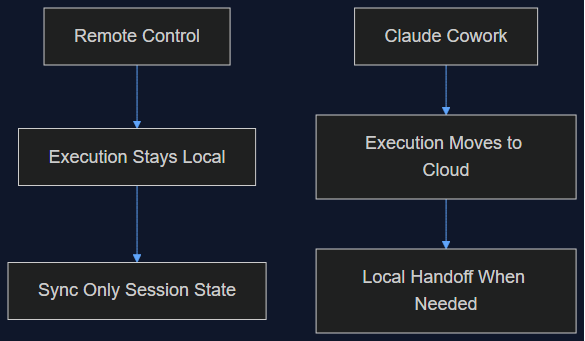
06 Oct 2026 · 6 phút đọc
agentic coding
Claude Cowork vừa làm đúng cái mình từng nói Remote Control không làm
Tháng 8 mình viết rằng Remote Control của Claude Code chỉ là một lớp đồng bộ, không phải di chuyển lên cloud, và việc giữ execution ở local chính là điểm cốt lõi. Tuần này Anthropic chuyển hẳn execution của Cowork lên cloud làm mặc định. Đây là lý do cả hai quyết định đều đúng — cho hai sản phẩm khác nhau.
Đọc tiếp
03 Oct 2026 · 5 phút đọc
agents
950 Agent, 21 Giờ, 210 Triệu Token: Cuộc Tìm CRISPR Của Anthropic Thực Sự Chứng Minh Điều Gì Về Fan-Out
Lab khoa học sự sống của Anthropic chạy 950 agent song song để tìm ra một hệ enzyme giống CRISPR có thể là mới. Toán học của cái funnel là một pattern fan-out thật sự hữu ích — nhưng phần phản ứng của giới khoa học mới là đoạn đáng đọc kỹ.
Đọc tiếp
Thảo luận
Bình luận được duyệt trước khi công khai. Email của bạn được giữ riêng tư.