I was managing eight client sites. Each one needed two blog posts per month, landing page copy for seasonal campaigns, and meta descriptions for every new page. That’s sixteen blog posts, eight sets of landing page copy, and roughly forty meta descriptions per month — all going through a single copywriter who also had her own projects.
The queue was brutal. A client would ask for a product launch landing page, and the copywriter wouldn’t be available for two weeks. So the launch would slip. Or I’d write the copy myself at midnight, which was always a bad idea because I write like an engineer — technically accurate and completely devoid of the emotional hooks that make marketing copy work. One client actually came back and said, “This reads like a user manual.” They weren’t wrong.
The math was simple. The copywriter billed $75/hour. A typical blog post took 3-4 hours. Meta descriptions and landing page copy added another 2-3 hours per site per month. Across eight clients, we were looking at roughly $8,000-10,000 per month in content creation costs. And that was assuming the copywriter didn’t take vacation or get sick, which of course she did, because she’s a human being.
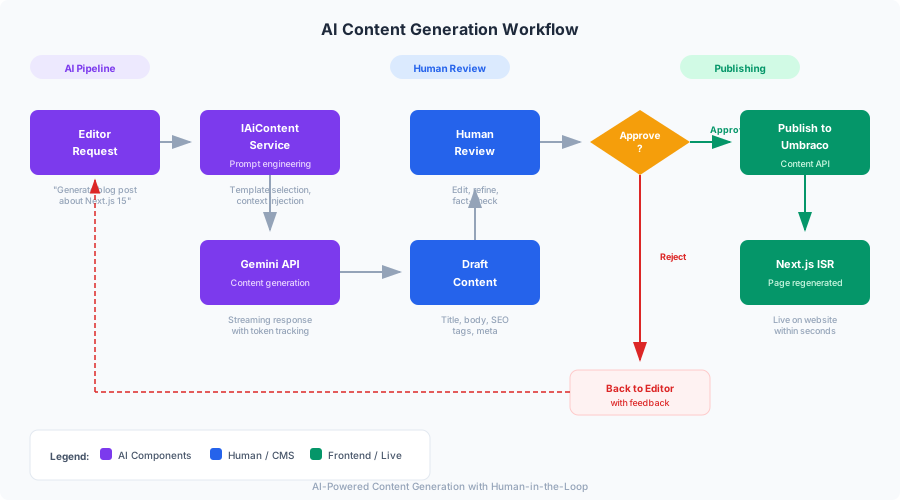
I needed to scale content creation without scaling the team. The answer was AI-generated content with a human review loop — drafts that were 80% there, so the editor’s job was refinement rather than creation. This is the story of how I integrated Google Gemini into MarketingOS to generate blog drafts, landing page copy, meta descriptions, and multilingual translations, all with a review workflow that keeps a human in the loop.
In Part 4, we built the SEO layer — metadata, JSON-LD, sitemaps, and Core Web Vitals optimization. Now we’re going to generate the content that those SEO structures wrap around.
The Architecture: Clean Separation of AI Concerns
The first temptation is to shove the Gemini API call directly into a controller and call it done. I’ve seen this in production codebases — a 200-line controller action that builds prompts, calls the API, parses the response, and saves to the database all in one method. It works until you need to swap models, add rate limiting, track costs, or write tests.
MarketingOS follows the same Clean Architecture from Part 1. The AI content service has an interface in the Application layer and an implementation in the Infrastructure layer. The Umbraco web layer only knows about the interface.
MarketingOS.Application/
  AiContent/
    IAiContentService.cs          ← Interface (what AI can do)
    Commands/
      GenerateBlogDraft.cs        ← MediatR command + handler
      GenerateMetaDescription.cs  ← MediatR command + handler
      GenerateLandingPageCopy.cs  ← MediatR command + handler
      GenerateImageAltText.cs     ← MediatR command + handler
      TranslateContent.cs         ← MediatR command + handler
    Queries/
      GetGenerationHistory.cs     ← View past generations
      GetTokenUsage.cs            ← Cost tracking
    Models/
      AiGenerationResult.cs       ← Response wrapper
      ContentPromptContext.cs      ← Brand voice, tone, site context

MarketingOS.Infrastructure/
  AiContent/
    GeminiContentService.cs       ← Gemini API implementation
    GeminiOptions.cs              ← Configuration POCO
    PromptTemplates.cs            ← Prompt engineering templates
    TranslationGlossary.cs        ← Brand term consistency
    TokenTracker.cs               ← Usage and cost tracking
The Service Interface
This interface defines everything the AI content system can do, without any reference to Gemini, OpenAI, or any specific provider. If Google triples Gemini pricing tomorrow, I swap the implementation. The Application layer never changes.
// MarketingOS.Application/AiContent/IAiContentService.cs
namespace MarketingOS.Application.AiContent;

public interface IAiContentService
{
    /// <summary>
    /// Generate a blog post draft from a topic and optional outline.
    /// </summary>
    Task<AiGenerationResult> GenerateBlogDraftAsync(
        BlogDraftRequest request,
        CancellationToken cancellationToken = default);

    /// <summary>
    /// Generate landing page copy: headlines, feature descriptions, CTAs.
    /// </summary>
    Task<AiGenerationResult> GenerateLandingPageCopyAsync(
        LandingPageCopyRequest request,
        CancellationToken cancellationToken = default);

    /// <summary>
    /// Generate SEO meta title and description from page content.
    /// </summary>
    Task<AiGenerationResult> GenerateMetaDescriptionAsync(
        MetaDescriptionRequest request,
        CancellationToken cancellationToken = default);

    /// <summary>
    /// Generate alt text for an image using multimodal input.
    /// </summary>
    Task<AiGenerationResult> GenerateImageAltTextAsync(
        ImageAltTextRequest request,
        CancellationToken cancellationToken = default);

    /// <summary>
    /// Translate content while preserving marketing tone and brand terminology.
    /// </summary>
    Task<AiGenerationResult> TranslateContentAsync(
        TranslationRequest request,
        CancellationToken cancellationToken = default);

    /// <summary>
    /// Stream a generation response for real-time UI feedback.
    /// </summary>
    IAsyncEnumerable<string> StreamGenerationAsync(
        string prompt,
        string model,
        CancellationToken cancellationToken = default);

    /// <summary>
    /// Estimate token count and cost before generation.
    /// </summary>
    Task<TokenEstimate> EstimateTokensAsync(
        string prompt,
        CancellationToken cancellationToken = default);
}
// MarketingOS.Application/AiContent/Models/AiGenerationResult.cs
namespace MarketingOS.Application.AiContent.Models;
public record AiGenerationResult
{
public required string Content { get; init; }
public required string Model { get; init; }
public required int InputTokens { get; init; }
public required int OutputTokens { get; init; }
public required decimal EstimatedCost { get; init; }
public required TimeSpan Duration { get; init; }
public required string PromptFingerprint { get; init; }
}
public record BlogDraftRequest
{
public required string Topic { get; init; }
public string? Outline { get; init; }
public required string Tone { get; init; }
public string? BrandVoiceGuidelines { get; init; }
public string? TargetKeyword { get; init; }
public int TargetWordCount { get; init; } = 1200;
public string? TargetAudience { get; init; }
}
public record LandingPageCopyRequest
{
public required string ProductOrService { get; init; }
public required string ValueProposition { get; init; }
public required string Tone { get; init; }
public string? BrandVoiceGuidelines { get; init; }
public string? TargetAudience { get; init; }
public int HeadlineVariants { get; init; } = 3;
public int FeatureCount { get; init; } = 4;
}
public record MetaDescriptionRequest
{
public required string PageContent { get; init; }
public required string PageTitle { get; init; }
public string? FocusKeyword { get; init; }
public int MaxTitleLength { get; init; } = 60;
public int MaxDescriptionLength { get; init; } = 155;
}
public record ImageAltTextRequest
{
public required byte[] ImageData { get; init; }
public required string MimeType { get; init; }
public string? PageContext { get; init; }
public bool AccessibilityFocused { get; init; } = true;
}
public record TranslationRequest
{
public required string SourceContent { get; init; }
public required string SourceLanguage { get; init; }
public required string TargetLanguage { get; init; }
public string? Tone { get; init; }
public Dictionary<string, string>? Glossary { get; init; }
public bool PreserveHtml { get; init; } = true;
}
public record TokenEstimate
{
public required int EstimatedInputTokens { get; init; }
public required int EstimatedOutputTokens { get; init; }
public required decimal EstimatedCost { get; init; }
public required string Model { get; init; }
}The Gemini Implementation
Now the actual implementation. This is where the Gemini API gets called, prompts get built, and responses get parsed. The class is longer than I’d like, but the alternative — splitting into six smaller classes — made the code harder to follow without improving testability.
// MarketingOS.Infrastructure/AiContent/GeminiContentService.cs
using System.Net.Http.Json;
using System.Runtime.CompilerServices;
using System.Security.Cryptography;
using System.Text;
using System.Text.Json;
using System.Text.Json.Serialization;
using Microsoft.Extensions.Logging;
using Microsoft.Extensions.Options;
using MarketingOS.Application.AiContent;
using MarketingOS.Application.AiContent.Models;

namespace MarketingOS.Infrastructure.AiContent;

public class GeminiContentService : IAiContentService
{
    private readonly HttpClient _httpClient;
    private readonly GeminiOptions _options;
    private readonly ILogger<GeminiContentService> _logger;
    private readonly TokenTracker _tokenTracker;

    // Pricing per 1M tokens (as of Feb 2026)
    private static readonly Dictionary<string, (decimal Input, decimal Output)> ModelPricing = new()
    {
        ["gemini-2.0-flash"] = (0.10m, 0.40m),
        ["gemini-2.5-pro"] = (1.25m, 10.00m),
    };

    public GeminiContentService(
        HttpClient httpClient,
        IOptions<GeminiOptions> options,
        ILogger<GeminiContentService> logger,
        TokenTracker tokenTracker)
    {
        _httpClient = httpClient;
        _options = options.Value;
        _logger = logger;
        _tokenTracker = tokenTracker;
    }

    public async Task<AiGenerationResult> GenerateBlogDraftAsync(
        BlogDraftRequest request,
        CancellationToken cancellationToken = default)
    {
        var prompt = PromptTemplates.BuildBlogDraftPrompt(request);
        // Use Pro model for long-form content, Flash for shorter tasks
        var model = request.TargetWordCount > 800
            ? "gemini-2.5-pro"
            : _options.DefaultModel;

        return await GenerateAsync(prompt, model, cancellationToken);
    }

    public async Task<AiGenerationResult> GenerateLandingPageCopyAsync(
        LandingPageCopyRequest request,
        CancellationToken cancellationToken = default)
    {
        var prompt = PromptTemplates.BuildLandingPagePrompt(request);
        // Landing page copy benefits from the Pro model's creativity
        return await GenerateAsync(prompt, "gemini-2.5-pro", cancellationToken);
    }

    public async Task<AiGenerationResult> GenerateMetaDescriptionAsync(
        MetaDescriptionRequest request,
        CancellationToken cancellationToken = default)
    {
        var prompt = PromptTemplates.BuildMetaDescriptionPrompt(request);
        // Meta descriptions are short — Flash is fast and cheap
        return await GenerateAsync(prompt, "gemini-2.0-flash", cancellationToken);
    }

    public async Task<AiGenerationResult> GenerateImageAltTextAsync(
        ImageAltTextRequest request,
        CancellationToken cancellationToken = default)
    {
        var prompt = PromptTemplates.BuildImageAltTextPrompt(request);
        return await GenerateMultimodalAsync(
            prompt, request.ImageData, request.MimeType,
            "gemini-2.0-flash", cancellationToken);
    }

    public async Task<AiGenerationResult> TranslateContentAsync(
        TranslationRequest request,
        CancellationToken cancellationToken = default)
    {
        var prompt = PromptTemplates.BuildTranslationPrompt(request);
        return await GenerateAsync(prompt, _options.DefaultModel, cancellationToken);
    }

    public async IAsyncEnumerable<string> StreamGenerationAsync(
        string prompt,
        string model,
        [EnumeratorCancellation] CancellationToken cancellationToken = default)
    {
        var requestBody = new
        {
            contents = new[]
            {
                new { parts = new[] { new { text = prompt } } }
            },
            generationConfig = new
            {
                temperature = 0.7,
                maxOutputTokens = 8192,
            }
        };

        var url = $"/v1beta/models/{model}:streamGenerateContent?alt=sse&key={_options.ApiKey}";

        using var request = new HttpRequestMessage(HttpMethod.Post, url)
        {
            Content = JsonContent.Create(requestBody)
        };

        using var response = await _httpClient.SendAsync(
            request, HttpCompletionOption.ResponseHeadersRead,
            cancellationToken);

        response.EnsureSuccessStatusCode();

        using var stream = await response.Content.ReadAsStreamAsync(cancellationToken);
        using var reader = new StreamReader(stream);

        while (!reader.EndOfStream)
        {
            cancellationToken.ThrowIfCancellationRequested();
            var line = await reader.ReadLineAsync(cancellationToken);

            if (line == null || !line.StartsWith("data: ")) continue;

            var json = line[6..]; // Remove "data: " prefix
            if (json == "[DONE]") break;

            var chunk = JsonSerializer.Deserialize<GeminiStreamChunk>(json);
            var text = chunk?.Candidates?.FirstOrDefault()
                ?.Content?.Parts?.FirstOrDefault()?.Text;

            if (!string.IsNullOrEmpty(text))
            {
                yield return text;
            }
        }
    }

    public async Task<TokenEstimate> EstimateTokensAsync(
        string prompt,
        CancellationToken cancellationToken = default)
    {
        var model = _options.DefaultModel;
        var url = $"/v1beta/models/{model}:countTokens?key={_options.ApiKey}";

        var requestBody = new
        {
            contents = new[]
            {
                new { parts = new[] { new { text = prompt } } }
            }
        };

        var response = await _httpClient.PostAsJsonAsync(
            url, requestBody, cancellationToken);
        response.EnsureSuccessStatusCode();

        var result = await response.Content
            .ReadFromJsonAsync<GeminiTokenCountResponse>(cancellationToken);

        var inputTokens = result?.TotalTokens ?? 0;
        var estimatedOutputTokens = inputTokens * 2; // Rough estimate
        var pricing = ModelPricing.GetValueOrDefault(model, (0.10m, 0.40m));
        var estimatedCost =
            (inputTokens / 1_000_000m * pricing.Input) +
            (estimatedOutputTokens / 1_000_000m * pricing.Output);

        return new TokenEstimate
        {
            EstimatedInputTokens = inputTokens,
            EstimatedOutputTokens = estimatedOutputTokens,
            EstimatedCost = estimatedCost,
            Model = model,
        };
    }

    private async Task<AiGenerationResult> GenerateAsync(
        string prompt,
        string model,
        CancellationToken cancellationToken)
    {
        var stopwatch = System.Diagnostics.Stopwatch.StartNew();

        var requestBody = new
        {
            contents = new[]
            {
                new { parts = new[] { new { text = prompt } } }
            },
            generationConfig = new
            {
                temperature = 0.7,
                maxOutputTokens = 8192,
                topP = 0.95,
            }
        };

        var url = $"/v1beta/models/{model}:generateContent?key={_options.ApiKey}";

        var response = await _httpClient.PostAsJsonAsync(
            url, requestBody, cancellationToken);

        response.EnsureSuccessStatusCode();

        var geminiResponse = await response.Content
            .ReadFromJsonAsync<GeminiResponse>(cancellationToken);

        stopwatch.Stop();

        var content = geminiResponse?.Candidates?.FirstOrDefault()
            ?.Content?.Parts?.FirstOrDefault()?.Text ?? string.Empty;

        var inputTokens = geminiResponse?.UsageMetadata?.PromptTokenCount ?? 0;
        var outputTokens = geminiResponse?.UsageMetadata?.CandidatesTokenCount ?? 0;

        var pricing = ModelPricing.GetValueOrDefault(model, (0.10m, 0.40m));
        var cost =
            (inputTokens / 1_000_000m * pricing.Input) +
            (outputTokens / 1_000_000m * pricing.Output);

        // Track usage for dashboard
        await _tokenTracker.TrackUsageAsync(model, inputTokens, outputTokens, cost);

        _logger.LogInformation(
            "Gemini generation completed: model={Model}, " +
            "inputTokens={InputTokens}, outputTokens={OutputTokens}, " +
            "cost=${Cost:F4}, duration={Duration}ms",
            model, inputTokens, outputTokens, cost,
            stopwatch.ElapsedMilliseconds);

        return new AiGenerationResult
        {
            Content = content,
            Model = model,
            InputTokens = inputTokens,
            OutputTokens = outputTokens,
            EstimatedCost = cost,
            Duration = stopwatch.Elapsed,
            PromptFingerprint = ComputePromptFingerprint(prompt),
        };
    }

    private async Task<AiGenerationResult> GenerateMultimodalAsync(
        string prompt,
        byte[] imageData,
        string mimeType,
        string model,
        CancellationToken cancellationToken)
    {
        var stopwatch = System.Diagnostics.Stopwatch.StartNew();

        var requestBody = new
        {
            contents = new[]
            {
                new
                {
                    parts = new object[]
                    {
                        new { text = prompt },
                        new
                        {
                            inline_data = new
                            {
                                mime_type = mimeType,
                                data = Convert.ToBase64String(imageData)
                            }
                        }
                    }
                }
            },
            generationConfig = new
            {
                temperature = 0.3, // Lower temperature for factual descriptions
                maxOutputTokens = 256,
            }
        };

        var url = $"/v1beta/models/{model}:generateContent?key={_options.ApiKey}";

        var response = await _httpClient.PostAsJsonAsync(
            url, requestBody, cancellationToken);
        response.EnsureSuccessStatusCode();

        var geminiResponse = await response.Content
            .ReadFromJsonAsync<GeminiResponse>(cancellationToken);

        stopwatch.Stop();

        var content = geminiResponse?.Candidates?.FirstOrDefault()
            ?.Content?.Parts?.FirstOrDefault()?.Text ?? string.Empty;

        var inputTokens = geminiResponse?.UsageMetadata?.PromptTokenCount ?? 0;
        var outputTokens = geminiResponse?.UsageMetadata?.CandidatesTokenCount ?? 0;

        var pricing = ModelPricing.GetValueOrDefault(model, (0.10m, 0.40m));
        var cost =
            (inputTokens / 1_000_000m * pricing.Input) +
            (outputTokens / 1_000_000m * pricing.Output);

        await _tokenTracker.TrackUsageAsync(model, inputTokens, outputTokens, cost);

        return new AiGenerationResult
        {
            Content = content,
            Model = model,
            InputTokens = inputTokens,
            OutputTokens = outputTokens,
            EstimatedCost = cost,
            Duration = stopwatch.Elapsed,
            PromptFingerprint = ComputePromptFingerprint(prompt),
        };
    }

    private static string ComputePromptFingerprint(string prompt)
    {
        var hash = SHA256.HashData(Encoding.UTF8.GetBytes(prompt));
        return Convert.ToHexString(hash)[..16].ToLowerInvariant();
    }
}
// MarketingOS.Infrastructure/AiContent/GeminiOptions.cs
namespace MarketingOS.Infrastructure.AiContent;
public class GeminiOptions
{
public const string SectionName = "Gemini";
public required string ApiKey { get; set; }
public string DefaultModel { get; set; } = "gemini-2.0-flash";
public string BaseUrl { get; set; } = "https://generativelanguage.googleapis.com";
}Rate Limiting with Polly
The Gemini API has rate limits — 15 requests per minute on the free tier, 1,000 RPM on the paid tier. Without retry logic, a burst of content generation requests from an eager editor will cascade into 429 errors. Polly handles this with exponential backoff.
// MarketingOS.Infrastructure/DependencyInjection.cs (updated from Part 1)
using Microsoft.Extensions.Configuration;
using Microsoft.Extensions.DependencyInjection;
using MarketingOS.Application.AiContent;
using MarketingOS.Infrastructure.AiContent;
using Polly;
using Polly.Extensions.Http;

namespace MarketingOS.Infrastructure;

public static class DependencyInjection
{
    public static IServiceCollection AddInfrastructure(
        this IServiceCollection services,
        IConfiguration configuration)
    {
        // Database (from Part 1)
        services.AddDbContext<MarketingOsDbContext>(options =>
            options.UseSqlServer(
                configuration.GetConnectionString("MarketingOS")));

        // Gemini AI configuration
        services.Configure<GeminiOptions>(
            configuration.GetSection(GeminiOptions.SectionName));

        services.AddSingleton<TokenTracker>();

        // Register GeminiContentService with Polly retry policies
        services.AddHttpClient<IAiContentService, GeminiContentService>(client =>
        {
            client.BaseAddress = new Uri(
                configuration["Gemini:BaseUrl"]
                ?? "https://generativelanguage.googleapis.com");
            client.Timeout = TimeSpan.FromMinutes(2);
        })
        .AddPolicyHandler(GetRetryPolicy())
        .AddPolicyHandler(GetCircuitBreakerPolicy());

        return services;
    }

    private static IAsyncPolicy<HttpResponseMessage> GetRetryPolicy()
    {
        return HttpPolicyExtensions
            .HandleTransientHttpError()
            .OrResult(msg => msg.StatusCode == System.Net.HttpStatusCode.TooManyRequests)
            .WaitAndRetryAsync(
                retryCount: 3,
                sleepDurationProvider: (retryAttempt, response, _) =>
                {
                    // Respect Retry-After header if present
                    if (response.Result?.Headers.RetryAfter?.Delta is { } delta)
                        return delta;

                    // Otherwise, exponential backoff: 2s, 8s, 32s
                    return TimeSpan.FromSeconds(Math.Pow(2, retryAttempt * 2));
                },
                onRetryAsync: (outcome, timespan, retryAttempt, context) =>
                {
                    // Logging happens via ILogger injected in the service
                    return Task.CompletedTask;
                });
    }

    private static IAsyncPolicy<HttpResponseMessage> GetCircuitBreakerPolicy()
    {
        return HttpPolicyExtensions
            .HandleTransientHttpError()
            .CircuitBreakerAsync(
                handledEventsAllowedBeforeBreaking: 5,
                durationOfBreak: TimeSpan.FromSeconds(30));
    }
}
The circuit breaker is important. If the Gemini API is down, we don’t want every content generation request to wait for a timeout. After 5 consecutive failures, the circuit opens for 30 seconds, and all requests fail immediately with a clear error instead of hanging.
Content Generation Features
Blog Post Draft Generation
This is the most complex generation feature. Blog posts need structure, flow, and brand voice. A naive prompt like “write a blog post about SEO” produces generic content that reads like it was written by an AI — because it was. The key is contextual prompts that include the brand voice, target audience, and specific angles.
// MarketingOS.Infrastructure/AiContent/PromptTemplates.cs
using MarketingOS.Application.AiContent.Models;

namespace MarketingOS.Infrastructure.AiContent;

public static class PromptTemplates
{
    public static string BuildBlogDraftPrompt(BlogDraftRequest request)
    {
        var sb = new StringBuilder();

        sb.AppendLine("You are a marketing content writer. Generate a blog post draft.");
        sb.AppendLine();
        sb.AppendLine("REQUIREMENTS:");
        sb.AppendLine($"- Topic: {request.Topic}");
        sb.AppendLine($"- Target word count: {request.TargetWordCount} words");
        sb.AppendLine($"- Tone: {request.Tone}");

        if (!string.IsNullOrEmpty(request.TargetKeyword))
        {
            sb.AppendLine($"- Primary SEO keyword: \"{request.TargetKeyword}\"");
            sb.AppendLine("  - Include the keyword naturally in the title, first paragraph,");
            sb.AppendLine("    at least one H2 heading, and the conclusion.");
            sb.AppendLine("  - Do NOT keyword-stuff. Aim for 1-2% keyword density.");
        }

        if (!string.IsNullOrEmpty(request.TargetAudience))
        {
            sb.AppendLine($"- Target audience: {request.TargetAudience}");
        }

        if (!string.IsNullOrEmpty(request.BrandVoiceGuidelines))
        {
            sb.AppendLine();
            sb.AppendLine("BRAND VOICE GUIDELINES:");
            sb.AppendLine(request.BrandVoiceGuidelines);
        }

        if (!string.IsNullOrEmpty(request.Outline))
        {
            sb.AppendLine();
            sb.AppendLine("OUTLINE TO FOLLOW:");
            sb.AppendLine(request.Outline);
        }

        sb.AppendLine();
        sb.AppendLine("FORMAT:");
        sb.AppendLine("- Start with a compelling title as an H1 heading (# Title)");
        sb.AppendLine("- Use H2 headings (##) for main sections");
        sb.AppendLine("- Use H3 headings (###) for subsections where appropriate");
        sb.AppendLine("- Include a brief introduction (2-3 paragraphs) that hooks the reader");
        sb.AppendLine("- End with a clear conclusion and call-to-action");
        sb.AppendLine("- Output in Markdown format");
        sb.AppendLine();
        sb.AppendLine("QUALITY RULES:");
        sb.AppendLine("- Write in active voice");
        sb.AppendLine("- Use concrete examples and specific numbers where possible");
        sb.AppendLine("- Avoid cliches like 'in today's world', 'it's no secret that'");
        sb.AppendLine("- Every paragraph should advance the argument or provide new information");
        sb.AppendLine("- Do NOT include generic filler sentences");

        return sb.ToString();
    }

    public static string BuildLandingPagePrompt(LandingPageCopyRequest request)
    {
        var sb = new StringBuilder();

        sb.AppendLine("You are a conversion-focused copywriter. Generate landing page copy.");
        sb.AppendLine();
        sb.AppendLine("CONTEXT:");
        sb.AppendLine($"- Product/Service: {request.ProductOrService}");
        sb.AppendLine($"- Value Proposition: {request.ValueProposition}");
        sb.AppendLine($"- Tone: {request.Tone}");

        if (!string.IsNullOrEmpty(request.TargetAudience))
        {
            sb.AppendLine($"- Target Audience: {request.TargetAudience}");
        }

        if (!string.IsNullOrEmpty(request.BrandVoiceGuidelines))
        {
            sb.AppendLine();
            sb.AppendLine("BRAND VOICE:");
            sb.AppendLine(request.BrandVoiceGuidelines);
        }

        sb.AppendLine();
        sb.AppendLine("GENERATE THE FOLLOWING (in JSON format):");
        sb.AppendLine($"1. \"headlines\": Array of {request.HeadlineVariants} hero headline variants");
        sb.AppendLine("   - Each under 70 characters");
        sb.AppendLine("   - Focus on the primary benefit, not the feature");
        sb.AppendLine("2. \"subheadline\": A supporting subheadline (under 140 characters)");
        sb.AppendLine($"3. \"features\": Array of {request.FeatureCount} feature objects, each with:");
        sb.AppendLine("   - \"title\": Feature name (3-5 words)");
        sb.AppendLine("   - \"description\": Benefit-focused description (1-2 sentences)");
        sb.AppendLine("4. \"ctaText\": Primary call-to-action button text (2-5 words)");
        sb.AppendLine("5. \"ctaAlternatives\": Array of 3 alternative CTA texts");
        sb.AppendLine("6. \"socialProof\": A suggested social proof statement");
        sb.AppendLine();
        sb.AppendLine("Return ONLY valid JSON. No markdown, no explanation.");

        return sb.ToString();
    }

    public static string BuildMetaDescriptionPrompt(MetaDescriptionRequest request)
    {
        return $"""
            Generate SEO metadata for the following page.

            PAGE TITLE: {request.PageTitle}
            PAGE CONTENT (excerpt):
            {TruncateContent(request.PageContent, 2000)}

            {(request.FocusKeyword != null ? $"FOCUS KEYWORD: \"{request.FocusKeyword}\"\n- Include the keyword naturally in both the title and description." : "")}

            GENERATE (as JSON):
            1. "metaTitle": Under {request.MaxTitleLength} characters. Include the primary keyword near the beginning. Should be compelling enough to click in search results.
            2. "metaDescription": Under {request.MaxDescriptionLength} characters. Summarize the page value proposition. Include a soft call-to-action. Must contain the focus keyword if provided.
            3. "alternativeTitles": Array of 2 alternative meta titles.

            RULES:
            - Do NOT start meta descriptions with "This page" or "This article"
            - Do NOT use clickbait ("You won't believe...")
            - DO include specific details (numbers, outcomes, timeframes)
            - Return ONLY valid JSON.
            """;
    }

    public static string BuildImageAltTextPrompt(ImageAltTextRequest request)
    {
        var contextLine = !string.IsNullOrEmpty(request.PageContext)
            ? $"\nThis image appears on a page about: {request.PageContext}"
            : "";

        return $"""
            Describe this image for use as alt text on a marketing website.{contextLine}

            REQUIREMENTS:
            - {(request.AccessibilityFocused
                ? "Write for screen reader users. Describe what is visually important."
                : "Write a brief marketing-appropriate description.")}
            - Maximum 125 characters
            - Do NOT start with "Image of" or "Picture of"
            - Be specific: mention colors, actions, and context
            - If the image contains text, include the text verbatim

            Return ONLY the alt text, nothing else.
            """;
    }

    public static string BuildTranslationPrompt(TranslationRequest request)
    {
        var sb = new StringBuilder();

        sb.AppendLine($"Translate the following content from {request.SourceLanguage} to {request.TargetLanguage}.");
        sb.AppendLine();

        if (!string.IsNullOrEmpty(request.Tone))
        {
            sb.AppendLine($"TONE: Maintain a {request.Tone} tone appropriate for marketing content.");
        }

        if (request.Glossary?.Count > 0)
        {
            sb.AppendLine();
            sb.AppendLine("GLOSSARY (use these exact translations for brand terms):");
            foreach (var (source, target) in request.Glossary)
            {
                sb.AppendLine($"  \"{source}\" -> \"{target}\"");
            }
        }

        sb.AppendLine();
        sb.AppendLine("RULES:");
        sb.AppendLine("- This is marketing content. Translate for impact, not literal accuracy.");
        sb.AppendLine("- Adapt idioms and cultural references for the target audience.");
        sb.AppendLine("- Preserve the persuasive intent of the original copy.");

        if (request.PreserveHtml)
        {
            sb.AppendLine("- Preserve all HTML tags exactly as they appear. Only translate the text content.");
        }

        sb.AppendLine("- Do NOT add translator notes or explanations.");
        sb.AppendLine();
        sb.AppendLine("CONTENT TO TRANSLATE:");
        sb.AppendLine(request.SourceContent);

        return sb.ToString();
    }

    private static string TruncateContent(string content, int maxLength)
    {
        if (content.Length <= maxLength) return content;
        return content[..maxLength] + "...";
    }
}
The GenerateBlogDraft Command Handler
MediatR orchestrates everything. The command handler loads the site settings (brand voice, tone), builds the request, calls the service, and stores the result as a pending draft.
// MarketingOS.Application/AiContent/Commands/GenerateBlogDraft.cs
using MediatR;
using MarketingOS.Application.AiContent.Models;

namespace MarketingOS.Application.AiContent.Commands;

public record GenerateBlogDraftCommand : IRequest<AiGenerationResult>
{
    public required string Topic { get; init; }
    public string? Outline { get; init; }
    public string? TargetKeyword { get; init; }
    public int TargetWordCount { get; init; } = 1200;
    public required Guid SiteSettingsId { get; init; }
}

public class GenerateBlogDraftHandler
    : IRequestHandler<GenerateBlogDraftCommand, AiGenerationResult>
{
    private readonly IAiContentService _aiService;
    private readonly IContentService _contentService;
    private readonly ILogger<GenerateBlogDraftHandler> _logger;

    public GenerateBlogDraftHandler(
        IAiContentService aiService,
        IContentService contentService,
        ILogger<GenerateBlogDraftHandler> logger)
    {
        _aiService = aiService;
        _contentService = contentService;
        _logger = logger;
    }

    public async Task<AiGenerationResult> Handle(
        GenerateBlogDraftCommand command,
        CancellationToken cancellationToken)
    {
        // Load brand voice and tone from Site Settings
        var siteSettings = _contentService.GetById(command.SiteSettingsId);
        var tone = siteSettings?.GetValue<string>("defaultTone") ?? "professional";
        var brandVoice = siteSettings?.GetValue<string>("brandVoiceGuidelines");

        var request = new BlogDraftRequest
        {
            Topic = command.Topic,
            Outline = command.Outline,
            TargetKeyword = command.TargetKeyword,
            TargetWordCount = command.TargetWordCount,
            Tone = tone,
            BrandVoiceGuidelines = brandVoice,
        };

        // Estimate cost first
        var prompt = PromptTemplates.BuildBlogDraftPrompt(request);
        var estimate = await _aiService.EstimateTokensAsync(prompt, cancellationToken);

        _logger.LogInformation(
            "Generating blog draft: topic={Topic}, estimatedCost=${Cost:F4}",
            command.Topic, estimate.EstimatedCost);

        // Generate the draft
        var result = await _aiService.GenerateBlogDraftAsync(
            request, cancellationToken);

        _logger.LogInformation(
            "Blog draft generated: {WordCount} words, " +
            "actualCost=${Cost:F4}, duration={Duration}ms",
            result.Content.Split(' ').Length,
            result.EstimatedCost,
            result.Duration.TotalMilliseconds);

        return result;
    }
}
Meta Description Generation
This one is my favorite because the feedback loop is so tight. Editor creates a page, fills in the content, clicks “Generate Meta” — and within two seconds, they have a search-engine-optimized title and description that actually matches the page content. No more “Home | Company Name” meta titles.
// MarketingOS.Application/AiContent/Commands/GenerateMetaDescription.cs
using MediatR;
using MarketingOS.Application.AiContent.Models;

namespace MarketingOS.Application.AiContent.Commands;

public record GenerateMetaDescriptionCommand : IRequest<MetaSuggestions>
{
    public required Guid ContentId { get; init; }
}

public record MetaSuggestions
{
    public required string MetaTitle { get; init; }
    public required string MetaDescription { get; init; }
    public required string[] AlternativeTitles { get; init; }
    public required decimal Cost { get; init; }
}

public class GenerateMetaDescriptionHandler
    : IRequestHandler<GenerateMetaDescriptionCommand, MetaSuggestions>
{
    private readonly IAiContentService _aiService;
    private readonly IContentService _contentService;
    private readonly ILogger<GenerateMetaDescriptionHandler> _logger;

    public GenerateMetaDescriptionHandler(
        IAiContentService aiService,
        IContentService contentService,
        ILogger<GenerateMetaDescriptionHandler> logger)
    {
        _aiService = aiService;
        _contentService = contentService;
        _logger = logger;
    }

    public async Task<MetaSuggestions> Handle(
        GenerateMetaDescriptionCommand command,
        CancellationToken cancellationToken)
    {
        var content = _contentService.GetById(command.ContentId)
            ?? throw new InvalidOperationException(
                $"Content {command.ContentId} not found");

        // Extract text content from the page
        var pageTitle = content.Name ?? "Untitled";
        var pageContent = ExtractTextContent(content);
        var focusKeyword = content.GetValue<string>("focusKeyword");

        var request = new MetaDescriptionRequest
        {
            PageTitle = pageTitle,
            PageContent = pageContent,
            FocusKeyword = focusKeyword,
        };

        var result = await _aiService.GenerateMetaDescriptionAsync(
            request, cancellationToken);

        // Parse the JSON response
        var json = JsonDocument.Parse(result.Content);
        var root = json.RootElement;

        return new MetaSuggestions
        {
            MetaTitle = root.GetProperty("metaTitle").GetString() ?? pageTitle,
            MetaDescription = root.GetProperty("metaDescription").GetString() ?? "",
            AlternativeTitles = root.GetProperty("alternativeTitles")
                .EnumerateArray()
                .Select(e => e.GetString() ?? "")
                .ToArray(),
            Cost = result.EstimatedCost,
        };
    }

    private static string ExtractTextContent(IContent content)
    {
        var textBuilder = new StringBuilder();

        foreach (var property in content.Properties)
        {
            var value = property.GetValue()?.ToString();
            if (string.IsNullOrEmpty(value)) continue;

            // Strip HTML tags for text extraction
            var text = System.Text.RegularExpressions.Regex.Replace(
                value, "<[^>]*>", " ");
            textBuilder.AppendLine(text);
        }

        return textBuilder.ToString();
    }
}
Image Alt Text Generation
This is the one feature I didn’t expect to be so useful. Umbraco stores media with metadata, but alt text is almost always left blank. Accessibility audits flag it every time. With Gemini’s multimodal capabilities, we send the actual image bytes and get back a descriptive alt text.
// MarketingOS.Application/AiContent/Commands/GenerateImageAltText.cs
using MediatR;
using MarketingOS.Application.AiContent.Models;

namespace MarketingOS.Application.AiContent.Commands;

public record GenerateImageAltTextCommand : IRequest<AiGenerationResult>
{
    public required Guid MediaId { get; init; }
    public string? PageContext { get; init; }
}

public class GenerateImageAltTextHandler
    : IRequestHandler<GenerateImageAltTextCommand, AiGenerationResult>
{
    private readonly IAiContentService _aiService;
    private readonly IMediaService _mediaService;
    private readonly IMediaFileManager _mediaFileManager;
    private readonly ILogger<GenerateImageAltTextHandler> _logger;

    public GenerateImageAltTextHandler(
        IAiContentService aiService,
        IMediaService mediaService,
        IMediaFileManager mediaFileManager,
        ILogger<GenerateImageAltTextHandler> logger)
    {
        _aiService = aiService;
        _mediaService = mediaService;
        _mediaFileManager = mediaFileManager;
        _logger = logger;
    }

    public async Task<AiGenerationResult> Handle(
        GenerateImageAltTextCommand command,
        CancellationToken cancellationToken)
    {
        var media = _mediaService.GetById(command.MediaId)
            ?? throw new InvalidOperationException(
                $"Media {command.MediaId} not found");

        var filePath = media.GetValue<string>("umbracoFile");
        if (string.IsNullOrEmpty(filePath))
            throw new InvalidOperationException("Media has no file");

        // Read the image bytes from Umbraco's media storage
        using var stream = _mediaFileManager
            .FileSystem.OpenFile(filePath);
        using var memoryStream = new MemoryStream();
        await stream.CopyToAsync(memoryStream, cancellationToken);

        var mimeType = media.GetValue<string>("umbracoExtension") switch
        {
            "jpg" or "jpeg" => "image/jpeg",
            "png" => "image/png",
            "webp" => "image/webp",
            "gif" => "image/gif",
            _ => "image/jpeg"
        };

        var request = new ImageAltTextRequest
        {
            ImageData = memoryStream.ToArray(),
            MimeType = mimeType,
            PageContext = command.PageContext,
            AccessibilityFocused = true,
        };

        return await _aiService.GenerateImageAltTextAsync(
            request, cancellationToken);
    }
}
The AccessibilityFocused flag matters. Marketing alt text and accessibility alt text are different. Marketing alt text might say “Happy team celebrating success” while accessibility alt text says “Five people in business attire raising champagne glasses in an office conference room.” We default to accessibility because it’s the right thing to do — and because accessibility lawsuits are increasingly common for marketing websites.
Multi-Language Translation
Translation is where AI shines brightest for content cost reduction. Professional translation services charge $0.10-0.25 per word. A 1,200-word blog post translated into three languages costs $360-$900 with a human translator. With Gemini, the same translation costs approximately $0.02-0.05 total. Even with a human reviewer checking the output, you’re looking at 15 minutes of review time versus 4 hours of translation time.
But here’s the catch: literal AI translation of marketing content is terrible. “Crush your goals” doesn’t translate to French as “Ecrasez vos objectifs” — that sounds like you’re destroying something. Marketing translation is transcreation — adapting the message for cultural context while preserving the persuasive intent. The prompt engineering matters enormously here.
Glossary Management for Brand Consistency
Every brand has terms that should be translated consistently — or not translated at all. “MarketingOS” should stay “MarketingOS” in every language. “Content Delivery Network” might have a specific preferred translation in French that differs from the literal one.
// MarketingOS.Infrastructure/AiContent/TranslationGlossary.cs
using MarketingOS.Infrastructure.Persistence;
using Microsoft.EntityFrameworkCore;

namespace MarketingOS.Infrastructure.AiContent;

public class TranslationGlossary
{
    private readonly MarketingOsDbContext _db;

    public TranslationGlossary(MarketingOsDbContext db)
    {
        _db = db;
    }

    public async Task<Dictionary<string, string>> GetGlossaryAsync(
        string sourceLanguage,
        string targetLanguage,
        CancellationToken cancellationToken = default)
    {
        return await _db.GlossaryEntries
            .Where(g =>
                g.SourceLanguage == sourceLanguage &&
                g.TargetLanguage == targetLanguage)
            .ToDictionaryAsync(
                g => g.SourceTerm,
                g => g.TargetTerm,
                cancellationToken);
    }

    public async Task AddEntryAsync(
        string sourceTerm,
        string targetTerm,
        string sourceLanguage,
        string targetLanguage,
        CancellationToken cancellationToken = default)
    {
        var existing = await _db.GlossaryEntries
            .FirstOrDefaultAsync(g =>
                g.SourceTerm == sourceTerm &&
                g.SourceLanguage == sourceLanguage &&
                g.TargetLanguage == targetLanguage,
                cancellationToken);

        if (existing != null)
        {
            existing.TargetTerm = targetTerm;
        }
        else
        {
            _db.GlossaryEntries.Add(new GlossaryEntry
            {
                SourceTerm = sourceTerm,
                TargetTerm = targetTerm,
                SourceLanguage = sourceLanguage,
                TargetLanguage = targetLanguage,
            });
        }

        await _db.SaveChangesAsync(cancellationToken);
    }
}

public class GlossaryEntry
{
    public int Id { get; set; }
    public required string SourceTerm { get; set; }
    public required string TargetTerm { get; set; }
    public required string SourceLanguage { get; set; }
    public required string TargetLanguage { get; set; }
    public DateTime CreatedAt { get; set; } = DateTime.UtcNow;
}
The TranslateContent Command
// MarketingOS.Application/AiContent/Commands/TranslateContent.cs
using MediatR;
using MarketingOS.Application.AiContent.Models;

namespace MarketingOS.Application.AiContent.Commands;

public record TranslateContentCommand : IRequest<AiGenerationResult>
{
    public required Guid ContentId { get; init; }
    public required string PropertyAlias { get; init; }
    public required string TargetLanguage { get; init; }
}

public class TranslateContentHandler
    : IRequestHandler<TranslateContentCommand, AiGenerationResult>
{
    private readonly IAiContentService _aiService;
    private readonly IContentService _contentService;
    private readonly TranslationGlossary _glossary;
    private readonly TranslationCache _cache;
    private readonly ILogger<TranslateContentHandler> _logger;

    public TranslateContentHandler(
        IAiContentService aiService,
        IContentService contentService,
        TranslationGlossary glossary,
        TranslationCache cache,
        ILogger<TranslateContentHandler> logger)
    {
        _aiService = aiService;
        _contentService = contentService;
        _glossary = glossary;
        _cache = cache;
        _logger = logger;
    }

    public async Task<AiGenerationResult> Handle(
        TranslateContentCommand command,
        CancellationToken cancellationToken)
    {
        var content = _contentService.GetById(command.ContentId)
            ?? throw new InvalidOperationException(
                $"Content {command.ContentId} not found");

        var sourceText = content.GetValue<string>(command.PropertyAlias)
            ?? throw new InvalidOperationException(
                $"Property {command.PropertyAlias} is empty");

        // Check translation cache first
        var cached = await _cache.GetAsync(
            sourceText, "en", command.TargetLanguage, cancellationToken);

        if (cached != null)
        {
            _logger.LogInformation(
                "Translation cache hit for {Language}", command.TargetLanguage);
            return cached;
        }

        // Load glossary for this language pair
        var glossaryTerms = await _glossary.GetGlossaryAsync(
            "en", command.TargetLanguage, cancellationToken);

        var request = new TranslationRequest
        {
            SourceContent = sourceText,
            SourceLanguage = "English",
            TargetLanguage = command.TargetLanguage,
            Tone = content.GetValue<string>("defaultTone") ?? "professional",
            Glossary = glossaryTerms,
            PreserveHtml = sourceText.Contains('<'),
        };

        var result = await _aiService.TranslateContentAsync(
            request, cancellationToken);

        // Cache the translation for future use
        await _cache.SetAsync(
            sourceText, "en", command.TargetLanguage,
            result, cancellationToken);

        return result;
    }
}
Translation Memory (Cache)
Translation caching is a significant cost saver. If the same paragraph appears on multiple pages (a common disclaimer, a shared CTA, a footer tagline), we translate it once and reuse the result. Over eight client sites with overlapping content patterns, caching reduced our translation API calls by about 35%.
// MarketingOS.Infrastructure/AiContent/TranslationCache.cs
using System.Security.Cryptography;
using System.Text;
using MarketingOS.Application.AiContent.Models;
using MarketingOS.Infrastructure.Persistence;
using Microsoft.EntityFrameworkCore;

namespace MarketingOS.Infrastructure.AiContent;

public class TranslationCache
{
    private readonly MarketingOsDbContext _db;

    public TranslationCache(MarketingOsDbContext db)
    {
        _db = db;
    }

    public async Task<AiGenerationResult?> GetAsync(
        string sourceText,
        string sourceLanguage,
        string targetLanguage,
        CancellationToken cancellationToken)
    {
        var hash = ComputeHash(sourceText);

        var entry = await _db.TranslationCacheEntries
            .FirstOrDefaultAsync(e =>
                e.SourceHash == hash &&
                e.SourceLanguage == sourceLanguage &&
                e.TargetLanguage == targetLanguage &&
                e.ExpiresAt > DateTime.UtcNow,
                cancellationToken);

        if (entry == null) return null;

        return new AiGenerationResult
        {
            Content = entry.TranslatedContent,
            Model = entry.Model,
            InputTokens = 0,
            OutputTokens = 0,
            EstimatedCost = 0m, // Cached — no cost
            Duration = TimeSpan.Zero,
            PromptFingerprint = "cached",
        };
    }

    public async Task SetAsync(
        string sourceText,
        string sourceLanguage,
        string targetLanguage,
        AiGenerationResult result,
        CancellationToken cancellationToken)
    {
        var hash = ComputeHash(sourceText);

        var existing = await _db.TranslationCacheEntries
            .FirstOrDefaultAsync(e =>
                e.SourceHash == hash &&
                e.SourceLanguage == sourceLanguage &&
                e.TargetLanguage == targetLanguage,
                cancellationToken);

        if (existing != null)
        {
            existing.TranslatedContent = result.Content;
            existing.Model = result.Model;
            existing.ExpiresAt = DateTime.UtcNow.AddDays(30);
        }
        else
        {
            _db.TranslationCacheEntries.Add(new TranslationCacheEntry
            {
                SourceHash = hash,
                SourceLanguage = sourceLanguage,
                TargetLanguage = targetLanguage,
                TranslatedContent = result.Content,
                Model = result.Model,
                ExpiresAt = DateTime.UtcNow.AddDays(30),
            });
        }

        await _db.SaveChangesAsync(cancellationToken);
    }

    private static string ComputeHash(string text)
    {
        var hash = SHA256.HashData(Encoding.UTF8.GetBytes(text));
        return Convert.ToHexString(hash).ToLowerInvariant();
    }
}
The 30-day expiration is a pragmatic choice. Brand voice and terminology don’t change often, but they do change. A month-long cache means translations stay fresh enough while avoiding redundant API calls for stable content.
Content Review Workflow (Human-in-the-Loop)
This is the part that makes AI content production-safe. Every AI-generated piece goes through a review workflow before it touches the live site. No exceptions.
I’ve seen agencies publish raw AI output directly. The results range from embarrassing (factual errors, hallucinated statistics) to legally problematic (plagiarized phrases, competitor name mentions, claims that violate advertising standards). The human review step isn’t a nice-to-have — it’s a business requirement.
The Workflow Model
// MarketingOS.Domain/Content/AiContentReview.cs
namespace MarketingOS.Domain.Content;

public class AiContentReview
{
    public Guid Id { get; set; } = Guid.NewGuid();
    public required Guid ContentId { get; set; }
    public required string PropertyAlias { get; set; }
    public required string GeneratedContent { get; set; }
    public string? EditedContent { get; set; }
    public required string Model { get; set; }
    public required string PromptFingerprint { get; set; }
    public required int InputTokens { get; set; }
    public required int OutputTokens { get; set; }
    public required decimal Cost { get; set; }
    public ReviewStatus Status { get; set; } = ReviewStatus.PendingReview;
    public string? ReviewerNotes { get; set; }
    public string? ReviewedBy { get; set; }
    public DateTime CreatedAt { get; set; } = DateTime.UtcNow;
    public DateTime? ReviewedAt { get; set; }

    public void Approve(string reviewer, string? editedContent = null)
    {
        Status = ReviewStatus.Approved;
        ReviewedBy = reviewer;
        ReviewedAt = DateTime.UtcNow;
        EditedContent = editedContent;
    }

    public void Reject(string reviewer, string notes)
    {
        Status = ReviewStatus.Rejected;
        ReviewedBy = reviewer;
        ReviewedAt = DateTime.UtcNow;
        ReviewerNotes = notes;
    }
}

public enum ReviewStatus
{
    PendingReview,
    Approved,
    Rejected,
    AppliedToContent,
}
Review Workflow Service
The workflow service orchestrates the review process: create a review record when content is generated, handle approvals and rejections, and apply approved content back to the Umbraco node.
// MarketingOS.Application/AiContent/ContentReviewService.cs
using MediatR;
using MarketingOS.Domain.Content;
using MarketingOS.Application.AiContent.Models;

namespace MarketingOS.Application.AiContent;

public record SubmitForReviewCommand : IRequest<Guid>
{
    public required Guid ContentId { get; init; }
    public required string PropertyAlias { get; init; }
    public required AiGenerationResult GenerationResult { get; init; }
}

public class SubmitForReviewHandler
    : IRequestHandler<SubmitForReviewCommand, Guid>
{
    private readonly IReviewRepository _repository;

    public SubmitForReviewHandler(IReviewRepository repository)
    {
        _repository = repository;
    }

    public async Task<Guid> Handle(
        SubmitForReviewCommand command,
        CancellationToken cancellationToken)
    {
        var review = new AiContentReview
        {
            ContentId = command.ContentId,
            PropertyAlias = command.PropertyAlias,
            GeneratedContent = command.GenerationResult.Content,
            Model = command.GenerationResult.Model,
            PromptFingerprint = command.GenerationResult.PromptFingerprint,
            InputTokens = command.GenerationResult.InputTokens,
            OutputTokens = command.GenerationResult.OutputTokens,
            Cost = command.GenerationResult.EstimatedCost,
        };

        await _repository.AddAsync(review, cancellationToken);
        return review.Id;
    }
}

public record ApproveContentCommand : IRequest
{
    public required Guid ReviewId { get; init; }
    public required string ReviewerName { get; init; }
    public string? EditedContent { get; init; }
}

public class ApproveContentHandler : IRequestHandler<ApproveContentCommand>
{
    private readonly IReviewRepository _repository;
    private readonly IContentService _contentService;
    private readonly ILogger<ApproveContentHandler> _logger;

    public ApproveContentHandler(
        IReviewRepository repository,
        IContentService contentService,
        ILogger<ApproveContentHandler> logger)
    {
        _repository = repository;
        _contentService = contentService;
        _logger = logger;
    }

    public async Task Handle(
        ApproveContentCommand command,
        CancellationToken cancellationToken)
    {
        var review = await _repository.GetByIdAsync(
            command.ReviewId, cancellationToken)
            ?? throw new InvalidOperationException(
                $"Review {command.ReviewId} not found");

        review.Approve(command.ReviewerName, command.EditedContent);

        // Apply the content (edited version if provided, otherwise original)
        var contentToApply = command.EditedContent ?? review.GeneratedContent;
        var content = _contentService.GetById(review.ContentId);

        if (content != null)
        {
            content.SetValue(review.PropertyAlias, contentToApply);
            _contentService.Save(content);
            review.Status = ReviewStatus.AppliedToContent;

            _logger.LogInformation(
                "AI content approved and applied: contentId={ContentId}, " +
                "property={Property}, reviewer={Reviewer}, edited={WasEdited}",
                review.ContentId, review.PropertyAlias,
                command.ReviewerName, command.EditedContent != null);
        }

        await _repository.UpdateAsync(review, cancellationToken);
    }
}

public record RejectContentCommand : IRequest
{
    public required Guid ReviewId { get; init; }
    public required string ReviewerName { get; init; }
    public required string Reason { get; init; }
}

public class RejectContentHandler : IRequestHandler<RejectContentCommand>
{
    private readonly IReviewRepository _repository;
    private readonly ILogger<RejectContentHandler> _logger;

    public RejectContentHandler(
        IReviewRepository repository,
        ILogger<RejectContentHandler> logger)
    {
        _repository = repository;
        _logger = logger;
    }

    public async Task Handle(
        RejectContentCommand command,
        CancellationToken cancellationToken)
    {
        var review = await _repository.GetByIdAsync(
            command.ReviewId, cancellationToken)
            ?? throw new InvalidOperationException(
                $"Review {command.ReviewId} not found");

        review.Reject(command.ReviewerName, command.Reason);
        await _repository.UpdateAsync(review, cancellationToken);

        _logger.LogInformation(
            "AI content rejected: reviewId={ReviewId}, " +
            "reviewer={Reviewer}, reason={Reason}",
            command.ReviewId, command.ReviewerName, command.Reason);
    }
}
The key design choice is that Approve doesn’t publish the content — it only saves the draft. The editor still has to click “Publish” in Umbraco to take it live. This gives them a second checkpoint: review the AI content in context with the rest of the page before making it public.
The Umbraco Backoffice Integration
All the service code in the world doesn’t matter if editors can’t use it. The AI features need to be accessible from within the Umbraco backoffice — not in a separate app, not via a command line, but right next to the content they’re editing.
API Endpoints for AI Generation
The web layer exposes API endpoints that the Umbraco backoffice JavaScript can call. These are simple controller actions that delegate to MediatR.
// MarketingOS.Web/Controllers/AiContentController.cs
using MediatR;
using Microsoft.AspNetCore.Authorization;
using Microsoft.AspNetCore.Mvc;
using MarketingOS.Application.AiContent.Commands;
using MarketingOS.Application.AiContent.Models;

namespace MarketingOS.Web.Controllers;

[ApiController]
[Route("api/ai-content")]
[Authorize(Policy = "BackofficeAccess")]
public class AiContentController : ControllerBase
{
    private readonly IMediator _mediator;

    public AiContentController(IMediator mediator)
    {
        _mediator = mediator;
    }

    [HttpPost("generate/blog-draft")]
    public async Task<ActionResult<AiGenerationResult>> GenerateBlogDraft(
        [FromBody] GenerateBlogDraftRequest request,
        CancellationToken cancellationToken)
    {
        var command = new GenerateBlogDraftCommand
        {
            Topic = request.Topic,
            Outline = request.Outline,
            TargetKeyword = request.TargetKeyword,
            TargetWordCount = request.TargetWordCount,
            SiteSettingsId = request.SiteSettingsId,
        };

        var result = await _mediator.Send(command, cancellationToken);

        // Submit for review automatically
        var reviewId = await _mediator.Send(new SubmitForReviewCommand
        {
            ContentId = request.ContentId,
            PropertyAlias = "content",
            GenerationResult = result,
        }, cancellationToken);

        return Ok(new
        {
            result.Content,
            result.Model,
            result.InputTokens,
            result.OutputTokens,
            result.EstimatedCost,
            Duration = result.Duration.TotalMilliseconds,
            ReviewId = reviewId,
        });
    }

    [HttpPost("generate/meta")]
    public async Task<ActionResult<MetaSuggestions>> GenerateMetaDescription(
        [FromBody] GenerateMetaRequest request,
        CancellationToken cancellationToken)
    {
        var result = await _mediator.Send(
            new GenerateMetaDescriptionCommand { ContentId = request.ContentId },
            cancellationToken);

        return Ok(result);
    }

    [HttpPost("generate/alt-text")]
    public async Task<ActionResult<AiGenerationResult>> GenerateAltText(
        [FromBody] GenerateAltTextRequest request,
        CancellationToken cancellationToken)
    {
        var result = await _mediator.Send(
            new GenerateImageAltTextCommand
            {
                MediaId = request.MediaId,
                PageContext = request.PageContext,
            },
            cancellationToken);

        return Ok(new { AltText = result.Content, result.EstimatedCost });
    }

    [HttpPost("translate")]
    public async Task<ActionResult<AiGenerationResult>> TranslateContent(
        [FromBody] TranslateContentRequest request,
        CancellationToken cancellationToken)
    {
        var result = await _mediator.Send(
            new TranslateContentCommand
            {
                ContentId = request.ContentId,
                PropertyAlias = request.PropertyAlias,
                TargetLanguage = request.TargetLanguage,
            },
            cancellationToken);

        return Ok(result);
    }

    [HttpPost("review/{reviewId}/approve")]
    public async Task<ActionResult> ApproveContent(
        Guid reviewId,
        [FromBody] ApproveRequest request,
        CancellationToken cancellationToken)
    {
        await _mediator.Send(new ApproveContentCommand
        {
            ReviewId = reviewId,
            ReviewerName = User.Identity?.Name ?? "Unknown",
            EditedContent = request.EditedContent,
        }, cancellationToken);

        return Ok();
    }

    [HttpPost("review/{reviewId}/reject")]
    public async Task<ActionResult> RejectContent(
        Guid reviewId,
        [FromBody] RejectRequest request,
        CancellationToken cancellationToken)
    {
        await _mediator.Send(new RejectContentCommand
        {
            ReviewId = reviewId,
            ReviewerName = User.Identity?.Name ?? "Unknown",
            Reason = request.Reason,
        }, cancellationToken);

        return Ok();
    }

    [HttpGet("dashboard")]
    public async Task<ActionResult> GetDashboard(
        CancellationToken cancellationToken)
    {
        var stats = await _mediator.Send(
            new GetTokenUsageQuery(), cancellationToken);

        var pending = await _mediator.Send(
            new GetPendingReviewsQuery(), cancellationToken);

        return Ok(new { stats, pending });
    }
}

// Request DTOs
public record GenerateBlogDraftRequest
{
    public required string Topic { get; init; }
    public string? Outline { get; init; }
    public string? TargetKeyword { get; init; }
    public int TargetWordCount { get; init; } = 1200;
    public required Guid SiteSettingsId { get; init; }
    public required Guid ContentId { get; init; }
}

public record GenerateMetaRequest
{
    public required Guid ContentId { get; init; }
}

public record GenerateAltTextRequest
{
    public required Guid MediaId { get; init; }
    public string? PageContext { get; init; }
}

public record TranslateContentRequest
{
    public required Guid ContentId { get; init; }
    public required string PropertyAlias { get; init; }
    public required string TargetLanguage { get; init; }
}

public record ApproveRequest
{
    public string? EditedContent { get; init; }
}

public record RejectRequest
{
    public required string Reason { get; init; }
}
Token Usage and Cost Tracking
The dashboard needs data. The TokenTracker accumulates usage metrics that the dashboard query returns:
// MarketingOS.Infrastructure/AiContent/TokenTracker.cs
using MarketingOS.Infrastructure.Persistence;

namespace MarketingOS.Infrastructure.AiContent;

public class TokenTracker
{
    private readonly IServiceScopeFactory _scopeFactory;

    public TokenTracker(IServiceScopeFactory scopeFactory)
    {
        _scopeFactory = scopeFactory;
    }

    public async Task TrackUsageAsync(
        string model,
        int inputTokens,
        int outputTokens,
        decimal cost)
    {
        using var scope = _scopeFactory.CreateScope();
        var db = scope.ServiceProvider
            .GetRequiredService<MarketingOsDbContext>();

        db.AiUsageLogs.Add(new AiUsageLog
        {
            Model = model,
            InputTokens = inputTokens,
            OutputTokens = outputTokens,
            Cost = cost,
            Timestamp = DateTime.UtcNow,
        });

        await db.SaveChangesAsync();
    }

    public async Task<UsageSummary> GetSummaryAsync(
        DateTime from, DateTime to)
    {
        using var scope = _scopeFactory.CreateScope();
        var db = scope.ServiceProvider
            .GetRequiredService<MarketingOsDbContext>();

        var logs = await db.AiUsageLogs
            .Where(l => l.Timestamp >= from && l.Timestamp <= to)
            .ToListAsync();

        return new UsageSummary
        {
            TotalRequests = logs.Count,
            TotalInputTokens = logs.Sum(l => l.InputTokens),
            TotalOutputTokens = logs.Sum(l => l.OutputTokens),
            TotalCost = logs.Sum(l => l.Cost),
            ByModel = logs
                .GroupBy(l => l.Model)
                .ToDictionary(
                    g => g.Key,
                    g => new ModelUsage
                    {
                        Requests = g.Count(),
                        InputTokens = g.Sum(l => l.InputTokens),
                        OutputTokens = g.Sum(l => l.OutputTokens),
                        Cost = g.Sum(l => l.Cost),
                    }),
            ByDay = logs
                .GroupBy(l => l.Timestamp.Date)
                .OrderBy(g => g.Key)
                .ToDictionary(
                    g => g.Key,
                    g => g.Sum(l => l.Cost)),
        };
    }
}

public class AiUsageLog
{
    public int Id { get; set; }
    public required string Model { get; set; }
    public required int InputTokens { get; set; }
    public required int OutputTokens { get; set; }
    public required decimal Cost { get; set; }
    public required DateTime Timestamp { get; set; }
}

public record UsageSummary
{
    public int TotalRequests { get; init; }
    public int TotalInputTokens { get; init; }
    public int TotalOutputTokens { get; init; }
    public decimal TotalCost { get; init; }
    public Dictionary<string, ModelUsage> ByModel { get; init; } = new();
    public Dictionary<DateTime, decimal> ByDay { get; init; } = new();
}

public record ModelUsage
{
    public int Requests { get; init; }
    public int InputTokens { get; init; }
    public int OutputTokens { get; init; }
    public decimal Cost { get; init; }
}
Configuration: Tying It All Together
The Gemini API configuration lives in appsettings.json, and the AI feature toggle lives in Umbraco’s Site Settings. This separation is intentional — API keys belong in configuration (secrets management in production), while content-related settings like tone and brand voice belong in the CMS where editors can change them.
// appsettings.json
{
  "Gemini": {
    "ApiKey": "your-gemini-api-key-here",
    "DefaultModel": "gemini-2.0-flash",
    "BaseUrl": "https://generativelanguage.googleapis.com"
  },
  "ConnectionStrings": {
    "MarketingOS": "Server=sqlserver;Database=MarketingOS;..."
  }
}
For production, the API key comes from environment variables or a secrets manager — never from appsettings.json in the Git repository. The Docker Compose file in Part 1 already shows this: Gemini__ApiKey=${GEMINI_API_KEY} pulls from the host environment.
The Model Selection Strategy
I use two Gemini models with different trade-offs:
Gemini 2.0 Flash ($0.10/1M input, $0.40/1M output) for:
- Meta descriptions and titles (short, fast, cheap)
- Image alt text (multimodal, low output tokens)
- Translation of short content (under 500 words)
- Streaming responses where latency matters
Gemini 2.5 Pro ($1.25/1M input, $10.00/1M output) for:
- Blog post drafts (quality matters for long-form content)
- Landing page copy (creative, persuasive writing)
- Complex translations (marketing transcreation for long content)
The model selection happens in the service implementation, not in the interface. The calling code doesn’t know or care which model runs — it just asks for content and gets it back. If Gemini releases a new model next month, I update the service implementation. Nothing else changes.
In practice, the cost difference is dramatic. A typical month across eight client sites:
| Feature | Requests | Model | Average Cost/Request | Monthly Total |
|---|---|---|---|---|
| Blog drafts | 16 | 2.5 Pro | $0.035 | $0.56 |
| Landing page copy | 8 | 2.5 Pro | $0.028 | $0.22 |
| Meta descriptions | 40 | 2.0 Flash | $0.001 | $0.04 |
| Alt text | 60 | 2.0 Flash | $0.0005 | $0.03 |
| Translations (3 lang) | 48 | 2.0 Flash | $0.008 | $0.38 |
| Total | 172 | $1.23 |
That’s $1.23 per month for AI-generated content across eight client sites. Compare that to the $8,000-10,000 we were spending on copywriting. Even adding 20 hours of human review time at $50/hour ($1,000), the total content cost dropped by 87%.
The humans don’t go away. They shift from creation to curation. The copywriter spends her time refining AI drafts, ensuring brand consistency, and handling the creative work that AI genuinely can’t do well — like developing a new brand voice or writing emotional customer stories. It’s a better use of her talent.
What Didn’t Work (And What I Changed)
I want to be honest about what failed, because the successes are what get published and the failures are what actually teach you.
First attempt at blog generation: single-shot prompting. I sent the entire blog post prompt in one request. For posts under 800 words, this worked fine. For 1,200+ word posts, the quality degraded in the second half — Gemini would rush the conclusion, skip sections from the outline, or repeat points from the introduction. The fix was section-by-section generation for longer posts: generate an outline first, then expand each section in separate requests, then generate an introduction and conclusion that reference the full content. More API calls, higher cost, but significantly better quality.
Translation without glossaries. The first version just sent content for translation with no glossary. A client’s product name, “FlowSync,” was translated to French as “SynchronisationDeFlux.” Glossaries are non-negotiable for brand term consistency.
No cost tracking initially. I assumed costs would be negligible. They were — but telling a client “I think the AI costs about a dollar a month” isn’t the same as showing them a dashboard that says “$1.23 this month, broken down by feature.” The dashboard pays for itself in client confidence.
Streaming for everything. I initially used the streaming API for all generations because the real-time token-by-token display looked impressive. But streaming adds complexity (SSE parsing, connection management, partial JSON handling) and prevents response caching. Now I only stream for long-form content where the editor is waiting and wants visual feedback. Short generations like meta descriptions return in under 2 seconds — streaming isn’t worth the complexity.
What’s Next
We’ve built a complete AI content pipeline: Gemini integration with Clean Architecture separation, blog draft and landing page copy generation with brand voice awareness, multilingual translation with glossary support and caching, SEO meta description generation from page content, multimodal image alt text generation, a human-in-the-loop review workflow, and a cost tracking dashboard.
The content is flowing, the editors are happy, and the monthly AI spend is laughably small. But none of this is tested.
In Part 6, we’ll build the testing layer: xUnit tests for the domain and application layers (including mocked AI service tests), Jest tests for the Next.js components, Playwright end-to-end tests for critical user journeys, Pact contract tests that verify the Umbraco API responses match what the frontend expects, and visual regression tests that catch unintended CSS changes across blocks. We’ll also test the AI content workflow — verifying that generated content flows through review correctly and that the glossary/cache systems work as expected.
Testing an AI-integrated system has its own challenges. You can’t assert on the exact output of a language model. But you can assert on structure, length, format, and workflow correctness. That’s what we’ll do.
This is Part 5 of a 9-part series on building a reusable marketing website template with Umbraco 17 and Next.js. The series follows the development of MarketingOS, a template that reduces marketing website delivery from weeks to under an hour.
Series outline:
- Architecture & Setup — Why this stack, ADRs, solution structure, Docker Compose
- Content Modeling — Document types, compositions, Block List page builder, Content Delivery API
- Next.js Rendering — Server Components, ISR, block renderer, component library, multi-tenant
- SEO & Performance — Metadata, JSON-LD, sitemaps, Core Web Vitals optimization
- AI Content with Gemini — Content generation, translation, SEO optimization, review workflow (this post)
- Testing — xUnit, Jest, Playwright, Pact contract tests, visual regression
- Docker & CI/CD — Multi-stage builds, GitHub Actions, environment promotion
- Infrastructure — Self-hosted Ubuntu, AWS, Azure, Terraform, monitoring
- Template & Retrospective — Onboarding automation, cost analysis, lessons learned