
JOURNAL
Tech Lead English: Running Effective Technical Meetings
English phrases and techniques for tech leads to run focused, outcome-driven meetings — facilitating discussion, time-boxing, driving decisions, and handling disagreements professionally.
On this page
Tech Lead English: Running Effective Technical Meetings
Role: You are a tech lead facilitating a technical meeting with your team. Challenge: Keep it focused, reach a decision, and make everyone feel heard — all in English.
This is one of the hardest communication challenges for non-native speakers: facilitating group discussions where you need to redirect, summarize, time-box, and decide — often under pressure.
🗣️ Opening a Meeting Well
Most meetings start badly. People don’t know the goal. Here’s how to open with clarity:
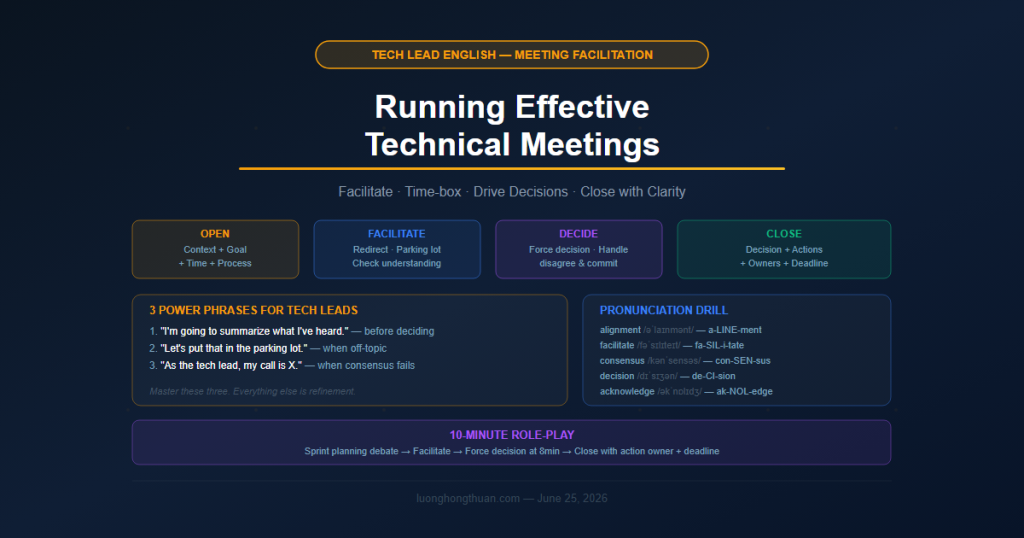
Formula: Context → Goal → Time → Process
“Thanks everyone for joining. We have 30 minutes. The goal today is to align on [specific decision] — by the end of this meeting, I want us to have a clear answer on [X]. We’ll spend the first 10 minutes hearing options, then 15 minutes discussing trade-offs, and the last 5 making a decision. Let’s start.”
Say this aloud now. Replace [X] with something real from your work.
Opening Phrases
| Situation | What to say |
|---|---|
| Starting on time | “Let’s get started — I know everyone’s busy.” |
| Setting the goal | “The outcome I’m looking for today is…” |
| Setting time boxes | “We have 45 minutes. I want to protect the last 10 for decisions.” |
| Framing the problem | “Before we jump into solutions, let me frame the problem.” |
| Managing latecomers | “We’ll catch [Name] up on the notes afterward — let’s keep moving.” |
🔄 Facilitating Discussion
This is where most meetings lose focus. Someone starts talking about a tangential issue. Another person goes too deep into technical detail. You need to redirect — professionally.
Redirecting Off-Topic Discussion
“That’s a really important point — I want to make sure we come back to it. Can we put it in the parking lot for now and focus on [main topic]?”
“I’m going to gently redirect us — we can explore that in a follow-up, but today’s decision is specifically about [X].”
The key phrase: “parking lot” — a place where you put important-but-off-topic items to address later. Every good facilitator uses this.
Moving Discussion Forward
| When | Say |
|---|---|
| Discussion is going in circles | “I think we’ve covered the main trade-offs. Let me summarize what I’ve heard and see if I’ve captured it correctly.” |
| Someone is going too deep | “This is really valuable detail — can we take this offline and set up a separate session?” |
| You need to time-box | “We have 8 minutes left. I want to use them to make a decision, not continue the discussion.” |
| Silence after a question | “Let me rephrase the question…” or “What’s your intuition, [Name]?” |
Checking Understanding
“Let me make sure I understand the concern — you’re saying that if we go with option B, the migration risk is too high for this sprint?”
“I want to check my understanding: the blocker here is [X], and if we resolve that, we can proceed with [Y]. Is that right?”
Why this works: It shows you’re listening, it surfaces misunderstandings, and it slows the meeting down in a good way — so you reach a real decision, not a fake one.
✅ Driving to a Decision
This is the hardest part. Meetings often end without a decision because no one explicitly called for one.
Decision-Forcing Phrases
“We’ve heard the options. I’m going to call for a decision now — I want everyone’s input. Option A or Option B — and I’ll go around the room.”
“I’m sensing we’re leaning toward [option] — is there anyone who has a strong objection? If not, let’s move forward with that.”
“We’re not going to reach consensus today, and that’s okay. As the tech lead, my call is [X]. Here’s my reasoning…”
The “Disagree and Commit” Moment
Sometimes a team member disagrees with your decision. Handle it directly:
“[Name], I hear your concern and I want to acknowledge it — the risk you’re flagging is real. I’m choosing to proceed anyway because [reason]. I need you on board. Can you commit to making this work even if you don’t agree?”
Why this matters: Teams need to see their tech lead make decisions — especially hard ones. This phrase acknowledges disagreement without opening the floor again.
📋 Closing a Meeting Well
Bad meetings end with: “Okay, I think we’re done?”
Good meetings end with a clear summary:
Closing Formula: Decision + Actions + Owners + Deadline
“Let me close with a summary. Decision: we’re going with [option]. Actions: [Name] will [do X] by [date], [Name] will [do Y] by [date]. I’ll send these notes to the group within the hour. Any final questions?”
Closing Phrases
| Situation | What to say |
|---|---|
| Summarizing | “Let me recap what we’ve decided…” |
| Assigning actions | “I want to be specific about ownership — [Name], this is yours.” |
| Parking lot | “Three items went to the parking lot — I’ll create tickets for all three.” |
| Ending on time | “We’re right at time — I’m going to stop here. Great discussion.” |
| Unresolved items | “We didn’t reach a decision on [X]. I’ll schedule a 20-minute sync with [Name] and [Name] to resolve it.” |
🎭 Role-Play: 10-Minute Technical Meeting
Scenario: Sprint planning. The team is debating whether to take on a new feature that might break the current sprint goal.
You are the Tech Lead. Facilitate this:
- Open: set the goal (decide: take it or not)
- Give each “voice” 90 seconds (pro: it’s urgent, customer asked; con: it risks sprint goal)
- Redirect if anyone goes off-topic
- Force a decision at the 8-minute mark
- Close with decision + owner + deadline
Practice this aloud. Play all the roles yourself. It feels weird — it works.
📖 Key Vocabulary
| Phrase | Meaning | Example |
|---|---|---|
| parking lot | a list of off-topic items to revisit later | “Let’s put that in the parking lot.” |
| time-box | set a fixed time limit for a discussion | “I’m going to time-box this to 10 minutes.” |
| disagree and commit | accept a decision you opposed | “I don’t love it, but I’ll disagree and commit.” |
| action item | a specific task assigned to a person | “The action item is yours — by Thursday.” |
| drive alignment | help everyone reach agreement | “The goal of this meeting is to drive alignment.” |
| take offline | discuss outside the meeting | “Let’s take that offline — it needs more depth.” |
| table (US English) | postpone/defer a decision | “Can we table the auth discussion to next week?” |
| raise | bring up a topic | “I want to raise one concern before we decide.” |
🔊 Pronunciation Focus
Meeting facilitation requires clear, confident delivery. Work on these:
| Phrase | IPA | Note |
|---|---|---|
| alignment | /əˈlaɪnmənt/ | stress: a-LINE-ment |
| facilitate | /fəˈsɪlɪteɪt/ | stress: fa-SIL-i-tate |
| consensus | /kənˈsensəs/ | stress: con-SEN-sus |
| decision | /dɪˈsɪʒən/ | stress: de-CI-sion |
| acknowledge | /əkˈnɒlɪdʒ/ | stress: ak-NOL-edge |
Drill: Say this sentence 5 times at normal speed:
“I want to drive alignment and acknowledge the concerns raised.”
🌐 Your Tech Lead Meeting Toolkit
Three phrases that will immediately make you a better meeting facilitator:
- “I’m going to summarize what I’ve heard.” (before any decision)
- “Let’s put that in the parking lot.” (when going off-topic)
- “As the tech lead, my call is X.” (when consensus fails)
Master these three. Everything else is refinement.
Strong facilitation is a skill, not a personality trait. It’s learnable. Practice it in every meeting.
Discussion
Comments are reviewed before publication. Your email is kept private.