Introduction
Building a demo agent takes a weekend. Shipping a multi-agent system that handles thousands of concurrent tasks, costs pennies per query, and scales without rearchitecting? That takes months of hard-won production experience.
This guide documents the architecture decisions, cost strategies, and infrastructure patterns I’ve used to build scalable multi-agent systems with LangGraph on AWS. It’s written from the perspective of a Technical Lead who’s responsible for both the technical design and the budget that funds it.
What you’ll learn:
- The Brain/Worker separation pattern that achieves 5-10x cost reduction vs. single-model architectures
- A 5-layer component architecture with clear responsibility boundaries
- AWS infrastructure patterns (Lambda + ECS + Step Functions + Bedrock) with real pricing numbers
- CI/CD pipelines specifically designed for agent systems
- Production best practices for error handling, observability, and human-in-the-loop workflows
Who is this for? Technical Leads evaluating multi-agent architectures, AI engineers moving from prototype to production, and anyone who’s been asked “how much will this cost at scale?” by their CTO.
Table of Contents
- Why Multi-Agent? The Case for Separation of Concerns
- Architecture Principles
- The 5-Layer Component Architecture
- LangGraph: Why Graph-Based Orchestration Wins
- The Brain Agent: Claude Sonnet as Orchestrator
- Worker Agents: Cheap, Fast, Focused
- State Management and Checkpointing
- AWS Infrastructure Deep Dive
- Cost Modeling: From USD 13,500 to USD 2,790/month
- CI/CD Pipeline for Agent Systems
- Observability and Monitoring
- Security Architecture
- Human-in-the-Loop Patterns
- Error Handling and Resilience
- Scaling Patterns
- Production Checklist
- LangGraph vs. Alternatives: When to Choose What
- Resources and References
1. Why Multi-Agent? The Case for Separation of Concerns
The instinct is to build one powerful agent that does everything. This fails at scale for three reasons:
Cost explosion. A single Claude Sonnet call costs USD 3/1M input tokens. If your agent processes 1M tasks/month and every task hits Sonnet, you’re looking at USD 13,500/month in model costs alone. Most of those tasks don’t need Sonnet-level reasoning.
Blast radius. When one monolithic agent fails, everything fails. When a SQL-writing worker fails, only the SQL step fails. The orchestrator can retry, route to a fallback, or escalate to a human.
Extensibility. Adding a new capability (say, a chart generator) to a monolithic agent means rewriting the entire prompt and retraining. In a multi-agent system, you add a new worker and register it with the orchestrator. Zero changes to existing agents.
The pattern that works in production is Brain/Worker separation:
- Brain (Orchestrator): An expensive, high-reasoning model (Claude Sonnet) that plans, coordinates, and synthesizes. Invoked 1-2 times per task.
- Workers: Cheap, fast models (Claude Haiku, DeepSeek) that execute specific subtasks. They don’t decide what to do; they do what they’re told.
This is the primary cost optimization lever. Get this right, and everything else falls into place.
2. Architecture Principles
Before diving into components, here are the non-negotiable principles that guide every decision:
| Principle | Implementation | Why It Matters |
|---|---|---|
| Brain/Worker separation | Sonnet handles reasoning; Haiku/DeepSeek handle execution | 5-10x cost reduction vs. all-Sonnet |
| Context injection over fine-tuning | Agent knowledge injected at runtime via system prompt and RAG | No retraining when schemas change |
| Human-in-the-loop on exceptions | Low-confidence results flagged, not silently returned | Analyst trust maintained as system scales |
| Pay-per-use infrastructure | Athena + Lambda + S3 with no always-on compute for queries | Cost scales linearly with usage |
| Typed contracts between agents | Structured JSON specs between brain and workers | Eliminates ambiguity, enables testing |
| Checkpoint everything | Every state transition persisted to durable storage | Resume from any failure point |
3. The 5-Layer Component Architecture
The system is organized into five layers, each with a defined responsibility boundary:
Layer 1 — Data Inputs Raw data sources, business rules, and schema definitions. Examples: S3 data lake, weighting rules, data dictionaries, configuration files.
Layer 2 — Orchestrator (Brain) Claude Sonnet loaded with full schema context and business rules. Receives natural-language questions, plans query strategies, issues typed instructions to workers, validates results, and synthesizes final answers.
Layer 3 — Worker Agents Specialized executors: SQL Writer, Data Processor, Formatter. Each receives structured input from the orchestrator and returns structured output. Uses Haiku or DeepSeek for cost efficiency.
Layer 4 — Data and State Layer Query execution (Athena), agent state persistence (DynamoDB), artifact storage (S3), and task queuing (SQS).
Layer 5 — Output Final deliverables: weighted insights, chart-ready JSON (Recharts/D3 compatible), markdown tables, or plain-English narrative summaries.
4. LangGraph: Why Graph-Based Orchestration Wins
After evaluating CrewAI, AutoGen, Semantic Kernel, and LangGraph, here’s why LangGraph is the right choice for production multi-agent systems:
The Graph Model
LangGraph models agent workflows as directed graphs where:
- Nodes are processing steps (LLM calls, tool executions, human approvals)
- Edges define transitions (conditional routing, parallel fan-out, loops)
- State flows through the graph, accumulating results at each step
This gives you something no other framework provides: you can see every possible execution path before the first line of code runs. For a Technical Lead responsible for production reliability, this is non-negotiable.
LangGraph 1.0 (October 2025)
LangGraph hit its first stable release in October 2025. Key facts:
- No breaking changes from v0.6.6
- LangGraph is now the low-level runtime; LangChain is the high-level API built on top
create_react_agentmoved tolangchain.agentsascreate_agent- 38M+ monthly PyPI downloads
- Nearly 400 companies deployed agents via LangGraph Platform during beta
The Supervisor Pattern
The supervisor pattern is the recommended architecture for multi-agent orchestration. A central supervisor (Brain) coordinates specialized workers:
from langchain.agents import create_agent
from langgraph_supervisor import create_supervisor
from langchain_aws import ChatBedrock

# Brain model (expensive, high-reasoning)
brain = ChatBedrock(
    model_id="anthropic.claude-sonnet-4-5-20250514-v1:0",
    region_name="us-east-1"
)

# Worker model (cheap, fast execution)
worker_model = ChatBedrock(
    model_id="anthropic.claude-3-5-haiku-20241022-v1:0",
    region_name="us-east-1"
)

# Specialized worker agents
sql_agent = create_agent(
    model=worker_model,
    tools=[execute_athena_query, validate_sql],
    name="sql_writer",
    prompt="You are a SQL specialist. Translate query "
           "specs into Athena-compatible SQL. Never decide "
           "WHAT to query; only translate intent to SQL."
)

formatter_agent = create_agent(
    model=worker_model,
    tools=[format_json, format_markdown, format_narrative],
    name="formatter",
    prompt="You convert data into the requested output format."
)

# Supervisor orchestration
workflow = create_supervisor(
    agents=[sql_agent, formatter_agent],
    model=brain,
    prompt="""You are the orchestrator of a data analytics system.
    You have access to a data dictionary and business rules.
    Plan the query strategy, delegate to specialists,
    validate results, and synthesize final answers."""
)

app = workflow.compile()
Manual Handoff for More Control
For production systems where you need explicit control over agent transitions:
Hierarchical Teams
For complex systems, compose subgraphs with multi-level supervisors:
Each team is an independent LangGraph subgraph. The top-level supervisor routes tasks to teams; team supervisors route to workers. This scales to dozens of agents without the orchestrator becoming a bottleneck.
5. The Brain Agent: Claude Sonnet as Orchestrator
Claude Sonnet serves as the central intelligence. It is not a data executor. It is a planner and synthesizer.
What the Brain Does
- Receives analyst or client natural-language questions
- Interprets the business intent behind the question
- Consults the injected data dictionary for schema, column semantics, and business rules
- Plans the query strategy: which table, which filters, which dimensions
- Issues tool calls to worker agents with structured, typed instructions
- Receives results from workers, validates against expected schema
- Synthesizes a final answer: narrative text, structured data, or both
Context Injection Pattern
Instead of fine-tuning (expensive, brittle), inject knowledge at runtime:
BRAIN_SYSTEM_PROMPT = """
You are the orchestrator of a data analytics system.

## Data Dictionary
[DATA_DICTIONARY]

## Business Rules
[BUSINESS_RULES]

## Available Workers
- sql_writer: Translates query specs to Athena SQL
- weight_applier: Applies rim weighting to raw results
- formatter: Converts data to JSON/markdown/narrative

## Instructions
1. Always plan before executing
2. Issue structured query specs to sql_writer (never raw SQL)
3. ALL metric outputs MUST pass through weight_applier
4. Flag low-confidence results for human review
"""
This approach means:
- No retraining when the schema changes (just update the dictionary)
- Version-controlled knowledge (prompts live in git alongside code)
- A/B testable (swap prompts via feature flags)
Cost Profile
Sonnet is invoked 1-2 times per query (planning + synthesis). The majority of token consumption is in worker agents, which use cheaper models. This is the primary cost optimization lever.
| Phase | Model | Tokens | Cost per Task |
|---|---|---|---|
| Planning | Sonnet (USD 3/1M in) | ~2,000 input, ~500 output | ~USD 0.0135 |
| Synthesis | Sonnet (USD 3/1M in) | ~1,500 input, ~300 output | ~USD 0.009 |
| Brain Total | ~USD 0.023 |
6. Worker Agents: Cheap, Fast, Focused
Workers are the cost-efficiency engine. They don’t decide what to do; they execute structured instructions from the Brain.
6.1 SQL Writer (Haiku)
Receives a structured query specification from the Brain and produces Athena-compatible SQL:
| Input | Output |
|---|---|
| Structured query spec (JSON) from Brain | Valid Athena SQL string |
| Target table, filters, GROUP BY dimensions | Result set (rows/columns) |
| Max scan size constraint | Error if query exceeds scan budget |
SQL_WRITER_PROMPT = """You are an Athena SQL specialist.

Input: A JSON query specification with:
- table: target table name
- filters: WHERE conditions
- dimensions: GROUP BY columns
- aggregations: SUM/AVG/COUNT functions
- scan_budget_gb: maximum data scan allowed

Output: A single Athena-compatible SQL query.

Rules:
- NEVER use SELECT * (always specify columns)
- ALWAYS include partition filters for cost control
- NEVER exceed the scan budget
- Return ONLY the SQL, no explanation"""
6.2 Data Processor (Haiku/DeepSeek)
Receives raw query results and applies domain-specific transformations. In analytics systems, this might include statistical weighting, normalization, or aggregation:
PROCESSOR_PROMPT = """You are a data processing specialist.

Input: Raw query results and processing instructions from the orchestrator.
Output: Processed results with a confidence report.

Rules:
- Apply all specified transformations in order
- Report confidence level (high/medium/low)
- Flag any anomalies or missing data
- Return structured JSON output"""
6.3 Formatter (Haiku)
Converts processed data into the requested output format:
| Format | Use Case |
|---|---|
| Structured JSON | Dashboard/chart rendering (Recharts, D3 compatible) |
| Markdown table | Report embedding |
| Plain-English narrative | Client-facing summaries |
| CSV | Data export |
Worker Cost Profile
| Worker | Model | Avg Tokens | Cost per Task |
|---|---|---|---|
| SQL Writer | Haiku (USD 0.80/1M in) | ~800 in, ~200 out | ~USD 0.0014 |
| Processor | Haiku (USD 0.80/1M in) | ~1,200 in, ~300 out | ~USD 0.002 |
| Formatter | Haiku (USD 0.80/1M in) | ~600 in, ~400 out | ~USD 0.002 |
| Workers Total | ~USD 0.0054 |
Combined cost per task: ~USD 0.028 (Brain USD 0.023 + Workers USD 0.005) vs. All-Sonnet: ~USD 0.135 (every step uses Sonnet) Savings: 4.8x
7. State Management and Checkpointing
In production, agents crash. Networks fail. Servers restart. Without durable state management, you lose everything.
How LangGraph Checkpointing Works
LangGraph follows a “read-execute-write” cycle:
- User sends message with
thread_id - LangGraph queries the database for the latest checkpoint
- State loaded into memory
- Agent processes through graph nodes
- After each super-step, new state serialized and saved as a checkpoint
Checkpoints are never overwritten. Full history is maintained, enabling “time travel” debugging. If your agent is 3 steps into a 10-step workflow when the server restarts, it picks up exactly where it left off.
DynamoDB Checkpointer for AWS
from langgraph_checkpoint_aws import DynamoDBSaver

checkpointer = DynamoDBSaver(
    table_name="agent-checkpoints",
    ttl_seconds=86400  # Auto-expire after 24 hours
)

# Intelligent payload handling:
# Payloads under 350KB -> stored directly in DynamoDB
# Payloads 350KB+ -> uploaded to S3 with DynamoDB reference
Checkpointer Comparison
| Backend | Package | Best For |
|---|---|---|
| InMemorySaver | built-in | Prototyping only (never production) |
| SQLite | langgraph-checkpoint-sqlite | Local development |
| PostgreSQL | langgraph-checkpoint-postgres | Production (used by LangSmith) |
| DynamoDB | langgraph-checkpoint-aws | AWS-native, serverless |
| Azure Cosmos DB | langgraph-checkpoint-azure | Azure production |
Production Rules
- Never use InMemorySaver in production — ephemeral and local
- Don’t store large binaries in state — store files in S3, save only URLs in state (a new copy is saved at every step)
- Use TTL for automatic checkpoint expiration
- Use compression to reduce checkpoint size
- Thread-scoped checkpoints — isolate state per conversation/task
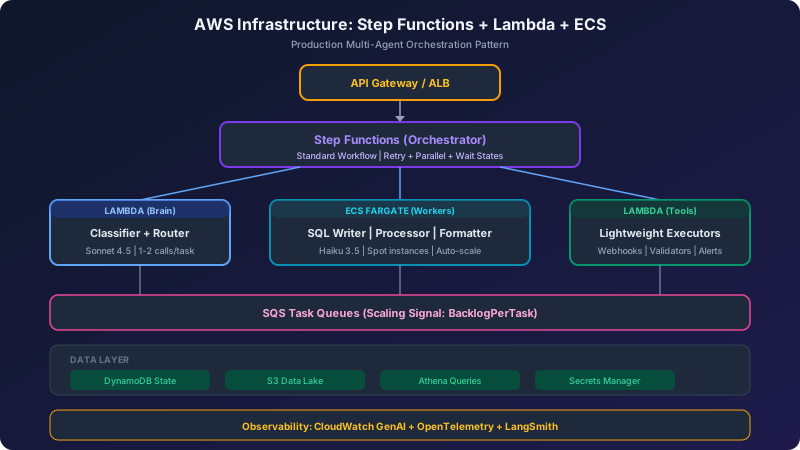
8. AWS Infrastructure Deep Dive
Compute: Lambda vs. ECS/Fargate
| Criterion | Lambda | ECS/Fargate |
|---|---|---|
| Max duration | 15 minutes | Unlimited |
| State management | External only (DynamoDB) | In-memory + external |
| Max memory | 10 GB | 120 GB |
| Cold start | 1-4s (200ms with SnapStart) | 30-90s |
| Cost model | Pay per invocation + duration | Pay per vCPU-hour |
| Scaling | Per-request, instant | Per-container, 30-90s |
Decision framework:
- Lambda for stateless, short-lived tasks: preprocessing, single inference calls, webhook handlers, lightweight tool execution
- ECS/Fargate for long-running agent sessions that exceed 15 minutes, need in-memory state, or require persistent connections
Orchestration: Step Functions
AWS Step Functions provides native orchestration for multi-agent workflows:
Key patterns:
Parallel Fan-Out for multi-agent work:
Human-in-the-Loop with task tokens:
Direct Bedrock Integration (no Lambda needed):
Data Layer: S3 + Athena
Athena pricing: USD 5.00 per TB scanned. Optimize ruthlessly:
| Strategy | Savings |
|---|---|
| Columnar format (Parquet/ORC) | 85-99% scan reduction |
| Partition pruning (date, region) | Proportional to filter selectivity |
| Compression (Snappy/ZSTD) | 3-10x size reduction |
| Column selection (never SELECT *) | Proportional to columns skipped |
| Scan budget guardrail | Hard cost ceiling per query |
Scan budget pattern:
Bedrock: Model Pricing
| Model | Input (per 1M tokens) | Output (per 1M tokens) | Use Case |
|---|---|---|---|
| Claude Sonnet 4.5 | USD 3.00 | USD 15.00 | Brain/planner |
| Claude 3.5 Haiku | USD 0.80 | USD 4.00 | Worker/executor |
| Claude 3.5 Haiku (Batch) | USD 0.50 | USD 2.00 | Async batch |
| Claude Opus 4.5 | USD 5.00 | USD 25.00 | Complex reasoning |
Prompt caching (critical for agents):
- 5-minute cache: 1.25x write cost, 0.1x read cost (90% savings)
- 1-hour cache: 2.0x write cost, 0.1x read cost
For agent systems with repeated system prompts and tool definitions, prompt caching can reduce costs by 85-90% on cached portions.
Cross-region inference: Routes requests across AWS regions for high availability with no additional charge. This is essentially free HA.
9. Cost Modeling: From USD 13,500 to USD 2,790/month
Here’s the real math for processing 1M agent tasks per month.
Scenario A: All-Sonnet (Naive Approach)
Every task uses Claude Sonnet for every step:
| Step | Tokens | Cost per Task | Monthly (1M tasks) |
|---|---|---|---|
| Planning | 2,000 in / 500 out | USD 0.0135 | USD 13,500 |
| SQL Writing | 1,000 in / 200 out | USD 0.006 | USD 6,000 |
| Processing | 1,200 in / 300 out | USD 0.0081 | USD 8,100 |
| Formatting | 600 in / 400 out | USD 0.008 | USD 8,000 |
| Synthesis | 1,500 in / 300 out | USD 0.009 | USD 9,000 |
| Total | USD 0.0446 | USD 44,600/month |
Scenario B: Brain/Worker Split
Sonnet for planning + synthesis (2 calls), Haiku for everything else (3 calls):
| Step | Model | Cost per Task | Monthly (1M tasks) |
|---|---|---|---|
| Planning | Sonnet | USD 0.0135 | USD 1,350 (10% of tasks need replanning) |
| SQL Writing | Haiku | USD 0.0014 | USD 1,400 |
| Processing | Haiku | USD 0.002 | USD 2,000 |
| Formatting | Haiku | USD 0.002 | USD 2,000 |
| Synthesis | Sonnet | USD 0.009 | USD 900 (only when needed) |
| Total | USD 0.028 | USD 7,650/month |
Scenario C: Brain/Worker + Prompt Caching + Batch
Add prompt caching (90% of system prompt cached) and batch API for non-real-time tasks:
| Optimization | Savings |
|---|---|
| Prompt caching (system prompts) | -40% on token costs |
| Batch API for 60% of tasks | -30% on those tasks |
| Token compression | -15% on context |
| Estimated monthly | ~USD 2,790 |
Infrastructure Costs
| Component | Monthly Cost |
|---|---|
| Lambda (orchestrator + workers) | ~USD 60 |
| ECS Fargate (baseline, 2 tasks) | ~USD 320 |
| Fargate Spot (burst capacity) | ~USD 96 |
| Step Functions (10-state, 100K/month) | ~USD 25 |
| SQS (5M messages) | ~USD 2 |
| DynamoDB (state storage) | ~USD 15 |
| Athena (50 GB scanned) | ~USD 0.25 |
| CloudWatch | ~USD 30 |
| Infrastructure Total | ~USD 550/month |
Grand Total
| Approach | Model Costs | Infra Costs | Total |
|---|---|---|---|
| All-Sonnet | USD 44,600 | USD 550 | USD 45,150 |
| Brain/Worker | USD 7,650 | USD 550 | USD 8,200 |
| Brain/Worker + Caching + Batch | USD 2,790 | USD 550 | USD 3,340 |
Total savings: 13.5x from the naive approach.
10. CI/CD Pipeline for Agent Systems
Agent CI/CD is different from traditional software CI/CD. You’re not just testing code correctness; you’re testing reasoning quality, cost efficiency, and output accuracy.
Pipeline Architecture
GitHub Actions Pipeline
name: Deploy Agent System
on:
  push:
    branches: [main]
    paths:
      - 'agents/**'
      - 'prompts/**'

jobs:
  test:
    runs-on: ubuntu-latest
    steps:
      - uses: actions/checkout@v4
      - name: Run unit tests
        run: pytest tests/agents/
      - name: Run agent eval suite
        run: python -m agent_eval --config eval_config.yaml

  build:
    needs: test
    steps:
      - name: Build agent container
        run: docker build -t agent-worker .
      - name: Push to ECR
        uses: aws-actions/amazon-ecr-login@v2

  deploy-canary:
    needs: build
    steps:
      - name: Deploy canary (10% traffic)
        uses: aws-actions/amazon-ecs-deploy-task-definition@v1
      - name: Monitor canary metrics (15 min)
        run: python scripts/monitor_canary.py --duration 900
      - name: Promote or rollback
        run: python scripts/promote_or_rollback.py
Agent-Specific Evaluation
Traditional testing checks “does the code work?” Agent testing checks “does the agent think well?”
LangSmith Evaluation Types:
- Trajectory evaluation: Did the agent take the right steps? (e.g., did it call sql_writer before formatter?)
- Output accuracy: Is the final answer correct against ground truth?
- Cost monitoring: Did it stay within the token budget?
- Latency check: Is P95 under the SLA threshold?
- Multi-turn evaluation: Did the agent accomplish the goal across the full interaction?
Rollback triggers:
AgentTaskCompletionRatedrops below 95%CostPerTaskexceeds 2x baselineP95Latencyexceeds SLA threshold- Eval accuracy drops below minimum threshold
Prompt Versioning
Treat prompts as code. Version-control them alongside your application:
Use feature flags to A/B test prompt versions in production.
11. Observability and Monitoring
Key Metrics to Track
Observability Stack
| Layer | Tool | Purpose |
|---|---|---|
| Agent tracing | LangSmith | Token usage, latency, cost per node, trajectory |
| Infrastructure | CloudWatch + ADOT | Container metrics, Lambda duration, error rates |
| Distributed tracing | OpenTelemetry | End-to-end request flow across services |
| Dashboards | CloudWatch GenAI | Pre-built model invocation dashboards |
| Alerts | CloudWatch Alarms | PagerDuty/Slack on threshold breaches |
LangSmith Integration
LangSmith provides agent-specific observability that generic APM tools can’t match:
- Token usage per node — identify which agent step is most expensive
- Trajectory visualization — see the exact path through the graph
- Cost attribution — break down spend by agent, tool, and model
- Eval drift detection — alert when production quality degrades
- Insights Agent — AI-powered analysis of your traces to discover patterns and failure modes
12. Security Architecture
IAM Roles Per Agent (Least Privilege)
Every agent type gets its own execution role. The Brain agent should NOT have the same permissions as a SQL Writer worker:
Note: The worker role only has access to Haiku (not Sonnet), read-only S3 access, and limited DynamoDB operations.
Additional Security Measures
- Secrets Manager for all API keys and credentials with automatic rotation
- VPC Endpoints for Bedrock, S3, DynamoDB, SQS to keep traffic off public internet
- PII Detection Middleware — LangGraph 1.0 includes built-in middleware for scanning inputs/outputs
- Encryption at rest — SSE-KMS for S3 and DynamoDB, TLS 1.2+ for all API calls
- Audit logging — CloudTrail for all Bedrock invocations and state changes
13. Human-in-the-Loop Patterns
Not all decisions should be automated. Low-confidence results, high-stakes actions, and edge cases need human oversight.
LangGraph Interrupt Pattern
from langgraph.types import interrupt

def sensitive_action_node(state: State):
    """Pause for human approval before executing."""
    result = analyze_risk(state)

    if result.confidence < 0.8:
        # Pause execution -- state saved to checkpoint store
        # No Python process stays alive during the wait
        human_decision = interrupt(dict(
            question="Low confidence result detected. Approve?",
            data=result.summary,
            confidence=result.confidence
        ))

        if human_decision == "reject":
            return dict(status="rejected_by_human")

    return execute_action(state)
How It Works in Production
- Agent reaches the interrupt point
- State is saved to DynamoDB checkpoint
- No compute is running — the system is completely idle
- Notification sent to human (Slack, email, dashboard)
- Human reviews and sends “resume” with their decision
- Agent loads state from checkpoint and continues
With Step Functions, this maps to the .waitForTaskToken pattern with configurable timeout (up to 1 year).
14. Error Handling and Resilience
Retry Configuration
from langgraph.types import RetryPolicy

# Different strategies per node type
llm_retry = RetryPolicy(
    max_attempts=3,
    backoff_factor=2.0,
    retry_on=[APIError, TimeoutError, RateLimitError]
)

db_retry = RetryPolicy(
    max_attempts=5,
    backoff_factor=1.5,
    retry_on=[ConnectionError, ThrottleError]
)
Fallback Strategy
Production Resilience Checklist
- Timeout for every async operation (no unbounded waits)
- Bounded cycles with hard stops (
max_stepscounter) - State-driven error tracking (errors are typed objects in state)
- Graceful degradation (partial results better than no results)
- Dead letter queues for permanently failed tasks
- Circuit breaker for external service dependencies
15. Scaling Patterns
Queue-Based Scaling (SQS + ECS)
The recommended pattern for agent workloads:
Target tracking auto-scaling maintains this ratio by adding/removing ECS tasks.
Scaling Strategy by Component
| Component | Scaling Signal | Min | Max | Strategy |
|---|---|---|---|---|
| Brain (Lambda) | Invocations | 0 | 1000 | Reserved concurrency |
| Workers (ECS) | SQS backlog per task | 2 | 50 | Target tracking |
| Workers (Spot) | Burst demand | 0 | 20 | Weight-based with Fargate |
| Data queries | Athena workgroup | - | - | Scan budget guardrail |
Predictive Scaling
For workloads with recurring patterns (business-hours traffic), AWS Predictive Scaling uses ML to forecast demand and pre-provisions capacity before the spike, eliminating the 2-3 minute reactive scaling lag.
16. Production Checklist
Before going live, verify every item:
Architecture
- Brain/Worker model split implemented and tested
- Context injection working (data dictionary, business rules)
- Typed contracts between all agents (JSON schemas)
- 5-layer separation enforced
State and Reliability
- DynamoDB checkpointer configured with TTL
- Checkpoint size monitored (state bloat alerts)
- All external calls have timeouts
- Retry policies configured per node type
- Dead letter queues for failed tasks
- Graceful shutdown handling (SIGTERM)
Cost Controls
- Token budget limits via middleware
- Scan budget guardrails on Athena workgroups
- Cost-per-task monitoring with alerts
- Prompt caching enabled for repeated system prompts
- Batch API for non-real-time workloads
Security
- Least-privilege IAM roles per agent type
- Secrets Manager for all credentials
- VPC endpoints for AWS services
- PII detection middleware enabled
- Audit logging via CloudTrail
Observability
- LangSmith tracing with cost attribution
- CloudWatch dashboards for infrastructure
- OpenTelemetry for distributed tracing
- Alert thresholds for latency, cost, error rate
- Eval drift monitoring in production
CI/CD
- Agent evaluations as deployment gates
- Canary deployment with automatic rollback
- Prompt versioning in git
- Shadow mode for new agent versions
17. LangGraph vs. Alternatives: When to Choose What
| Framework | Best For | Not Great For |
|---|---|---|
| LangGraph | Production systems needing fine-grained control, conditional logic, durable execution, regulated industries | Quick prototypes, simple workflows |
| CrewAI | Fast prototyping, role-based collaboration, demos | Complex conditional logic, production durability |
| AutoGen | Research, flexible multi-agent conversations | Production reliability |
| Semantic Kernel | .NET enterprise, Azure-native applications | Python-first teams |
| AWS Strands | AWS-native, model-driven (LLM plans autonomously) | When you need explicit execution paths |
| AWS Bedrock Agents | No-code/low-code, managed service | Custom orchestration logic |
Migration path: CrewAI to LangGraph is the most common migration as teams hit CrewAI’s control flow ceiling. Start with CrewAI for validation, move to LangGraph for production.
Industry trend (2026): Convergence toward graph-based orchestration across all frameworks. LangGraph pioneered it; others are following.
18. Resources and References
Official Documentation
- LangGraph Documentation
- LangSmith Platform
- AWS Guidance: Multi-Agent Orchestration
- AWS Prescriptive Guidance: Agentic AI Patterns
Case Studies
- LinkedIn: 40% reduction in time-to-hire with LangGraph
- Uber: 60% reduction in migration time
- Build.inc: 4 weeks to 75 minutes with 25+ parallel agents
- NVIDIA: Scaling LangGraph agents from 1 to 1000 users
Architecture References
- Build Multi-Agent Systems with LangGraph and Amazon Bedrock
- Durable AI Agents with LangGraph and DynamoDB
- LangGraph Multi-Agent Workflows