Introduction
Building a voice agent demo takes a weekend. Shipping one to production takes months. Pipecat — the open-source Python framework by Daily.co with 10.6k GitHub stars — is the most popular choice for building real-time voice and multimodal AI agents. But between “it works on my laptop” and “it handles 10,000 concurrent calls,” lies a minefield of production issues that no tutorial covers.
This guide documents 26+ real GitHub issues, benchmarks from Daily.co and Modal.com, and hard-won production lessons from companies that have actually deployed Pipecat at scale. Whether you’re debugging choppy audio at 2 AM or architecting a system for 50K monthly minutes, this is the reference you need.
Who is this for? Voice AI engineers, tech leads evaluating Pipecat, and anyone who’s heard “the bot sounds robotic” from a product manager.
Table of Contents
- The Voice Agent Latency Budget
- Production Latency Issues (5 Critical Bugs)
- Audio Quality Problems
- WebSocket & WebRTC Connection Failures
- Memory Leaks & Resource Management
- Concurrency & The Python GIL Problem
- VAD: When Your Bot Can’t Tell Who’s Talking
- Smart Turn Detection v3: The Game Changer
- Provider Failures & Fallback Strategies
- Pipeline Hangs, Freezes & Deadlocks
- Telephony (Twilio) Specific Issues
- Session & Context Management
- The Scalable Architecture Pattern
- Latency Optimization Playbook
- Provider Selection Guide
- Monitoring & Observability
- Pipecat vs LiveKit vs Managed Platforms
- Production Deployment Checklist
1. The Voice Agent Latency Budget
Before diving into bugs, you need to understand why latency matters more for voice than any other AI modality. In natural human conversation, the median inter-turn gap is just 200 milliseconds. Anything beyond 600-700ms feels artificially delayed — your users will describe the experience as “talking to a robot.”
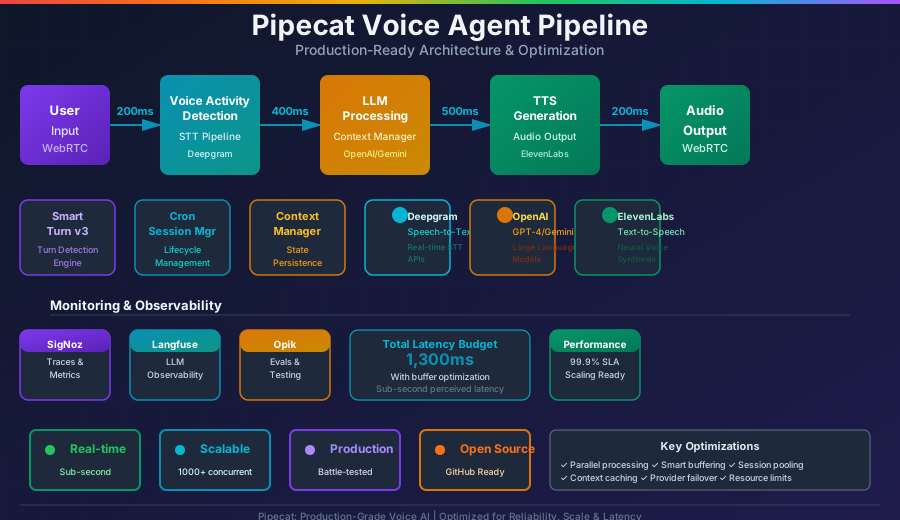
Here’s the latency budget for a complete voice-to-voice loop, based on Daily.co’s research and community benchmarks:
| Stage | Target | What Happens |
|---|---|---|
| Network Transport | ~200ms | Audio travels from user to server |
| STT + Turn Detection | ~400ms | Speech recognized + end-of-turn detected |
| LLM Inference (TTFT) | ~300-500ms | First token generated |
| TTS (TTFB) | ~200ms | First audio chunk synthesized |
| Total | under 800ms | User perceives “instant” response |
The industry target is sub-800ms median for the complete voice loop. Modal.com achieved median 1-second with self-hosted models, while optimized cloud stacks can hit ~600ms.
Key metric: TTFS (Time to Final Segment) — the time from when a user stops speaking to when the final transcription arrives. Daily.co released an open-source STT benchmark tool specifically for this metric. Target: P95 TTFB under 300ms, P95 Final under 800ms for 3-second utterances.
2. Production Latency Issues
These are real bugs from the Pipecat GitHub repository that cause unacceptable latency in production:
2.1 Bot Response Delay: 2-5 Seconds (Issue #1694)
Version: v0.0.65 | Severity: Critical
On Ubuntu 22.04 with Python 3.10, users reported a 2-5 second delay between finishing speech and hearing the bot respond. Root cause: the bot only starts TTS synthesis after run_tts is called twice rather than immediately on first response.
Impact: Users hang up. In telephony use cases, this is a deal-breaker.
2.2 The Hidden 1-Second Tax (Issue #1319)
Version: v0.0.57+ | Severity: High
An aggregation_timeout=1.0 parameter introduced in v0.0.57 adds an unavoidable 1-second delay to every response. This single parameter accounts for more user complaints than any other latency source.
Fix: Reduce or expose this parameter for configuration. Community workaround: set aggregation_timeout=0.3.
2.3 Sequential Component Initialization (Issue #904)
Severity: Medium (affects startup only)
TTS, LLM, STT, and Daily transport all initialize sequentially. On a cold start, this adds 3-8 seconds before the first response. A proposal to parallelize initialization exists but hasn’t shipped due to concerns about premature frame pushes.
2.4 First Greeting Latency: 4-5 Seconds (Issue #2957)
Version: v0.0.85 | Severity: Critical for telephony
The initial greeting in telephony pipelines takes 4-5 seconds — an eternity on a phone call. Mid-conversation latency is acceptable at 1-2s, but first impressions matter. Root causes: TTS cold start + initialization overhead.
Proposed fix (Issue #3752): Pre-run LLM inference before client connects, cache the response, and trigger only TTS upon connection.
2.5 No Preemptive Generation (Issue #3321)
Severity: Architectural limitation
Pipecat currently waits for full VAD end-of-speech detection before starting LLM response generation. Even when STT has already produced a final transcript, the pipeline stalls until VAD confirms silence. A preemptive_generation flag has been proposed but not yet implemented.
Potential savings: 200-400ms per turn.
3. Audio Quality Problems
3.1 Choppy Audio with SmallWebRTCTransport (Issue #1530)
Starting in v0.0.62, SmallWebRTCTransport produces robotic, choppy audio. This is particularly frustrating because SmallWebRTCTransport is the recommended path for self-hosted WebRTC without Daily.co dependency.
3.2 Audio Cracking & Frame Drops (Issue #331)
ElevenLabs TTS + DailyTransport combination produces audio cracks and dropped frames in WebRTC pipelines. The issue is intermittent, making it difficult to reproduce in testing but noticeable to end users.
3.3 Mystery Ticking Noise (Issue #1653)
A consistent ticking noise appears in recorded user audio when using AudioBufferProcessor across versions 0.0.58-0.0.65 on both Linux and macOS. The bot’s own voice is unaffected — only user audio recordings have the artifact.
3.4 Audio Pipeline Freeze (Issue #721)
The most terrifying production bug: _audio_in_queue randomly stops receiving InputAudioRawFrame objects even though Daily continues sending them. The pipeline silently dies. No error. No recovery. The call just… stops working.
3.5 Noise Cancellation Options
| Filter | License | CPU Impact | Notes |
|---|---|---|---|
| KrispVivaFilter | Paid (Krisp SDK) | Medium | Best quality, 8-48kHz |
| RNNoiseFilter | Free/Open Source | Low | Also works as VAD! |
| NoisereduceFilter | Deprecated | - | Removed in v0.85 |
Pro tip: RNNoise serves double duty as both noise cancellation AND voice activity detection, minimizing CPU footprint. It outputs speech probability per frame, making it a practical two-in-one solution.
4. WebSocket & WebRTC Connection Failures
WebSocket connections are the Achilles’ heel of production voice agents. Here are the failure modes you’ll encounter:
4.1 STT WebSocket Dies Silently (Issue #3699)
SarvamSTT WebSocket connections die after ~60-70 seconds of silence during phone calls. The critical problem: no reconnection logic exists. The _socket_client object persists but points to a dead WebSocket, and the if not self._socket_client: guard fails to detect it.
Unlike SarvamTTSService (which sends {"type": "ping"} every 20 seconds), the STT service has no keepalive mechanism.
4.2 Sending to Closed WebSocket (Issue #2209)
A race condition at the disconnection boundary causes the pipeline to send AudioFrame to an already-closed WebSocket. Error: WebSocketDisconnect(), application_state: WebSocketState.DISCONNECTED.
4.3 Twilio Random Disconnects (Issue #2550)
Since v0.0.78, Twilio connections randomly reset with: "Stream - WebSocket - Connection Broken Pipe (Connection Reset By Peer)". Calls close unexpectedly with no recovery path.
4.4 ElevenLabs Infinite Reconnect Loop (Issue #1192)
ElevenLabs WebSocket disconnections trigger an infinite loop of error closing websocket: no close frame received or sent errors that persists even after the pipeline ends with EndFrame.
4.5 Deepgram: 1 in 50 Calls Drop
Deepgram connections drop with code 1011 (NET-0001: "did not receive audio data within timeout") roughly once every 50 calls. Pipecat now sends explicit KeepAlive messages every 5 seconds, but the issue still occurs.
Known gotcha: Using language=Language.EN (enum) instead of language="en" (string) in LiveOptions causes silent HTTP 400 rejection.
4.6 The WebRTC Recommendation
Pipecat co-founder Kwindla Hultman-Kramer explicitly recommends:
Use WebRTC over WebSockets for production audio. WebRTC runs on UDP, was built for low-latency real-time media, handles NAT traversal, and produces noticeably better interruption handling and voice quality than WebSocket transport.
5. Memory Leaks & Resource Management
5.1 The 3GB/Minute Memory Leak (Issue #3116)
Version: v0.0.85+ | Severity: Critical | Platform: Ubuntu/Kubernetes only
A severe memory leak causes usage to increase by approximately 3 GB per minute with a Deepgram + OpenAI + ElevenLabs + LiveKit pipeline. Versions 0.0.80-0.0.84 are unaffected. The issue only manifests in Kubernetes pods on Linux — not on macOS.
Impact: Without mitigation, a single session will OOM-kill your pod within minutes.
5.2 LiveKit High Memory (Issue #1003)
Running Pipecat with LiveKit triggers process memory usage is high ~ 400mb warnings on single instances. For a framework where you’re running one process per session, 400MB baseline is significant.
5.3 AudioOutMixer OOM (Issue #740)
AudioOutMixer causes out-of-memory errors and blocks the entire pipeline on both macOS and Ubuntu.
5.4 Production Memory Strategies
1. Pin Pipecat version if leak identified
2. Use LRU caches with explicit size limits
3. Remove all event listeners on teardown
4. Use context managers (with statements)
5. Kubernetes: rolling restarts + HPA
6. Monitor RSS per-session, alert at threshold
7. Isolate each session in its own container
6. Concurrency & The Python GIL Problem
6.1 The Fundamental Bottleneck
Python’s Global Interpreter Lock (GIL) prevents true parallel execution of CPU-bound code. Pipecat’s use of async Python and multi-threaded I/O can conflict with certain event loops. This is the reason you cannot run multiple concurrent voice sessions in a single Python process.
6.2 ThreadPoolExecutor Deadlock (Issue #1912)
Using ThreadPoolExecutor to run multiple concurrent DailyTransport pipelines within a single process: first call works fine, second concurrent call causes the entire service to become unresponsive. SIGKILL required — SIGINT has no effect. ProcessPoolExecutor does not exhibit this behavior, confirming the root cause is threading/GIL related.
6.3 Multi-Participant Degradation (Issue #3218)
With LiveKit, a single participant works normally. Two or more participants with active audio tracks cause severe performance degradation — the agent answers previous questions instead of current ones, and lag compounds over time.
6.4 The Golden Rule
The community-validated, production-proven pattern:
1 CONTAINER = 1 SESSION = 1 PROCESS
Never run multiple voice sessions in the same Python process. This is the golden rule validated by every production deployment.
| Platform | Implementation |
|---|---|
| Fly.io | Machine API spawns per session, auto_stop_machines = true |
| AWS ECS/Fargate | One Fargate task per session |
| Modal | Serverless GPU containers, auto-scale |
| Pipecat Cloud | Managed per-session orchestration |
| Kubernetes | Pod per session with HPA |
7. VAD: When Your Bot Can’t Tell Who’s Talking
Voice Activity Detection (VAD) determines when a user starts and stops speaking. Get it wrong and your bot either interrupts users or waits awkwardly after they finish.
7.1 Missing Short Utterances (Issue #984)
“OK”, “Yes”, “No”, and other brief responses aren’t detected because the default start_secs=0.2 requires 200ms of sustained speech. Fix: lower to 0.1-0.15s — but this increases false positive interruptions.
7.2 Background Noise False Triggers (Issue #3036)
Cafe chatter, TV audio, and environmental noise trigger VAD, causing irrelevant transcriptions and agent interruptions. The confidence threshold alone doesn’t cover all scenarios.
7.3 “Mhm” and “Hmm” Interruptions (Issue #1084)
SileroVAD + Deepgram: acknowledgment sounds like “mhm” or “hmm” trigger UserInterruptionFrame, causing the bot to get stuck in noisy environments.
7.4 VAD Parameter Tuning
VADParams(
    confidence=0.7,     # Speech detection confidence
    start_secs=0.2,     # Min speech duration to trigger (was 0.8)
    stop_secs=0.2,      # Silence before end-of-speech (was 0.8)
    min_volume=0.6,     # Minimum audio volume threshold
)
The tradeoff: Lower thresholds = higher True Positive Rate but also higher False Positive Rate. There is no universal setting — tune for your specific environment.
8. Smart Turn Detection v3
Pipecat’s answer to VAD limitations is Smart Turn v3 — a purpose-built turn detection model:
| Property | Value |
|---|---|
| Architecture | Whisper Tiny + linear classifier (~8M params) |
| Size | 8MB (int8 quantized for CPU) |
| CPU Inference | 12ms on modern CPUs, 60ms on budget instances |
| GPU Required | No |
| Languages | 23 |
| How it works | Runs only during silence periods (after Silero VAD) |
Smart Turn v3 analyzes audio context during silence to determine if the user has finished their turn or is just pausing. This is dramatically more accurate than simple silence timers.
The Critical Twilio Bug (Issue #3844)
Setting audio_in_sample_rate=8000 (as recommended by Twilio’s own integration guide!) silently breaks Smart Turn v3. Production impacts:
- Mean turn duration dropped 51% (2.33s to 1.14s)
- Phone numbers fragmented across multiple turns
- Users reported “chipmunk audio” and premature turn endings
The fix:
# CORRECT
PipelineParams(
    audio_out_sample_rate=8000,  # Twilio needs 8kHz output
    # Do NOT set audio_in_sample_rate - leave at default 16000
)

# WRONG - breaks Smart Turn v3
PipelineParams(
    audio_in_sample_rate=8000,   # NEVER DO THIS
    audio_out_sample_rate=8000,
)
TwilioFrameSerializer handles 8kHz to 16kHz upsampling internally.
9. Provider Failures & Fallback Strategies
9.1 The Silent Failure Problem (Issue #2876)
Multiple providers (Cartesia, Deepgram, ElevenLabs, Rime, AssemblyAI) fail on initialization but do not emit ErrorFrame objects. This means your on_pipeline_error handler never fires. Your bot just sits there, silent, with no programmatic way to detect the failure.
9.2 Real Provider Failures
| Provider | Failure Mode | Impact |
|---|---|---|
| Sarvam | SDK outdated, missing saaras:v3 support | Complete STT failure |
| ElevenLabs | Infinite loop on WebSocket disconnect | Process blocked forever |
| Azure | Silently swallows cancellation errors | No error propagation |
| Cartesia | App hangs after 5-minute session timeout | Session dead |
9.3 Building Failover with ParallelPipeline
Pipecat does not have a built-in FallbackAdapter (LiveKit Agents JS SDK does). You must build failover manually:
pipeline = Pipeline([
    transport.input(),
    stt,
    ParallelPipeline(
        [gate_primary, primary_llm, error_detector],
        [gate_backup, backup_llm, fallback_processor]
    ),
    tts,
    transport.output(),
])
For WebSocket-based TTS services, enable auto-reconnect:
tts_service = ElevenLabsTTSService(
    reconnect_on_error=True  # Default: True
)

@tts_service.event_handler("on_connection_error")
async def handle_tts_error(error):
    logger.error(f"TTS connection failed: " + str(error))
    # Switch to backup TTS or queue retry
10. Pipeline Hangs, Freezes & Deadlocks
These are the bugs that wake you up at 3 AM:
10.1 EndFrame Blocks Everything (Issue #3757)
Three compounding root causes in v0.0.101:
_wait_for_pipeline_endhas no timeout for EndFrame- First frame after
set_muted()leaks through due to state timing - If EndFrame gets stuck in any processor, the entire pipeline hangs forever
CancelFrame never reaches the end of the pipeline, triggering: "timeout waiting for CancelFrame to reach the end of the pipeline (being blocked somewhere?)".
10.2 Interruption During Context Processing (Issue #2567)
Pipeline freezes completely when StartInterruptionFrame arrives while OpenAIContext is being processed. No recovery possible.
10.3 Bot Hangs After Function Calls (Issue #2179)
After executing a function, the bot falls silent until the user speaks again — then responds twice. This affects the Realtime API integration specifically.
10.4 Prevention Strategies
1. Timeout for ALL async operations (no unbounded waits)
2. Use ProcessPoolExecutor, never ThreadPoolExecutor
3. Health check endpoint + Kubernetes liveness probe
4. Graceful shutdown with CancelFrame + hard timeout
5. Monitor frame flow through pipeline stages
6. Log and alert on any frame queue backup > 100ms
11. Telephony (Twilio) Specific Issues
11.1 The Sample Rate Trap
Already covered in Section 8, but it bears repeating: do NOT set audio_in_sample_rate=8000 even though Twilio’s own docs suggest it. Let TwilioFrameSerializer handle upsampling.
11.2 Choppy Phone Audio (Issue #2551)
Server-side recordings sound perfect, but the actual phone call has choppy, broken audio. The TTS synthesizes correctly — the issue is in the transport layer between your server and Twilio’s network.
11.3 Broken Audio Chunks (Issue #826)
Twilio output transport inserts malformed audio chunks, causing audible glitches during calls.
12. Session & Context Management
12.1 The Context Growth Problem
Every conversation turn adds tokens to the LLM context. This causes:
- Increasing latency: More tokens = slower inference
- Rising costs: Token-based pricing compounds over long conversations
- Accuracy degradation: LLM instruction-following drops significantly in long contexts
- Context overflow: Tool outputs (20K+ tokens of JSON) can exceed limits
12.2 Pipecat Flows: The State Machine Solution
Instead of one massive prompt that tries to handle everything, break your conversation into states:
[Greeting] --> [Information Gathering] --> [Processing] --> [Confirmation]
   |               |                         |               |
 Prompt A        Prompt B                 Prompt C        Prompt D
 Tools: []       Tools: [search,          Tools: [calc,    Tools: [confirm,
                  validate]                process]         transfer]
Each state gets its own focused prompt and only the tools relevant to that state.
12.3 Context Management Modes
| Mode | Behavior | Best For |
|---|---|---|
| APPEND (default) | Keep full history, growing context | Short conversations (under 10 turns) |
| RESET | Clear everything, fresh start | Independent task states |
| RESET_WITH_SUMMARY | Clear + AI-generated summary | Long conversations requiring some context |
12.4 Best Practices
# Enable automatic context summarization
context_aggregator = LLMUserContextAggregator(
    enable_context_summarization=True
)

# Use rolling context window
# Keep only last N turns in active context
# Store older turns in RAG for retrieval if needed
13. The Scalable Architecture Pattern
Based on production experience from One2N, Modal.com, and the Pipecat community, here is the proven architecture:
The Reference Architecture
                         Load Balancer
                              |
              +---------------+---------------+
              |               |               |
        [Container A]  [Container B]  [Container C]
        Session #1      Session #2      Session #3
        (1 process)     (1 process)     (1 process)
              |               |               |
              +-------+-------+-------+-------+
                      |               |
                [STT Service]   [TTS Service]
                (Shared pool)   (Shared pool)
                      |
                [LLM Inference]
                (GPU cluster)
                      |
                [Monitoring]
                SigNoz / Langfuse
Key Principles
- One process per session — Never share a Python process between voice sessions
- Separate compute tiers — CPU-only bot containers, GPU inference as shared services
- Geographic co-location — Bot, STT, LLM, TTS in the same region (saves 180-200ms)
- Independent autoscaling — Bot containers scale by session count, GPU by inference load
- Warm instance pools —
min-agents > 0to avoid cold starts in production
Pipecat Cloud Scaling Details
| Setting | Value | Notes |
|---|---|---|
| Buffer instance startup | ~10 seconds | From cold |
min-agents | Set > 0 for production | Prevents cold start |
max-agents | Hard limit | HTTP 429 when full |
| Idle instance timeout | 5 minutes | Before termination |
| Beta cap | 50 instances | Per deployment |
| Architecture | ARM64 required | Cross-compile for Intel |
Warning: Scale-to-zero is NOT recommended for production where immediate response is critical.
14. Latency Optimization Playbook
Tier 1: Quick Wins (under 1 day)
[ ] Set TextAggregationMode.TOKEN for TTS
    Saves: ~200-300ms per sentence
    Risk: Slightly less natural speech

[ ] Reduce aggregation_timeout to 0.3s
    Saves: ~700ms per response
    Risk: May cut off slow STT finals

[ ] Pre-cache greeting before client connects
    Saves: 1-2s on first response
    Risk: Stale greeting if context changes

[ ] Enable Smart Turn v3 (CPU, no GPU needed)
    Saves: More accurate turn detection
    Risk: 8kHz input bug (use 16kHz)
Tier 2: Architecture Changes (1-7 days)
[ ] Stream everything: STT → LLM → TTS
    Saves: Entire response pipeline overlaps

[ ] Implement semantic caching
    Cache hit: ~50ms vs ~500ms LLM call
    Cache pre-synthesized TTS audio too

[ ] Geographic co-location
    Saves: 180-200ms cross-region latency
    Move bot + providers to same region

[ ] Parallelize component initialization
    Saves: 3-8s on cold start
    Implement with asyncio.gather()
Tier 3: Deep Optimization (1-4 weeks)
[ ] Self-host STT (NVIDIA Parakeet-tdt)
    Saves: Network round-trip to STT API
    Cost: GPU infrastructure

[ ] Self-host LLM with vLLM engine
    Saves: Lowest TTFT, KV cache reuse
    Model: Qwen3-4B or similar

[ ] Self-host TTS (Kokoro 82M)
    Saves: Network round-trip, $0 per character
    Quality: Good for most use cases

[ ] Implement preemptive generation
    Saves: 200-400ms (don't wait for VAD)
    Requires: Custom pipeline modification
The Modal.com 1-Second Achievement
Modal.com published a detailed benchmark achieving median 1-second voice-to-voice latency:
| Component | Choice | Why |
|---|---|---|
| STT | NVIDIA Parakeet-tdt-0.6b | Local model beats streaming STT API latency |
| LLM | Qwen3-4B + vLLM | Lowest TTFT across all benchmarked setups |
| TTS | Kokoro 82M (streaming) | Fast + streaming output + free |
| Transport | SmallWebRTCTransport | P2P encrypted, lowest overhead |
| Region | Single region pinning | Eliminates cross-region hops |
15. Provider Selection Guide
STT (Speech-to-Text)
| Provider | Word Error Rate | Latency | Best For | Cost |
|---|---|---|---|---|
| Deepgram Nova-3 | 6.84% | under 300ms | Real-time production | $$ |
| AssemblyAI Universal-2 | 6.6% | 300-600ms | Accuracy-critical | $$$ |
| Gladia | - | Moderate | Cost optimization | $ |
| Whisper (self-hosted) | ~5% | Variable | Full control | GPU cost |
Production SLO: P95 TTFB under 300ms, P95 Final under 800ms for 3-second utterances.
TTS (Text-to-Speech)
| Provider | TTFB | Quality | Cost | Notes |
|---|---|---|---|---|
| ElevenLabs Flash | ~75ms | Excellent | $$$$ | Lowest latency |
| Cartesia Sonic | ~90ms | Very Good | $$ | Best value |
| Kokoro 82M | Fast | Good | Free | Open-source, self-hosted |
| minimax speech-02-turbo | OK | Good | $ | Budget option |
LLM
| Model | Strength | Weakness | Function Call Accuracy |
|---|---|---|---|
| GPT-4.1 | Best accuracy | Cost, latency | High |
| Gemini 2.5 Flash | Fastest | Function calling quirks | Medium |
| GPT-4o Mini | Cheapest | 34% multi-turn accuracy | Low |
| Qwen3-4B + vLLM | Self-hosted, fast TTFT | Setup complexity | Medium |
Critical finding from Daily.co benchmarks: GPT-4o achieves 72% function-calling accuracy overall but drops to 50% on multi-turn scenarios. GPT-4o Mini drops to 34%. Plan your tool-calling architecture accordingly.
16. Monitoring & Observability
Built-in Pipecat Metrics
from pipecat.metrics import MetricsLogObserver

task = PipelineTask(
    pipeline,
    enable_metrics=True,
    enable_usage_metrics=True,
    observers=[MetricsLogObserver()]
)
Available metrics:
- Text Aggregation Latency: Time from first LLM token to first complete sentence
- Token Usage: LLM tokens consumed per turn
- Character Usage: TTS characters synthesized
- Turn Metrics: From Krisp Viva Turn and Smart Turn analyzers
Third-Party Integrations
| Platform | Capabilities | Setup Effort |
|---|---|---|
| SigNoz (OpenTelemetry) | Token usage, error rate, HTTP duration, TTS/STT distribution | Medium |
| Langfuse | Hierarchical tracing (conversation > turn > service), TTFB, usage | Low |
| Opik (Comet) | Conversation/Turn/Service spans, LLM I/O tokens, TTS chars | Low |
The Observability Gap
Both Pipecat and LiveKit currently lack easy detection of:
- Silence detection misfires mid-call
- Incorrect interruption triggers
- Latency spikes during active conversations
- Real-time voice quality degradation
These require custom instrumentation — typically by logging frame timestamps through each pipeline stage and computing P95/P99 inter-frame delays.
17. Pipecat vs LiveKit vs Managed Platforms
Head-to-Head: Pipecat vs LiveKit Agents
| Factor | Pipecat | LiveKit Agents |
|---|---|---|
| Architectural control | Full (transport-agnostic) | Limited to LiveKit |
| Pipeline model | Complex/parallel pipelines | Linear STT>LLM>TTS |
| Language support | Python only | Python + Node.js |
| Turn-taking | Requires configuration | Works well out-of-box |
| Scaling DevOps | More infrastructure work | SFU architecture helps |
| Failover | Manual (ParallelPipeline) | Built-in FallbackAdapter |
| Time to production | Slower (more flexibility) | Faster (more opinionated) |
| Community | 10.6k stars | Growing |
Key insight: Pipecat orchestrates the agent brain (what it hears, thinks, says). LiveKit is a platform that moves audio/video and includes its own agent framework. Choose Pipecat when you need maximum control; choose LiveKit when you want faster time-to-production.
When to Use What
| Scenario | Recommendation |
|---|---|
| under 10K min/month, need speed | Managed (Vapi, Retell) |
| 10-50K min/month, custom needs | Pipecat or LiveKit |
| over 50K min/month, cost matters | Self-hosted Pipecat (80% savings) |
| HIPAA/SOC2 required | Self-hosted Pipecat |
| under 500ms latency SLA | Self-hosted Pipecat with self-hosted models |
| Multi-participant rooms | LiveKit (SFU architecture) |
Industry trend: ~50% of teams starting with managed platforms migrate to self-hosted within 12 months after hitting scale or customization limits.
18. Production Deployment Checklist
Architecture
- One container/process per user session
- Geographic co-location of bot + all providers
- WebRTC transport (not WebSocket) for audio
- Health check endpoint + auto-restart (K8s liveness probe)
- Graceful shutdown with timeout on all frame waits
Latency
- Streaming at ALL stages (STT, LLM, TTS)
- Pre-cache greeting + model artifacts in Docker image
- Semantic caching for common LLM queries
- Smart Turn v3 enabled (CPU only, 12ms inference)
- Target: P95 voice-to-voice under 1.5 seconds
Audio
- Noise cancellation enabled (KrispViva or RNNoise)
- VAD parameters tuned for your environment
- Twilio:
audio_out_sample_rate=8000ONLY (notaudio_in) - Test with headset, speakerphone, AND phone line
Reliability
- Provider failover with ParallelPipeline
- WebSocket reconnection logic for all services
- KeepAlive messages every 5-10 seconds
- ErrorFrame handling for all providers
- Function call timeout set (default: 10s)
Context Management
- Pipecat Flows (state machine) for complex conversations
enable_context_summarization=True- Rolling context window (N most recent turns)
- Per-state tool isolation (each state only has relevant tools)
Monitoring
enable_metrics=Truein PipelineTask- SigNoz/Langfuse/Opik integration
- P95/P99 latency dashboards per pipeline stage
- Error rate alerting (> 1% = page on-call)
- Memory usage tracking per session
Cost
- Provider cost benchmarked for your specific use case
- Cache hit rate monitored (target > 20%)
- Token usage budgets with alerts
- Autoscale-down policies configured
- Monthly cost review cadence established
Conclusion
Building production voice agents with Pipecat is not for the faint of heart. The framework gives you incredible control — but with that control comes responsibility for every layer of the stack, from VAD tuning to container orchestration.
The three most impactful actions you can take today:
- Adopt the 1-container-per-session pattern — This alone eliminates an entire class of concurrency bugs
- Enable Smart Turn v3 — 12ms CPU inference, dramatically better turn detection than VAD alone
- Implement streaming at every stage — The difference between “robotic” and “natural” is usually just pipeline architecture
The voice AI landscape is evolving rapidly. Problems that were unsolvable in 2024 (low latency, accurate turn detection, context management) are now addressed in modern frameworks. The frontier has moved to steering LLMs effectively for specific use cases — especially multi-turn conversations where function-calling accuracy drops below 50%.
Build incrementally. Start with a single use case. Get the fundamentals right before optimizing. And always, always test with real phone hardware.
References
- Pipecat GitHub Repository — 10.6k stars, 1.8k forks
- Pipecat Documentation
- Daily.co - Advice on Building Voice AI (June 2025)
- Daily.co - Benchmarking STT for Voice Agents
- Daily.co - Benchmarking LLMs for Voice Agent Use Cases
- Daily.co - Announcing Smart Turn v3
- Modal.com - 1-Second Voice-to-Voice Latency
- One2N - Eliminating Bot-tlenecks
- Freeplay - Lessons from Pipecat Co-Founder
- Dev.to - 30+ Stack Benchmarks
- Hamming AI - Voice Agent Stack Selection
- SigNoz - Pipecat Monitoring
- Langfuse - Pipecat Integration
- Pipecat STT Benchmark Tool
- Smart Turn v3 Model