We have a Domain with rich entities, an Application layer with CQRS handlers, and a set of interfaces that promise “someone will implement me later.” That someone is the Infrastructure layer. And the Presentation layer is where HTTP meets our clean architecture.
In Part 1, we built the Domain layer for Kids Learn — rich entities like Child, Lesson, and LearningProgress with value objects and domain events. In Part 2, we created the Application layer with CQRS command and query handlers, pipeline behaviors, and the interfaces those handlers depend on. In Part 3, we tested all of it.
Now we face the reality check. Interfaces are lovely abstractions, but at some point you need actual database queries, real HTTP calls to Gemini, and a working API that someone can call from a browser. This is where 80% of the complexity lives in any real project, and where most Clean Architecture tutorials wave their hands and say “just wire it up.”
I’m not going to do that. Let’s build it properly.
Infrastructure: Implementing the Ports
The Infrastructure layer has one job: implement the interfaces defined in the Application layer. Every I<Something> from Part 2 gets a concrete class here. This is the Dependency Inversion Principle in action — the Application layer defines the contract, the Infrastructure layer fulfills it.
For Kids Learn, we have four key interfaces to implement:
| Interface | Implementation | What it does |
|---|---|---|
IApplicationDbContext | KidsLearnDbContext | EF Core database access |
ILessonGenerator | GeminiLessonGenerator | Generates lessons via Gemini AI |
ICurriculumRetriever | PgVectorCurriculumRetriever | Hybrid vector + text search for curriculum standards |
IAdaptiveEngine | AdaptiveEngine | Calculates next difficulty level based on child’s performance |
Let me show you each one, starting with the most critical: the database context.
KidsLearnDbContext — The Database Foundation
// src/Infrastructure/Persistence/KidsLearnDbContext.cs
using Microsoft.EntityFrameworkCore;
using KidsLearn.Application.Common.Interfaces;
using KidsLearn.Domain.Entities;
using KidsLearn.Infrastructure.Persistence.Interceptors;
using System.Reflection;

namespace KidsLearn.Infrastructure.Persistence;

public class KidsLearnDbContext : DbContext, IApplicationDbContext
{
    private readonly DomainEventDispatcherInterceptor _domainEventInterceptor;

    public KidsLearnDbContext(
        DbContextOptions<KidsLearnDbContext> options,
        DomainEventDispatcherInterceptor domainEventInterceptor)
        : base(options)
    {
        _domainEventInterceptor = domainEventInterceptor;
    }

    public DbSet<Child> Children => Set<Child>();
    public DbSet<Lesson> Lessons => Set<Lesson>();
    public DbSet<LearningProgress> LearningProgress => Set<LearningProgress>();
    public DbSet<Topic> Topics => Set<Topic>();
    public DbSet<LearningSession> LearningSessions => Set<LearningSession>();
    public DbSet<CurriculumStandard> CurriculumStandards => Set<CurriculumStandard>();

    protected override void OnModelCreating(ModelBuilder modelBuilder)
    {
        // Apply all IEntityTypeConfiguration<T> from this assembly
        modelBuilder.ApplyConfigurationsFromAssembly(Assembly.GetExecutingAssembly());

        // Enable pgvector extension
        modelBuilder.HasPostgresExtension("vector");

        base.OnModelCreating(modelBuilder);
    }

    protected override void OnConfiguring(DbContextOptionsBuilder optionsBuilder)
    {
        optionsBuilder.AddInterceptors(_domainEventInterceptor);
    }
}
Two things to notice. First, we implement IApplicationDbContext — the interface defined in the Application layer. The Application layer’s command handlers inject IApplicationDbContext, and they never know they’re talking to PostgreSQL through EF Core. Second, we register the domain event interceptor, which dispatches domain events after SaveChanges succeeds. I’ll show that interceptor in detail shortly.
GeminiLessonGenerator — AI-Powered Content
// src/Infrastructure/AI/GeminiLessonGenerator.cs
using System.Text.Json;
using KidsLearn.Application.Common.Interfaces;
using KidsLearn.Domain.Entities;
using KidsLearn.Domain.ValueObjects;
using Microsoft.Extensions.Logging;
using Microsoft.Extensions.Options;
using Polly;
using Polly.Retry;

namespace KidsLearn.Infrastructure.AI;

public class GeminiLessonGenerator : ILessonGenerator
{
    private readonly HttpClient _httpClient;
    private readonly GeminiOptions _options;
    private readonly ILogger<GeminiLessonGenerator> _logger;
    private readonly AsyncRetryPolicy<HttpResponseMessage> _retryPolicy;

    public GeminiLessonGenerator(
        HttpClient httpClient,
        IOptions<GeminiOptions> options,
        ILogger<GeminiLessonGenerator> logger)
    {
        _httpClient = httpClient;
        _options = options.Value;
        _logger = logger;

        _retryPolicy = Policy<HttpResponseMessage>
            .Handle<HttpRequestException>()
            .OrResult(r => r.StatusCode == System.Net.HttpStatusCode.TooManyRequests
                        || r.StatusCode == System.Net.HttpStatusCode.ServiceUnavailable)
            .WaitAndRetryAsync(
                retryCount: 3,
                sleepDurationProvider: attempt =>
                    TimeSpan.FromSeconds(Math.Pow(2, attempt)),
                onRetry: (outcome, delay, attempt, _) =>
                    _logger.LogWarning(
                        "Gemini API retry attempt {Attempt} after {Delay}s. Status: {Status}",
                        attempt, delay.TotalSeconds, outcome.Result?.StatusCode));
    }

    public async Task<LessonContent> GenerateLessonAsync(
        Topic topic,
        GradeLevel gradeLevel,
        MasteryLevel currentMastery,
        CancellationToken cancellationToken = default)
    {
        var prompt = BuildPrompt(topic, gradeLevel, currentMastery);

        var response = await _retryPolicy.ExecuteAsync(async () =>
            await _httpClient.PostAsJsonAsync(
                $"v1beta/models/gemini-2.0-flash:generateContent?key={_options.ApiKey}",
                new
                {
                    contents = new[] { new { parts = new[] { new { text = prompt } } } },
                    generationConfig = new
                    {
                        responseMimeType = "application/json",
                        responseSchema = LessonContentSchema(),
                        temperature = 0.7,
                        maxOutputTokens = 4096
                    },
                    safetySettings = ChildSafetySettings()
                },
                cancellationToken));

        response.EnsureSuccessStatusCode();

        var geminiResponse = await response.Content
            .ReadFromJsonAsync<GeminiResponse>(cancellationToken: cancellationToken);

        var content = JsonSerializer.Deserialize<LessonContent>(
            geminiResponse!.Candidates[0].Content.Parts[0].Text);

        _logger.LogInformation(
            "Generated lesson for topic {TopicId} at grade {Grade}, mastery {Mastery}",
            topic.Id, gradeLevel.Value, currentMastery.Value);

        return content!;
    }

    // ... I'll show the prompt building and safety settings below
}
I’ll go deeper on this in the AI integration section. For now, the important thing is the shape: it implements ILessonGenerator, it takes domain objects as input, and it returns a domain value object. The Application layer never sees an HTTP client or a Gemini API key.
PgVectorCurriculumRetriever — Hybrid Search
// src/Infrastructure/Search/PgVectorCurriculumRetriever.cs
using KidsLearn.Application.Common.Interfaces;
using KidsLearn.Domain.Entities;
using KidsLearn.Infrastructure.Persistence;
using Microsoft.EntityFrameworkCore;
using Pgvector;
using Pgvector.EntityFrameworkCore;

namespace KidsLearn.Infrastructure.Search;

public class PgVectorCurriculumRetriever : ICurriculumRetriever
{
    private readonly KidsLearnDbContext _dbContext;
    private readonly IEmbeddingService _embeddingService;

    public PgVectorCurriculumRetriever(
        KidsLearnDbContext dbContext,
        IEmbeddingService embeddingService)
    {
        _dbContext = dbContext;
        _embeddingService = embeddingService;
    }

    public async Task<IReadOnlyList<CurriculumStandard>> FindRelevantStandardsAsync(
        string query,
        GradeLevel gradeLevel,
        int topK = 5,
        CancellationToken cancellationToken = default)
    {
        // Generate embedding for the search query
        var queryEmbedding = await _embeddingService
            .GenerateEmbeddingAsync(query, cancellationToken);
        var queryVector = new Vector(queryEmbedding);

        // Hybrid search: combine vector similarity with keyword matching
        var results = await _dbContext.CurriculumStandards
            .Where(cs => cs.GradeLevel == gradeLevel.Value)
            .Select(cs => new
            {
                Standard = cs,
                VectorScore = cs.Embedding!.CosineDistance(queryVector),
                TextScore = EF.Functions.ToTsVector("english", cs.Description)
                    .Rank(EF.Functions.PlainToTsQuery("english", query))
            })
            .OrderBy(x => x.VectorScore * 0.7 - x.TextScore * 0.3)
            .Take(topK)
            .Select(x => x.Standard)
            .ToListAsync(cancellationToken);

        return results;
    }
}
This is where pgvector shines. We combine vector cosine similarity with PostgreSQL’s built-in full-text search to get hybrid results. The 0.7 / 0.3 weighting means we trust semantic similarity more than keyword matching, but keywords still help when someone searches for a specific standard like “CCSS.MATH.3.OA.A.1”. I’ll dig into the vector search setup more in the EF Core section.
AdaptiveEngine — The Difficulty Algorithm
// src/Infrastructure/Learning/AdaptiveEngine.cs
using KidsLearn.Application.Common.Interfaces;
using KidsLearn.Domain.Entities;
using KidsLearn.Domain.ValueObjects;

namespace KidsLearn.Infrastructure.Learning;

public class AdaptiveEngine : IAdaptiveEngine
{
    // Based on Item Response Theory (IRT) — simplified for children's learning
    private const double LearningRate = 0.15;
    private const double MinDifficulty = 0.1;
    private const double MaxDifficulty = 0.95;
    private const double TargetSuccessRate = 0.75; // Zone of proximal development

    public DifficultyLevel CalculateNextDifficulty(
        LearningProgress progress,
        SessionResult lastSession)
    {
        var currentDifficulty = progress.CurrentDifficulty.Value;
        var successRate = lastSession.CorrectAnswers / (double)lastSession.TotalQuestions;

        // If child is succeeding too easily, increase difficulty
        // If struggling too much, decrease
        // Target: ~75% success rate (zone of proximal development)
        var adjustment = LearningRate * (successRate - TargetSuccessRate);
        var newDifficulty = Math.Clamp(
            currentDifficulty + adjustment,
            MinDifficulty,
            MaxDifficulty);

        // Factor in time pressure — if child is answering correctly but slowly,
        // don't increase difficulty as aggressively
        if (lastSession.AverageResponseTime > TimeSpan.FromSeconds(30))
        {
            newDifficulty = currentDifficulty + (adjustment * 0.5);
        }

        // Streak bonus — if child got 5+ correct in a row, bump up faster
        if (lastSession.ConsecutiveCorrect >= 5)
        {
            newDifficulty += 0.05;
        }

        return DifficultyLevel.Create(
            Math.Clamp(newDifficulty, MinDifficulty, MaxDifficulty));
    }

    public MasteryLevel CalculateMastery(LearningProgress progress)
    {
        if (progress.TotalAttempts == 0)
            return MasteryLevel.Beginner;

        var accuracy = progress.CorrectAnswers / (double)progress.TotalAttempts;
        var consistency = CalculateConsistency(progress.RecentResults);
        var retention = CalculateRetention(progress.LastActivityAt);

        // Weighted mastery score
        var masteryScore = (accuracy * 0.5) + (consistency * 0.3) + (retention * 0.2);

        return masteryScore switch
        {
            >= 0.9 => MasteryLevel.Mastered,
            >= 0.7 => MasteryLevel.Proficient,
            >= 0.5 => MasteryLevel.Developing,
            >= 0.3 => MasteryLevel.Emerging,
            _ => MasteryLevel.Beginner
        };
    }

    private static double CalculateConsistency(IReadOnlyList<bool> recentResults)
    {
        if (recentResults.Count < 3) return 0.5;

        // Standard deviation of success rate over sliding windows
        var windowSize = 5;
        var windows = recentResults
            .Chunk(windowSize)
            .Select(w => w.Count(r => r) / (double)w.Length)
            .ToList();

        if (windows.Count < 2) return 0.5;

        var mean = windows.Average();
        var variance = windows.Average(w => Math.Pow(w - mean, 2));

        // Low variance = high consistency
        return Math.Clamp(1.0 - Math.Sqrt(variance), 0, 1);
    }

    private static double CalculateRetention(DateTimeOffset? lastActivity)
    {
        if (lastActivity is null) return 0;

        var daysSinceActivity = (DateTimeOffset.UtcNow - lastActivity.Value).TotalDays;

        // Ebbinghaus forgetting curve (simplified)
        return Math.Exp(-0.1 * daysSinceActivity);
    }
}
I want to call out something here. The AdaptiveEngine is a pure algorithm — no database calls, no HTTP requests, no side effects. You could argue it belongs in the Domain layer. Honestly, it’s a judgment call. I put it in Infrastructure because its algorithm is an implementation detail that might change (maybe we swap in an ML model later), and the Application layer should be able to swap implementations via the IAdaptiveEngine interface. If the algorithm was core to the business rules and would never change, I’d move it into Domain. There’s no perfect answer.

EF Core 10 Setup
Let’s look at the full EF Core configuration. In Clean Architecture, entity configurations live in the Infrastructure layer because they’re persistence concerns — how you map to a database is not your domain’s problem.
Entity Configurations: One File Per Entity
I use IEntityTypeConfiguration<T> for each entity. One file, one responsibility, easy to find.
// src/Infrastructure/Persistence/Configurations/ChildConfiguration.cs
using KidsLearn.Domain.Entities;
using KidsLearn.Domain.ValueObjects;
using Microsoft.EntityFrameworkCore;
using Microsoft.EntityFrameworkCore.Metadata.Builders;

namespace KidsLearn.Infrastructure.Persistence.Configurations;

public class ChildConfiguration : IEntityTypeConfiguration<Child>
{
    public void Configure(EntityTypeBuilder<Child> builder)
    {
        builder.ToTable("children");

        builder.HasKey(c => c.Id);

        builder.Property(c => c.Id)
            .HasColumnName("id")
            .ValueGeneratedNever(); // Domain generates GUIDs

        builder.Property(c => c.Name)
            .HasColumnName("name")
            .HasMaxLength(200)
            .IsRequired();

        builder.Property(c => c.DateOfBirth)
            .HasColumnName("date_of_birth")
            .IsRequired();

        builder.Property(c => c.ParentId)
            .HasColumnName("parent_id")
            .IsRequired();

        // Value object conversion: GradeLevel -> int
        builder.Property(c => c.GradeLevel)
            .HasColumnName("grade_level")
            .HasConversion(
                gl => gl.Value,
                value => GradeLevel.Create(value))
            .IsRequired();

        // Value object as owned type: MasteryLevel
        // This creates columns directly on the children table
        builder.OwnsOne(c => c.OverallMastery, mastery =>
        {
            mastery.Property(m => m.Value)
                .HasColumnName("overall_mastery_value")
                .HasColumnType("decimal(3,2)");

            mastery.Property(m => m.Level)
                .HasColumnName("overall_mastery_level")
                .HasMaxLength(20)
                .HasConversion<string>();
        });

        // Relationships
        builder.HasMany(c => c.LearningProgress)
            .WithOne(lp => lp.Child)
            .HasForeignKey(lp => lp.ChildId)
            .OnDelete(DeleteBehavior.Cascade);

        builder.HasMany(c => c.Sessions)
            .WithOne(s => s.Child)
            .HasForeignKey(s => s.ChildId)
            .OnDelete(DeleteBehavior.Cascade);

        // Indexes
        builder.HasIndex(c => c.ParentId);
        builder.HasIndex(c => new { c.ParentId, c.Name }).IsUnique();
    }
}
Notice the two patterns for value objects. GradeLevel uses a simple value conversion — it stores as an integer in the database and converts back to the value object when reading. MasteryLevel uses an owned type because it has multiple properties (the numeric value and the human-readable level). Both patterns keep the domain model clean while mapping to reasonable database schemas.
Lesson Configuration with JSON Columns
This is where EF Core 10 gets interesting. The Lesson entity stores its content as structured JSON, and EF Core 10 maps this natively to PostgreSQL’s JSONB column:
// src/Infrastructure/Persistence/Configurations/LessonConfiguration.cs
using KidsLearn.Domain.Entities;
using KidsLearn.Domain.ValueObjects;
using Microsoft.EntityFrameworkCore;
using Microsoft.EntityFrameworkCore.Metadata.Builders;

namespace KidsLearn.Infrastructure.Persistence.Configurations;

public class LessonConfiguration : IEntityTypeConfiguration<Lesson>
{
    public void Configure(EntityTypeBuilder<Lesson> builder)
    {
        builder.ToTable("lessons");

        builder.HasKey(l => l.Id);

        builder.Property(l => l.Id)
            .HasColumnName("id")
            .ValueGeneratedNever();

        builder.Property(l => l.TopicId)
            .HasColumnName("topic_id")
            .IsRequired();

        builder.Property(l => l.DifficultyLevel)
            .HasColumnName("difficulty_level")
            .HasConversion(
                d => d.Value,
                v => DifficultyLevel.Create(v))
            .HasColumnType("decimal(3,2)");

        // JSON column for structured lesson content
        // EF Core 10 maps this to PostgreSQL JSONB natively
        builder.OwnsOne(l => l.Content, content =>
        {
            content.ToJson("content");

            content.Property(c => c.Title).IsRequired();
            content.Property(c => c.Introduction).IsRequired();
            content.Property(c => c.Explanation).IsRequired();

            content.OwnsMany(c => c.Questions, question =>
            {
                question.Property(q => q.Text).IsRequired();
                question.Property(q => q.CorrectAnswer).IsRequired();
                question.Property(q => q.Hint);

                question.OwnsMany(q => q.Options, option =>
                {
                    option.Property(o => o.Text).IsRequired();
                    option.Property(o => o.IsCorrect);
                });
            });

            content.OwnsMany(c => c.Hints, hint =>
            {
                hint.Property(h => h.Text).IsRequired();
                hint.Property(h => h.Order);
            });
        });

        // pgvector column for content embeddings
        builder.Property(l => l.ContentEmbedding)
            .HasColumnName("content_embedding")
            .HasColumnType("vector(768)");

        builder.Property(l => l.GeneratedBy)
            .HasColumnName("generated_by")
            .HasMaxLength(50)
            .HasDefaultValue("gemini-2.0-flash");

        builder.Property(l => l.QualityScore)
            .HasColumnName("quality_score")
            .HasColumnType("decimal(3,2)");

        builder.Property(l => l.CreatedAt)
            .HasColumnName("created_at")
            .HasDefaultValueSql("now()");

        // Relationships
        builder.HasOne(l => l.Topic)
            .WithMany(t => t.Lessons)
            .HasForeignKey(l => l.TopicId);

        // Indexes
        builder.HasIndex(l => l.TopicId);
        builder.HasIndex(l => l.DifficultyLevel);
    }
}
The ToJson("content") call is the key. This tells EF Core to serialize the entire LessonContent object graph — including nested Questions with their Options and Hints — as a single JSONB column. No separate tables for questions, no join queries. When you load a lesson, you get the entire content tree in one round trip.
This is a deliberate trade-off. JSONB means you can’t efficiently query “find all questions where the correct answer is X” across lessons. But for our use case, lessons are always loaded as a unit — you never need half a lesson. The read performance is excellent, and the write path is simpler because you persist the whole content structure atomically.
Domain Event Dispatcher Interceptor
This is a pattern I use in every EF Core project. After SaveChanges succeeds, we dispatch any domain events that were raised by the entities during the operation:
// src/Infrastructure/Persistence/Interceptors/DomainEventDispatcherInterceptor.cs
using KidsLearn.Domain.Common;
using MediatR;
using Microsoft.EntityFrameworkCore;
using Microsoft.EntityFrameworkCore.Diagnostics;

namespace KidsLearn.Infrastructure.Persistence.Interceptors;

public class DomainEventDispatcherInterceptor : SaveChangesInterceptor
{
    private readonly IPublisher _publisher;

    public DomainEventDispatcherInterceptor(IPublisher publisher)
    {
        _publisher = publisher;
    }

    public override async ValueTask<int> SavedChangesAsync(
        SaveChangesCompletedEventData eventData,
        int result,
        CancellationToken cancellationToken = default)
    {
        if (eventData.Context is not null)
        {
            await DispatchDomainEventsAsync(eventData.Context, cancellationToken);
        }

        return result;
    }

    private async Task DispatchDomainEventsAsync(
        DbContext context,
        CancellationToken cancellationToken)
    {
        // Collect all domain events from tracked entities
        var domainEntities = context.ChangeTracker
            .Entries<BaseEntity>()
            .Where(e => e.Entity.DomainEvents.Any())
            .Select(e => e.Entity)
            .ToList();

        var domainEvents = domainEntities
            .SelectMany(e => e.DomainEvents)
            .ToList();

        // Clear events BEFORE dispatching to avoid infinite loops
        domainEntities.ForEach(e => e.ClearDomainEvents());

        // Dispatch each event
        foreach (var domainEvent in domainEvents)
        {
            await _publisher.Publish(domainEvent, cancellationToken);
        }
    }
}
The crucial detail: we dispatch events after SaveChanges completes (SavedChangesAsync, not SavingChangesAsync). This means events only fire if the database transaction succeeded. If SaveChanges throws, no events get dispatched, which prevents inconsistencies where an event handler runs but the triggering data wasn’t actually persisted.
We also clear the events from the entities before dispatching them. Why? Because an event handler might modify an entity and call SaveChanges again, which would trigger the interceptor again, which would see the same events, and you’d have an infinite loop. Clear first, dispatch second.
Migration Setup
# Install EF Core tools if not already installed
dotnet tool install --global dotnet-ef

# Add migration (run from solution root)
dotnet ef migrations add InitialCreate \
    --project src/Infrastructure \
    --startup-project src/Api \
    --output-dir Persistence/Migrations

# Apply migration
dotnet ef database update \
    --project src/Infrastructure \
    --startup-project src/Api
The --project and --startup-project split is important in Clean Architecture. The migration code lives in Infrastructure (where the DbContext is), but the startup project is the API (where the connection string is configured). Without both flags, EF Core tools can’t find what they need.

EF Core 10 New Features for Kids Learn
EF Core 10 brings several features that are genuinely useful for our adaptive learning platform. Let me walk through the ones we’re actually using, not just the ones that look cool in release notes.
Vector Search with pgvector
Finding curriculum standards similar to a given topic is the foundation of our content recommendation engine. When a child masters “single-digit addition,” we need to find related standards like “double-digit addition” and “addition word problems.”
// Finding similar curriculum standards using vector cosine distance
public async Task<IReadOnlyList<CurriculumStandard>> FindSimilarStandardsAsync(
    CurriculumStandard sourceStandard,
    int topK = 10,
    CancellationToken cancellationToken = default)
{
    var sourceVector = sourceStandard.Embedding
        ?? throw new InvalidOperationException(
            $"Standard {sourceStandard.Id} has no embedding");

    return await _dbContext.CurriculumStandards
        .Where(cs => cs.Id != sourceStandard.Id)
        .Where(cs => cs.Embedding != null)
        .OrderBy(cs => cs.Embedding!.CosineDistance(sourceVector))
        .Take(topK)
        .ToListAsync(cancellationToken);
}
The CosineDistance method translates directly to PostgreSQL’s <=> operator on the vector column. With an IVFFlat index, this query runs in milliseconds even with tens of thousands of standards. The Npgsql pgvector extension handles the translation seamlessly — you write C# LINQ, EF Core generates the correct SQL with vector operators.
Here’s what the generated SQL looks like:
SELECT c.*
FROM curriculum_standards AS c
WHERE c.id <> @sourceId AND c.embedding IS NOT NULL
ORDER BY c.embedding <=> @sourceVector
LIMIT 10;
JSON Columns for Structured Lesson Content
I showed the configuration above, but let me show the querying side. EF Core 10 lets you query into JSON columns with LINQ:
// Query lessons by properties inside the JSON content column
public async Task<IReadOnlyList<Lesson>> FindLessonsWithQuestionCountAsync(
    Guid topicId,
    int minQuestions,
    CancellationToken cancellationToken = default)
{
    return await _dbContext.Lessons
        .Where(l => l.TopicId == topicId)
        .Where(l => l.Content.Questions.Count >= minQuestions)
        .OrderByDescending(l => l.QualityScore)
        .ToListAsync(cancellationToken);
}

// Querying nested JSON properties
public async Task<IReadOnlyList<Lesson>> FindLessonsAboutAsync(
    string keyword,
    CancellationToken cancellationToken = default)
{
    return await _dbContext.Lessons
        .Where(l => l.Content.Title.Contains(keyword)
                  || l.Content.Explanation.Contains(keyword))
        .ToListAsync(cancellationToken);
}
This compiles to PostgreSQL JSONB operators — content->'Questions', jsonb_array_length(), and content->>'Title' LIKE '%keyword%'. You get the flexibility of document storage with the type safety of C# LINQ. In previous EF Core versions, you’d need raw SQL for this.
Hybrid Search: Vectors + Full-Text
Pure vector search has a weakness: it’s semantic, which means it misses exact keyword matches. If a teacher searches for “CCSS.MATH.3.OA.A.1” (a specific Common Core standard code), vector similarity might not rank it first because the embedding captures meaning, not exact strings.
Hybrid search combines both approaches:
public async Task<IReadOnlyList<CurriculumStandard>> HybridSearchAsync(
    string query,
    int gradeLevel,
    int topK = 10,
    double vectorWeight = 0.7,
    CancellationToken cancellationToken = default)
{
    var queryEmbedding = await _embeddingService
        .GenerateEmbeddingAsync(query, cancellationToken);
    var queryVector = new Vector(queryEmbedding);

    // Reciprocal Rank Fusion (RRF) combines both rankings
    var vectorResults = await _dbContext.CurriculumStandards
        .Where(cs => cs.GradeLevel == gradeLevel && cs.Embedding != null)
        .OrderBy(cs => cs.Embedding!.CosineDistance(queryVector))
        .Take(topK * 2)
        .Select(cs => new { cs.Id, Rank = EF.Functions.RowNumber(
            EF.Functions.Over().OrderBy(cs.Embedding!.CosineDistance(queryVector))) })
        .ToListAsync(cancellationToken);

    var textResults = await _dbContext.CurriculumStandards
        .Where(cs => cs.GradeLevel == gradeLevel)
        .Where(cs => EF.Functions.ToTsVector("english",
            cs.Code + " " + cs.Title + " " + cs.Description)
            .Matches(EF.Functions.WebSearchToTsQuery("english", query)))
        .Select(cs => new { cs.Id, Rank = EF.Functions.RowNumber(
            EF.Functions.Over().OrderByDescending(
                EF.Functions.ToTsVector("english",
                    cs.Code + " " + cs.Title + " " + cs.Description)
                .Rank(EF.Functions.WebSearchToTsQuery("english", query)))) })
        .ToListAsync(cancellationToken);

    // Reciprocal Rank Fusion scoring
    var fusedScores = new Dictionary<Guid, double>();

    foreach (var r in vectorResults)
    {
        fusedScores[r.Id] = vectorWeight * (1.0 / (60 + r.Rank));
    }

    foreach (var r in textResults)
    {
        var textWeight = 1.0 - vectorWeight;
        fusedScores.TryGetValue(r.Id, out var existing);
        fusedScores[r.Id] = existing + textWeight * (1.0 / (60 + r.Rank));
    }

    var topIds = fusedScores
        .OrderByDescending(kvp => kvp.Value)
        .Take(topK)
        .Select(kvp => kvp.Key)
        .ToList();

    return await _dbContext.CurriculumStandards
        .Where(cs => topIds.Contains(cs.Id))
        .ToListAsync(cancellationToken);
}
Reciprocal Rank Fusion (RRF) is the standard technique for combining two ranked lists. The constant 60 in 1.0 / (60 + rank) prevents top-ranked items from dominating — it smooths the score distribution. This gives us the best of both worlds: semantic understanding from vectors and exact matching from full-text search.
In practice, for Kids Learn, this means a teacher can search “third grade multiplication” (semantic match) or “3.OA.A.1” (exact keyword match) and get relevant results either way.
AI Service Integration
The GeminiLessonGenerator is the most complex piece of Infrastructure in Kids Learn. It calls an external AI API, enforces child safety, handles structured output, and retries on failures. Let me show the full implementation.
The Interface Contract
From the Application layer (defined in Part 2):
// src/Application/Common/Interfaces/ILessonGenerator.cs
namespace KidsLearn.Application.Common.Interfaces;

public interface ILessonGenerator
{
    Task<LessonContent> GenerateLessonAsync(
        Topic topic,
        GradeLevel gradeLevel,
        MasteryLevel currentMastery,
        CancellationToken cancellationToken = default);
}
Clean. Simple. The Application layer says “I need a lesson generated for this topic, grade, and mastery level.” It doesn’t care if that lesson comes from Gemini, GPT-4, a local model, or a hard-coded template. This is why the Dependency Inversion Principle exists.
The Full Implementation
// src/Infrastructure/AI/GeminiLessonGenerator.cs
public class GeminiLessonGenerator : ILessonGenerator
{
    // Constructor and retry policy shown earlier ...

    public async Task<LessonContent> GenerateLessonAsync(
        Topic topic,
        GradeLevel gradeLevel,
        MasteryLevel currentMastery,
        CancellationToken cancellationToken = default)
    {
        var prompt = BuildPrompt(topic, gradeLevel, currentMastery);

        var response = await _retryPolicy.ExecuteAsync(async () =>
            await _httpClient.PostAsJsonAsync(
                $"v1beta/models/gemini-2.0-flash:generateContent?key={_options.ApiKey}",
                new
                {
                    contents = new[]
                    {
                        new { parts = new[] { new { text = prompt } } }
                    },
                    generationConfig = new
                    {
                        responseMimeType = "application/json",
                        responseSchema = LessonContentSchema(),
                        temperature = 0.7,
                        maxOutputTokens = 4096
                    },
                    safetySettings = ChildSafetySettings()
                },
                cancellationToken));

        response.EnsureSuccessStatusCode();

        var geminiResponse = await response.Content
            .ReadFromJsonAsync<GeminiResponse>(cancellationToken: cancellationToken);

        var lessonJson = geminiResponse!.Candidates[0].Content.Parts[0].Text;
        var content = JsonSerializer.Deserialize<LessonContent>(lessonJson,
            new JsonSerializerOptions { PropertyNameCaseInsensitive = true });

        if (content is null)
            throw new LessonGenerationException(
                $"Failed to parse lesson content for topic {topic.Id}");

        return content;
    }

    private string BuildPrompt(
        Topic topic, GradeLevel gradeLevel, MasteryLevel currentMastery)
    {
        return $"""
            You are an expert children's educational content creator.
            Create a lesson for a child in grade {gradeLevel.Value}.

            Subject: {topic.Subject}
            Topic: {topic.Title}
            Description: {topic.Description}
            Curriculum Standard: {topic.CurriculumStandard}

            The child's current mastery level is: {currentMastery.Level}
            (Mastery score: {currentMastery.Value:F2} out of 1.0)

            Adjust the difficulty and language appropriately:
            - Beginner (0.0-0.3): Use simple words, lots of examples, visual descriptions
            - Emerging (0.3-0.5): Introduce concepts gradually, scaffold from known material
            - Developing (0.5-0.7): Challenge with varied problem types, less scaffolding
            - Proficient (0.7-0.9): Complex scenarios, application problems, connections to other topics
            - Mastered (0.9-1.0): Extension activities, creative applications, teaching others

            Create exactly 5 questions with 4 options each.
            Include a progressive hint system (3 hints per question, from subtle to direct).
            All content must be age-appropriate, encouraging, and culturally inclusive.
            Never use negative language about wrong answers — frame them as learning opportunities.
            """;
    }

    private static object LessonContentSchema()
    {
        // Gemini structured output schema
        return new
        {
            type = "object",
            properties = new
            {
                title = new { type = "string" },
                introduction = new { type = "string" },
                explanation = new { type = "string" },
                questions = new
                {
                    type = "array",
                    items = new
                    {
                        type = "object",
                        properties = new
                        {
                            text = new { type = "string" },
                            correctAnswer = new { type = "string" },
                            hint = new { type = "string" },
                            options = new
                            {
                                type = "array",
                                items = new
                                {
                                    type = "object",
                                    properties = new
                                    {
                                        text = new { type = "string" },
                                        isCorrect = new { type = "boolean" }
                                    },
                                    required = new[] { "text", "isCorrect" }
                                }
                            }
                        },
                        required = new[] { "text", "correctAnswer", "options" }
                    }
                },
                hints = new
                {
                    type = "array",
                    items = new
                    {
                        type = "object",
                        properties = new
                        {
                            text = new { type = "string" },
                            order = new { type = "integer" }
                        },
                        required = new[] { "text", "order" }
                    }
                }
            },
            required = new[] { "title", "introduction", "explanation", "questions", "hints" }
        };
    }

    private static object[] ChildSafetySettings()
    {
        // Maximum safety filtering for children's content
        return new object[]
        {
            new { category = "HARM_CATEGORY_HARASSMENT", threshold = "BLOCK_LOW_AND_ABOVE" },
            new { category = "HARM_CATEGORY_HATE_SPEECH", threshold = "BLOCK_LOW_AND_ABOVE" },
            new { category = "HARM_CATEGORY_SEXUALLY_EXPLICIT", threshold = "BLOCK_LOW_AND_ABOVE" },
            new { category = "HARM_CATEGORY_DANGEROUS_CONTENT", threshold = "BLOCK_LOW_AND_ABOVE" }
        };
    }
}
Let me call out the design decisions:
Structured output over free-text parsing. Gemini 2.0 supports responseMimeType: "application/json" with a schema. This means the AI is constrained to return valid JSON matching our schema. No regex parsing, no “hope the model formatted it right.” If Gemini can’t match the schema, it returns an error rather than malformed data. This is critical for a children’s app where broken content would be unacceptable.
Safety settings at maximum. BLOCK_LOW_AND_ABOVE is the strictest setting for every harm category. For a children’s educational app, I’d rather have a lesson generation fail than serve inappropriate content. The retry policy handles transient safety blocks — sometimes the model generates something that trips a filter on the first try but succeeds on retry with slightly different output.
Polly retry with exponential backoff. Gemini has rate limits and occasional 503s. The retry policy handles both with exponential backoff: 2s, 4s, 8s. Three retries cover most transient issues without making users wait too long. If all three fail, we let the exception propagate — the Application layer’s exception handling (from Part 2’s pipeline behaviors) returns an appropriate error to the user.
The prompt encodes domain knowledge. Notice how the prompt references mastery levels, zone of proximal development, and pedagogical strategies. This is domain knowledge that lives in the prompt template, not in the model’s general training. When we adjust our educational approach, we update the prompt, not the AI model.
Presentation Layer: Minimal APIs
The Presentation layer in Clean Architecture has one job: translate HTTP into application commands and queries. In .NET 10, Minimal APIs with Route Groups give us the cleanest way to do this.
Route Groups: Organized Endpoint Registration
// src/Api/Endpoints/ChildEndpoints.cs
using KidsLearn.Application.Children.Commands;
using KidsLearn.Application.Children.Queries;
using MediatR;
using Microsoft.AspNetCore.Http.HttpResults;

namespace KidsLearn.Api.Endpoints;

public static class ChildEndpoints
{
    public static RouteGroupBuilder MapChildEndpoints(this IEndpointRouteBuilder routes)
    {
        var group = routes.MapGroup("/api/children")
            .WithTags("Children")
            .RequireAuthorization("ParentPolicy");

        group.MapGet("/", GetChildren)
            .WithName("GetChildren")
            .WithSummary("Get all children for the authenticated parent");

        group.MapGet("/{id:guid}", GetChild)
            .WithName("GetChild")
            .WithSummary("Get a specific child's profile and progress");

        group.MapPost("/", CreateChild)
            .WithName("CreateChild")
            .WithSummary("Register a new child profile");

        group.MapPut("/{id:guid}", UpdateChild)
            .WithName("UpdateChild");

        group.MapGet("/{id:guid}/progress", GetChildProgress)
            .WithName("GetChildProgress")
            .WithSummary("Get learning progress across all subjects");

        return group;
    }

    private static async Task<Results<Ok<ChildrenResponse>, NotFound>>
        GetChildren(ISender sender, CancellationToken ct)
    {
        var result = await sender.Send(new GetChildrenQuery(), ct);
        return result.Children.Any()
            ? TypedResults.Ok(result)
            : TypedResults.NotFound();
    }

    private static async Task<Results<Ok<ChildResponse>, NotFound>>
        GetChild(Guid id, ISender sender, CancellationToken ct)
    {
        var result = await sender.Send(new GetChildQuery(id), ct);
        return result is not null
            ? TypedResults.Ok(result)
            : TypedResults.NotFound();
    }

    private static async Task<Results<Created<ChildResponse>, ValidationProblem>>
        CreateChild(
            CreateChildCommand command,
            ISender sender,
            CancellationToken ct)
    {
        var result = await sender.Send(command, ct);
        return TypedResults.Created($"/api/children/{result.Id}", result);
    }

    private static async Task<Results<Ok<ChildResponse>, NotFound, ValidationProblem>>
        UpdateChild(
            Guid id,
            UpdateChildCommand command,
            ISender sender,
            CancellationToken ct)
    {
        if (id != command.ChildId)
            return TypedResults.ValidationProblem(
                new Dictionary<string, string[]>
                {
                    ["id"] = ["Route ID does not match command ID"]
                });

        var result = await sender.Send(command, ct);
        return result is not null
            ? TypedResults.Ok(result)
            : TypedResults.NotFound();
    }

    private static async Task<Ok<ChildProgressResponse>>
        GetChildProgress(Guid id, ISender sender, CancellationToken ct)
    {
        var result = await sender.Send(new GetChildProgressQuery(id), ct);
        return TypedResults.Ok(result);
    }
}
Learning Session Endpoints
The learning session flow is the core of Kids Learn — start a session, get a lesson, submit answers, see results. This is where the adaptive engine, lesson generator, and progress tracking all come together:
// src/Api/Endpoints/LearningSessionEndpoints.cs
using KidsLearn.Application.Sessions.Commands;
using KidsLearn.Application.Sessions.Queries;
using MediatR;
using Microsoft.AspNetCore.Http.HttpResults;

namespace KidsLearn.Api.Endpoints;

public static class LearningSessionEndpoints
{
    public static RouteGroupBuilder MapLearningSessionEndpoints(
        this IEndpointRouteBuilder routes)
    {
        var group = routes.MapGroup("/api/sessions")
            .WithTags("Learning Sessions")
            .RequireAuthorization();

        group.MapPost("/start", StartSession)
            .WithName("StartLearningSession")
            .WithSummary("Start a new adaptive learning session for a child");

        group.MapGet("/{sessionId:guid}/next-lesson", GetNextLesson)
            .WithName("GetNextLesson")
            .WithSummary("Get the next AI-generated lesson based on adaptive difficulty");

        group.MapPost("/{sessionId:guid}/submit", SubmitAnswers)
            .WithName("SubmitAnswers")
            .WithSummary("Submit answers for the current lesson");

        group.MapPost("/{sessionId:guid}/complete", CompleteSession)
            .WithName("CompleteSession")
            .WithSummary("Complete the learning session and update progress");

        group.MapGet("/{sessionId:guid}/summary", GetSessionSummary)
            .WithName("GetSessionSummary")
            .WithSummary("Get a summary of the completed session");

        return group;
    }

    private static async Task<Results<Ok<SessionResponse>, ValidationProblem>>
        StartSession(
            StartSessionCommand command,
            ISender sender,
            CancellationToken ct)
    {
        var result = await sender.Send(command, ct);
        return TypedResults.Ok(result);
    }

    private static async Task<Results<Ok<LessonResponse>, NotFound>>
        GetNextLesson(Guid sessionId, ISender sender, CancellationToken ct)
    {
        var result = await sender.Send(
            new GetNextLessonQuery(sessionId), ct);
        return result is not null
            ? TypedResults.Ok(result)
            : TypedResults.NotFound();
    }

    private static async Task<Results<Ok<SubmitAnswersResponse>, ValidationProblem>>
        SubmitAnswers(
            Guid sessionId,
            SubmitAnswersCommand command,
            ISender sender,
            CancellationToken ct)
    {
        var enrichedCommand = command with { SessionId = sessionId };
        var result = await sender.Send(enrichedCommand, ct);
        return TypedResults.Ok(result);
    }

    private static async Task<Ok<SessionSummaryResponse>>
        CompleteSession(
            Guid sessionId,
            ISender sender,
            CancellationToken ct)
    {
        var result = await sender.Send(
            new CompleteSessionCommand(sessionId), ct);
        return TypedResults.Ok(result);
    }

    private static async Task<Results<Ok<SessionSummaryResponse>, NotFound>>
        GetSessionSummary(
            Guid sessionId,
            ISender sender,
            CancellationToken ct)
    {
        var result = await sender.Send(
            new GetSessionSummaryQuery(sessionId), ct);
        return result is not null
            ? TypedResults.Ok(result)
            : TypedResults.NotFound();
    }
}
A few things I want to highlight about the Minimal API approach:
TypedResults for compile-time safety. Results<Ok<T>, NotFound> tells the compiler (and OpenAPI generation) exactly what responses this endpoint can return. In .NET 10, OpenAPI generation reads these types directly — no Swashbuckle, no XML comments, no [ProducesResponseType] attributes. The type system documents your API.
Thin endpoints. Notice how thin these methods are. They receive a command/query, send it to MediatR, and map the result to an HTTP response. No business logic, no database access, no validation. All of that lives in the Application layer’s handlers and pipeline behaviors. If you find yourself writing if statements with business rules in an endpoint, you’re putting logic in the wrong layer.
Route Groups for organization. Each entity or feature gets its own static class with a Map*Endpoints extension method. The route group applies common configuration — tags for OpenAPI, authorization policy, base path — so individual endpoints don’t repeat it. This scales well. We have five endpoint groups in Kids Learn, each in its own file, and Program.cs just chains the registrations.
OpenAPI in .NET 10
In .NET 10, OpenAPI generation is built in. No more Swashbuckle package, no more wrestling with XML documentation:
// In Program.cs — that's it. OpenAPI just works.
builder.Services.AddOpenApi();

// ...

app.MapOpenApi(); // Serves /openapi/v1.json
The generated OpenAPI spec includes request/response schemas derived from your TypedResults return types, descriptions from WithSummary(), parameter constraints from route templates, and tags from WithTags(). It’s not perfect — you’ll want to add descriptions for complex DTOs — but for 90% of cases, the automatic generation is good enough.
Authentication and Authorization
Authentication in Clean Architecture should be invisible to the inner layers. The Domain doesn’t know about JWT tokens. The Application layer doesn’t know about cookies. These are Infrastructure concerns that get applied in the Presentation layer.
JWT Authentication Setup
// src/Infrastructure/Identity/IdentityServiceExtensions.cs
using Microsoft.AspNetCore.Authentication.JwtBearer;
using Microsoft.IdentityModel.Tokens;
using System.Text;

namespace KidsLearn.Infrastructure.Identity;

public static class IdentityServiceExtensions
{
    public static IServiceCollection AddIdentityServices(
        this IServiceCollection services,
        IConfiguration configuration)
    {
        services.AddAuthentication(options =>
        {
            options.DefaultAuthenticateScheme = JwtBearerDefaults.AuthenticationScheme;
            options.DefaultChallengeScheme = JwtBearerDefaults.AuthenticationScheme;
        })
        .AddJwtBearer(options =>
        {
            options.TokenValidationParameters = new TokenValidationParameters
            {
                ValidateIssuer = true,
                ValidateAudience = true,
                ValidateLifetime = true,
                ValidateIssuerSigningKey = true,
                ValidIssuer = configuration["Jwt:Issuer"],
                ValidAudience = configuration["Jwt:Audience"],
                IssuerSigningKey = new SymmetricSecurityKey(
                    Encoding.UTF8.GetBytes(configuration["Jwt:Key"]!)),
                ClockSkew = TimeSpan.Zero
            };
        });

        services.AddAuthorizationBuilder()
            .AddPolicy("ParentPolicy", policy =>
                policy.RequireRole("Parent"))
            .AddPolicy("TeacherPolicy", policy =>
                policy.RequireRole("Teacher", "Admin"))
            .AddPolicy("AdminPolicy", policy =>
                policy.RequireRole("Admin"))
            .AddPolicy("ChildAccessPolicy", policy =>
                policy.RequireAssertion(context =>
                {
                    // Parents can access their own children
                    // Teachers can access children in their class
                    // Admins can access any child
                    var role = context.User.FindFirst(
                        System.Security.Claims.ClaimTypes.Role)?.Value;
                    return role is "Parent" or "Teacher" or "Admin";
                }));

        return services;
    }
}
Current User Service
The Application layer needs to know who is making the request, but it shouldn’t depend on HttpContext. We solve this with an interface:
// src/Application/Common/Interfaces/ICurrentUserService.cs
namespace KidsLearn.Application.Common.Interfaces;

public interface ICurrentUserService
{
    Guid UserId { get; }
    string Role { get; }
    bool IsAuthenticated { get; }
}
// src/Infrastructure/Identity/CurrentUserService.cs
using System.Security.Claims;
using KidsLearn.Application.Common.Interfaces;
namespace KidsLearn.Infrastructure.Identity;
public class CurrentUserService : ICurrentUserService
{
private readonly IHttpContextAccessor _httpContextAccessor;
public CurrentUserService(IHttpContextAccessor httpContextAccessor)
{
_httpContextAccessor = httpContextAccessor;
}
public Guid UserId =>
Guid.Parse(_httpContextAccessor.HttpContext?.User
.FindFirst(ClaimTypes.NameIdentifier)?.Value
?? throw new UnauthorizedAccessException("User not authenticated"));
public string Role =>
_httpContextAccessor.HttpContext?.User
.FindFirst(ClaimTypes.Role)?.Value ?? "Anonymous";
public bool IsAuthenticated =>
_httpContextAccessor.HttpContext?.User.Identity?.IsAuthenticated ?? false;
}This is the pattern. The Application layer says “I need to know the current user.” The Infrastructure layer reads it from HttpContext. The Application layer never sees HttpContext, never imports Microsoft.AspNetCore.Http, and remains perfectly testable — in tests, you just mock ICurrentUserService.
Authorization in Endpoints
Authorization policies are applied at the endpoint level in the Presentation layer:
// Authorization flows through without polluting inner layers
group.MapGet("/{childId:guid}/progress", GetChildProgress)
    .RequireAuthorization("ChildAccessPolicy");

// In the handler, we check parent-child relationship
// using ICurrentUserService (injected via DI)
public class GetChildProgressHandler
    : IRequestHandler<GetChildProgressQuery, ChildProgressResponse>
{
    private readonly IApplicationDbContext _dbContext;
    private readonly ICurrentUserService _currentUser;

    public GetChildProgressHandler(
        IApplicationDbContext dbContext,
        ICurrentUserService currentUser)
    {
        _dbContext = dbContext;
        _currentUser = currentUser;
    }

    public async Task<ChildProgressResponse> Handle(
        GetChildProgressQuery request,
        CancellationToken cancellationToken)
    {
        var child = await _dbContext.Children
            .Include(c => c.LearningProgress)
            .FirstOrDefaultAsync(c => c.Id == request.ChildId, cancellationToken)
            ?? throw new NotFoundException(nameof(Child), request.ChildId);

        // Business rule: parents can only see their own children
        if (_currentUser.Role == "Parent" && child.ParentId != _currentUser.UserId)
            throw new ForbiddenAccessException();

        // ... map to response
    }
}
The handler enforces business rules about data access (parents can only see their own children) using domain concepts, not HTTP concepts. No [Authorize] attributes on the handler. No checking HTTP headers. Just a clean business rule: “Is this parent the owner of this child?” If we moved to a gRPC or GraphQL presentation layer tomorrow, this handler works unchanged.
Wiring It All Together: Program.cs
Program.cs is the composition root. It’s the one place in the entire application that knows about every layer. This is the only file that references Domain, Application, Infrastructure, and Presentation projects simultaneously.
Extension Methods Per Layer
Each layer registers its own services via an extension method. This keeps Program.cs clean and makes each layer responsible for its own DI configuration:
// src/Domain/DependencyInjection.cs
namespace KidsLearn.Domain;

public static class DependencyInjection
{
    public static IServiceCollection AddDomain(this IServiceCollection services)
    {
        // Domain layer has no DI registrations in most cases.
        // Domain services (if any) would go here.
        // Keeping this method for consistency and future use.
        return services;
    }
}
// src/Application/DependencyInjection.cs
using System.Reflection;
using FluentValidation;
using KidsLearn.Application.Common.Behaviors;
using MediatR;
namespace KidsLearn.Application;
public static class DependencyInjection
{
public static IServiceCollection AddApplication(this IServiceCollection services)
{
services.AddMediatR(cfg =>
{
cfg.RegisterServicesFromAssembly(Assembly.GetExecutingAssembly());
});
// Pipeline behaviors — order matters!
services.AddTransient(typeof(IPipelineBehavior<,>), typeof(LoggingBehavior<,>));
services.AddTransient(typeof(IPipelineBehavior<,>), typeof(ValidationBehavior<,>));
services.AddTransient(typeof(IPipelineBehavior<,>), typeof(PerformanceBehavior<,>));
// FluentValidation — auto-register all validators
services.AddValidatorsFromAssembly(Assembly.GetExecutingAssembly());
return services;
}
}// src/Infrastructure/DependencyInjection.cs
using KidsLearn.Application.Common.Interfaces;
using KidsLearn.Infrastructure.AI;
using KidsLearn.Infrastructure.Identity;
using KidsLearn.Infrastructure.Learning;
using KidsLearn.Infrastructure.Persistence;
using KidsLearn.Infrastructure.Persistence.Interceptors;
using KidsLearn.Infrastructure.Search;
using Microsoft.EntityFrameworkCore;
namespace KidsLearn.Infrastructure;
public static class DependencyInjection
{
public static IServiceCollection AddInfrastructure(
this IServiceCollection services,
IConfiguration configuration)
{
// EF Core with PostgreSQL + pgvector
services.AddScoped<DomainEventDispatcherInterceptor>();
services.AddDbContext<KidsLearnDbContext>((sp, options) =>
{
options.UseNpgsql(
configuration.GetConnectionString("DefaultConnection"),
npgsqlOptions =>
{
npgsqlOptions.UseVector();
npgsqlOptions.MigrationsAssembly(
typeof(KidsLearnDbContext).Assembly.FullName);
npgsqlOptions.EnableRetryOnFailure(
maxRetryCount: 3,
maxRetryDelay: TimeSpan.FromSeconds(10),
errorCodesToAdd: null);
});
});
// Register DbContext as the Application interface
services.AddScoped<IApplicationDbContext>(sp =>
sp.GetRequiredService<KidsLearnDbContext>());
// AI services
services.Configure<GeminiOptions>(
configuration.GetSection("Gemini"));
services.AddHttpClient<ILessonGenerator, GeminiLessonGenerator>(client =>
{
client.BaseAddress = new Uri(
configuration["Gemini:BaseUrl"]
?? "https://generativelanguage.googleapis.com/");
client.Timeout = TimeSpan.FromSeconds(30);
});
services.AddHttpClient<IEmbeddingService, GeminiEmbeddingService>(client =>
{
client.BaseAddress = new Uri(
configuration["Gemini:BaseUrl"]
?? "https://generativelanguage.googleapis.com/");
client.Timeout = TimeSpan.FromSeconds(15);
});
// Search and learning services
services.AddScoped<ICurriculumRetriever, PgVectorCurriculumRetriever>();
services.AddScoped<IAdaptiveEngine, AdaptiveEngine>();
// Identity
services.AddIdentityServices(configuration);
services.AddScoped<ICurrentUserService, CurrentUserService>();
return services;
}
}// src/Api/DependencyInjection.cs
using KidsLearn.Api.Endpoints;
namespace KidsLearn.Api;
public static class DependencyInjection
{
public static IServiceCollection AddPresentation(this IServiceCollection services)
{
services.AddOpenApi();
services.AddHttpContextAccessor();
// Add rate limiting
services.AddRateLimiter(options =>
{
options.AddFixedWindowLimiter("ai-generation", limiter =>
{
limiter.Window = TimeSpan.FromMinutes(1);
limiter.PermitLimit = 10;
limiter.QueueLimit = 5;
});
options.AddFixedWindowLimiter("general", limiter =>
{
limiter.Window = TimeSpan.FromMinutes(1);
limiter.PermitLimit = 100;
});
});
return services;
}
public static WebApplication MapEndpoints(this WebApplication app)
{
app.MapChildEndpoints();
app.MapLearningSessionEndpoints();
app.MapProgressEndpoints();
app.MapCurriculumEndpoints();
app.MapAuthEndpoints();
return app;
}
}The Complete Program.cs
And finally, the composition root itself:
// src/Api/Program.cs
using KidsLearn.Api;
using KidsLearn.Application;
using KidsLearn.Domain;
using KidsLearn.Infrastructure;

var builder = WebApplication.CreateBuilder(args);

// Each layer registers its own services
builder.Services
    .AddDomain()
    .AddApplication()
    .AddInfrastructure(builder.Configuration)
    .AddPresentation();

var app = builder.Build();

// Middleware pipeline
if (app.Environment.IsDevelopment())
{
    app.MapOpenApi();
    app.UseSwaggerUI(options =>
    {
        options.SwaggerEndpoint("/openapi/v1.json", "Kids Learn API v1");
    });
}

app.UseHttpsRedirection();
app.UseAuthentication();
app.UseAuthorization();
app.UseRateLimiter();

// Map all endpoint groups
app.MapEndpoints();

app.Run();
That’s it. Seventeen lines of actual configuration code (not counting the using statements). Each layer encapsulates its own dependencies. Program.cs doesn’t know what AddInfrastructure registers — it doesn’t need to. If we swap PostgreSQL for SQL Server, we change DependencyInjection.cs in the Infrastructure layer. Program.cs doesn’t change. If we add a new endpoint group, we add a Map*Endpoints call in DependencyInjection.cs in the API layer. Program.cs doesn’t change.
This is the payoff of Clean Architecture. The composition root is the only place that knows about all layers, and it’s tiny. Every other file in the codebase has a narrow, focused set of dependencies.
Project References
The project reference graph enforces the dependency rule at compile time:
Api.csproj          → references Application, Infrastructure
Infrastructure.csproj → references Application
Application.csproj    → references Domain
Domain.csproj         → references nothing
If someone in the Domain layer tries to using KidsLearn.Infrastructure, the compiler refuses. The dependency rule isn’t just a convention — it’s enforced by the build system. This is why I use separate projects instead of separate folders in one project. Folders are conventions. Project references are constraints.
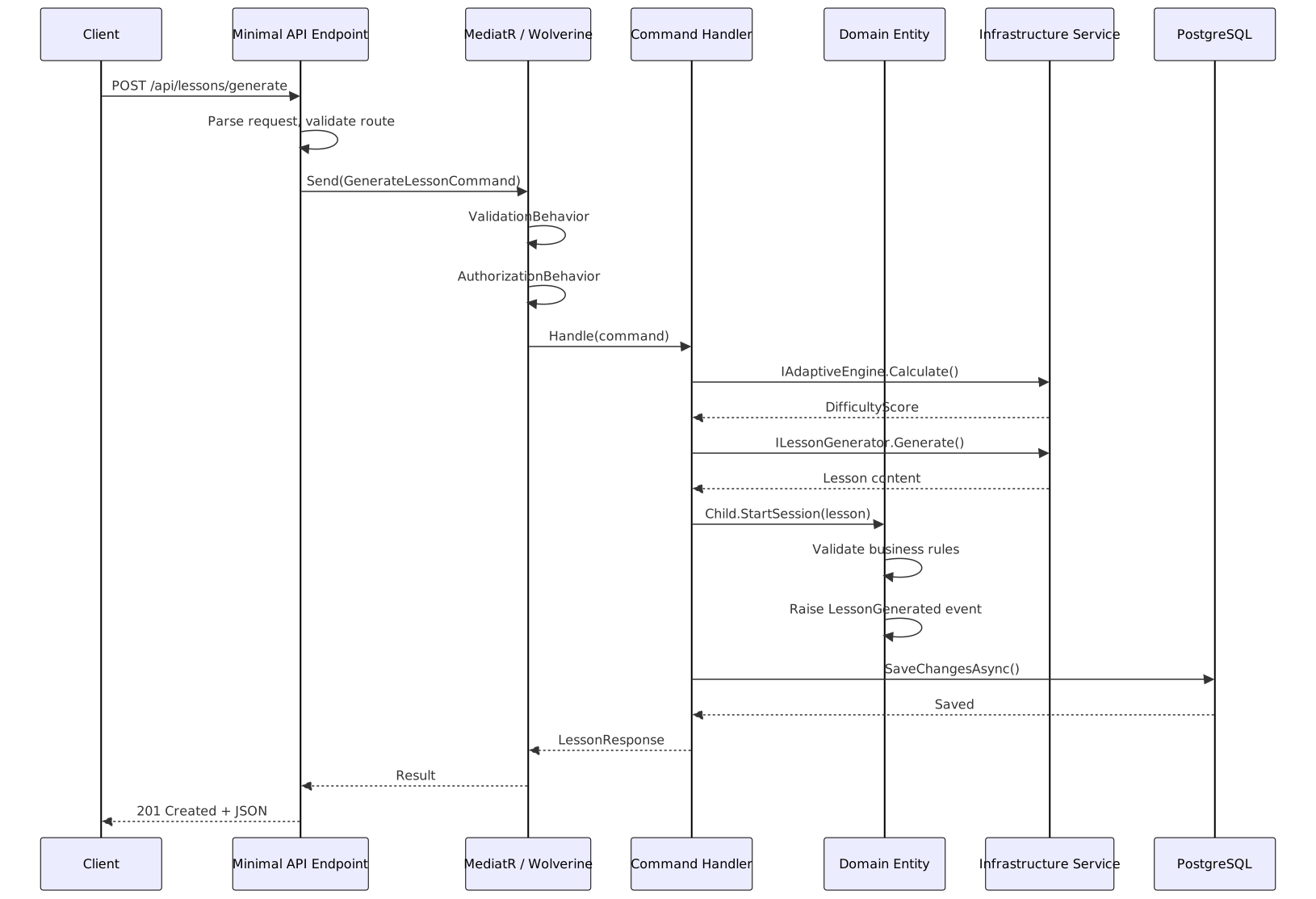
The Trade-Offs Nobody Talks About
I’ve shown you the “clean” version of all this code. Let me be honest about the trade-offs.
Abstraction overhead. IApplicationDbContext adds a layer of indirection over EF Core’s DbContext. In practice, this means you lose some EF Core features — like Include with complex filters — because they don’t express well through an interface. I’ve seen teams create an IApplicationDbContext that’s basically a clone of DbContext with 40 methods, which defeats the purpose. Keep the interface focused on what the Application layer actually needs.
The AI service coupling problem. GeminiLessonGenerator implements ILessonGenerator, which is clean. But the LessonContent class it returns has a shape that’s partly determined by what Gemini can generate. If we switch to a different AI provider that structures content differently, we’d need an adapter layer. I accepted this trade-off because content structure should be stable — it’s defined by our educational requirements, not by the AI provider.
JSON columns vs. normalized tables. Storing lesson content as JSONB means we can’t easily query “show me all questions about fractions across all lessons.” We’d need a separate analytics pipeline for that. For our primary use case (load a lesson, present it to a child, record answers), JSONB is perfect. For analytics, we’d denormalize into a reporting database. Know your access patterns before choosing.
Minimal APIs verbosity. Route Groups reduce boilerplate compared to controllers, but they’re still verbose for CRUD endpoints. For simple resources, you write a lot of MapGet, MapPost, MapPut that look nearly identical. Libraries like Carter or FastEndpoints can reduce this further, but they add another dependency. I use vanilla Minimal APIs because the team doesn’t need to learn another framework on top of ASP.NET Core.
What’s Next
We’ve built the outer layers — Infrastructure and Presentation — and wired everything together in Program.cs. We have a working API backed by PostgreSQL with pgvector, AI-powered lesson generation with Gemini, and clean separation of concerns enforced by project references.
In Part 5, we’re going to challenge some of what we just built. The Vertical Slices approach asks: “What if organizing by layer is the wrong axis?” Instead of grouping all entity configurations together, all handlers together, and all endpoints together, what if we grouped everything for a single feature together? We’ll explore a hybrid approach — Clean Architecture for the foundational structure, Vertical Slices for feature development — and I’ll show you how Kids Learn uses both patterns depending on the complexity of the feature.
It’s going to get controversial. See you there.