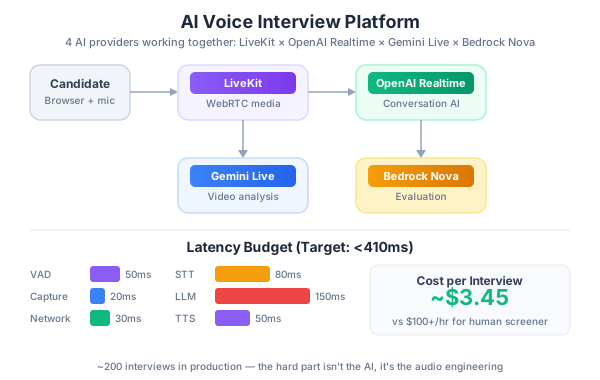
I recently built an AI-powered voice interview platform that uses four different AI providers working together. LiveKit for real-time media, OpenAI Realtime for conversation, Gemini Live for multimodal analysis, and Amazon Bedrock Nova for evaluation. After three months in production and ~200 interviews, here are the best practices I’ve learned — the stuff the docs don’t tell you.
Start With the Latency Budget
This is the single most important decision you’ll make. In a voice conversation, humans notice delays above 300ms. Above 500ms, it feels broken. Above 1 second, people start talking over the AI.
Here’s our latency budget:
Voice Activity Detection (VAD):  ~50ms
Audio capture + encoding:        ~20ms
Network (WebRTC):                ~30ms
Speech-to-Text:                  ~80ms
LLM inference:                   ~150ms
Text-to-Speech:                  ~50ms
Network + playback:              ~30ms
─────────────────────────────────────
Total target:                    ~410ms
Every architectural decision flows from this budget. It’s why we chose OpenAI Realtime over a traditional STT → LLM → TTS pipeline — the Realtime API collapses the middle three steps into one, saving 200-400ms.
Best practice: Define your latency budget before writing code. Measure each component independently. If you’re above budget, you know exactly where to cut.
LiveKit Is the Right Foundation
We evaluated building directly on WebRTC, using Twilio, and using LiveKit. LiveKit won for three reasons:
- The Agents SDK is genuinely good. It abstracts the WebRTC complexity while giving you access to raw audio frames when you need them.
- Room-based architecture maps naturally to interviews — one room per session, with the AI as a participant.
- Egress for recording. You get session recordings out of the box.
Setting Up the Agent
from livekit.agents import AutoSubscribe, JobContext, WorkerOptions, cli
from livekit.agents.voice_assistant import VoiceAssistant
from livekit.plugins import openai, silero

async def entrypoint(ctx: JobContext):
    await ctx.connect(auto_subscribe=AutoSubscribe.AUDIO_ONLY)

    vad = silero.VAD.load(
        min_speech_duration=0.1,
        min_silence_duration=0.4,   # This number matters a lot
        padding_duration=0.1,
        max_buffered_speech=30.0,
        activation_threshold=0.5,
    )

    assistant = VoiceAssistant(
        vad=vad,
        stt=openai.STT(model="whisper-1"),
        llm=openai.LLM.with_realtime(
            model="gpt-4o-realtime-preview",
            temperature=0.7,
            voice="alloy",
        ),
        tts=openai.TTS(model="tts-1", voice="alloy"),
    )

    assistant.start(ctx.room)

    await assistant.say(
        "Hi, I'm here to chat about your technical background. "
        "Let's start with a quick intro — tell me about yourself "
        "and what you've been working on lately.",
        allow_interruptions=True,
    )

if __name__ == "__main__":
    cli.run_app(WorkerOptions(entrypoint_fnc=entrypoint))
The VAD Problem Nobody Warns You About
Voice Activity Detection — determining when someone has stopped talking — is the hardest part of building voice AI. Get it wrong and you either:
- Cut people off mid-sentence (too aggressive)
- Wait awkwardly after they finish (too conservative)
The default settings in most frameworks are tuned for casual conversation. Interview speech is different — candidates pause to think, use filler words, and trail off when unsure.
Best practice: Set min_silence_duration to 400ms for interviews. The default 250ms cuts off candidates who pause to think. 400ms is the sweet spot — long enough to not interrupt, short enough to not feel sluggish.
Best practice: Use activation_threshold of 0.5, not the default 0.25. Interviews happen in quiet rooms, so you can afford a higher threshold. This reduces false activations from background noise and keyboard typing.
Best practice: Set max_buffered_speech to 30 seconds. Technical explanations can be long. The default 10-15 seconds will cut off candidates explaining complex architectures.
OpenAI Realtime: The Conversational Engine
The Realtime API is the closest thing we have to natural AI conversation. But there are patterns that work and patterns that don’t.
What Works: Function Calling for Interview Flow
Don’t try to manage interview flow through the system prompt alone. Use function calling to give the AI structured transitions:
interview_tools = [
    {
        "type": "function",
        "name": "transition_section",
        "description": "Move to the next interview section when ready",
        "parameters": {
            "type": "object",
            "properties": {
                "from_section": {"type": "string"},
                "to_section": {
                    "type": "string",
                    "enum": [
                        "introduction",
                        "technical_questions",
                        "system_design",
                        "behavioral",
                        "candidate_questions",
                        "wrap_up"
                    ]
                },
                "reason": {"type": "string"},
                "time_spent_seconds": {"type": "number"}
            },
            "required": ["from_section", "to_section", "reason"]
        }
    },
    {
        "type": "function",
        "name": "flag_followup",
        "description": "Flag a response that needs deeper probing",
        "parameters": {
            "type": "object",
            "properties": {
                "topic": {"type": "string"},
                "reason": {
                    "type": "string",
                    "enum": [
                        "vague_answer",
                        "interesting_depth",
                        "potential_red_flag",
                        "claimed_expertise"
                    ]
                }
            },
            "required": ["topic", "reason"]
        }
    }
]
This gives you structured data about the interview flow, which feeds into the evaluation later. It also prevents the AI from spending 20 minutes on introductions.
What Doesn’t Work: Long System Prompts
We started with a 2000-word system prompt describing every aspect of interview behavior. The model would lose track of instructions mid-conversation.
Best practice: Keep the system prompt under 500 words. Use function calling for structured behavior. Let the AI be conversational — that’s what it’s good at. Move the detailed rubric to the evaluation phase, not the conversation phase.
Handling Interruptions
Candidates will interrupt the AI. This is normal and healthy — it shows engagement. Configure allow_interruptions=True and design your prompts to handle it.
Best practice: After an interruption, the AI should acknowledge what the candidate said, not repeat what it was saying. Add “If interrupted, prioritize the candidate’s input over completing your current statement” to your system prompt.
Gemini Live for Multimodal Analysis
This is where things get interesting. While OpenAI handles the conversation, we run a parallel Gemini Live session that processes the video feed.
import google.genai as genai
from google.genai import types

client = genai.Client(api_key=GEMINI_API_KEY)

async def run_multimodal_analysis(video_stream, analysis_queue):
    config = types.LiveConnectConfig(
        response_modalities=["TEXT"],
        system_instruction=(
            "You are analyzing a job interview video feed. Report on:\n"
            "1. Candidate engagement level (eye contact, posture)\n"
            "2. Whether they appear to be reading from notes\n"
            "3. Screen content analysis if screen sharing is active\n"
            "4. Code quality assessment if coding is visible\n"
            "Report only significant observations, not every frame."
        ),
    )

    async with client.aio.live.connect(
        model="gemini-2.0-flash-exp", config=config
    ) as session:
        async for frame in video_stream:
            await session.send(
                types.LiveClientContent(
                    turns=[types.Content(
                        parts=[types.Part(inline_data=types.Blob(
                            mime_type="image/jpeg",
                            data=frame
                        ))]
                    )]
                )
            )

            response = await session.receive()
            if response.text:
                await analysis_queue.put({
                    "timestamp": time.time(),
                    "observation": response.text
                })
What Gemini Live Is Good At Here
- Detecting if candidates read from notes. Surprisingly accurate — consistent downward gaze + scrolling motion = reading.
- Code review during live coding. When candidates share their screen, Gemini assesses code quality, identifies bugs, and notes patterns in real-time.
- Engagement tracking. Not for penalizing nervous candidates, but for identifying when someone is confused so the AI interviewer can adapt.
What It’s Not Good At
- Real-time emotional analysis. Too noisy, too many false positives. We tried and removed it.
- Continuous frame analysis. Sending every frame is expensive and unnecessary. Sample at 1 frame per 2 seconds for engagement, 1 per second during coding.
Best practice: Use Gemini Live as a supplementary signal, not a primary one. The voice conversation is what matters. Multimodal analysis adds context but should never override what the candidate actually said.
Bedrock Nova for Evaluation
After the interview ends, we send the full transcript plus Gemini’s observations to Amazon Bedrock Nova Pro for structured evaluation.
import boto3
import json

bedrock = boto3.client("bedrock-runtime", region_name="us-east-1")

def evaluate_interview(transcript: str, observations: list, role: str) -> dict:
    evaluation_prompt = f"""Evaluate this interview for a {role} position.

## Transcript
{transcript}

## Multimodal Observations
{json.dumps(observations, indent=2)}

## Scoring Rubric
Rate each dimension 1-5 with specific evidence from the transcript:

1. **Technical Depth** (1-5): Genuine understanding, not surface knowledge?
2. **Problem Solving** (1-5): Approach to unfamiliar problems? Clarifying questions?
3. **Communication** (1-5): Explains complex ideas clearly? Structured thoughts?
4. **Experience Authenticity** (1-5): Specific details suggesting real experience?
5. **Culture Fit Signals** (1-5): Collaboration, learning orientation, disagreements.

Return JSON with scores, evidence, overall_recommendation
(strong_yes/yes/maybe/no/strong_no), and summary."""

    response = bedrock.invoke_model(
        modelId="amazon.nova-pro-v1:0",
        body=json.dumps({
            "messages": [{"role": "user", "content": evaluation_prompt}],
            "inferenceConfig": {
                "maxTokens": 3000,
                "temperature": 0.3,
                "topP": 0.9
            }
        }),
    )

    return json.loads(response["body"].read())
Why Bedrock and Not the Others?
Honest answer: compliance. Our HR team required data residency guarantees, audit logs, and SOC 2 compliance. Bedrock’s IAM integration and VPC endpoints checked those boxes. Nova Pro’s quality is comparable to other models for structured evaluation tasks.
Calibrating Evaluation Consistency
This was our biggest challenge. Same transcript, different scores between runs.
Best practice: Use temperature 0.3 for evaluations. Higher temperatures add unnecessary variance.
Best practice: Include 2-3 calibration examples in your prompt — scored transcripts representing a clear 2, a clear 3, and a clear 5. This anchors the model’s scoring.
Best practice: Run evaluation twice and average the scores. If any dimension differs by more than 1 point between runs, flag for human review. Costs 2x but virtually eliminates scoring outliers.
Provider Failover: The Pattern That Saved Us
OpenAI Realtime goes down, or more commonly, has latency spikes that make conversation impossible. You need a failover strategy.
import time
from collections import deque

class ProviderCircuitBreaker:
    def __init__(self, failure_threshold=3, recovery_timeout=60):
        self.failure_threshold = failure_threshold
        self.recovery_timeout = recovery_timeout
        self.failures = 0
        self.last_failure_time = 0
        self.state = "closed"  # closed = healthy, open = failing
        self.latency_window = deque(maxlen=20)

    def record_latency(self, latency_ms: float):
        self.latency_window.append(latency_ms)

        if len(self.latency_window) >= 10:
            sorted_latencies = sorted(self.latency_window)
            p95 = sorted_latencies[int(len(sorted_latencies) * 0.95)]
            if p95 > 800:
                self.failures += 1
                self.last_failure_time = time.time()

        if self.failures >= self.failure_threshold:
            self.state = "open"

    def should_failover(self) -> bool:
        if self.state == "closed":
            return False

        if time.time() - self.last_failure_time > self.recovery_timeout:
            self.state = "half-open"
            self.failures = 0
            return False

        return True
Best practice: Don’t fail over on a single slow response. Use a sliding window of the last 20 responses and trigger failover when p95 exceeds your latency budget. This prevents flapping.
Best practice: When failing over from OpenAI Realtime to Gemini Live voice, don’t try to transfer conversation state. Start a fresh context with a summary: “We were discussing [topic]. The candidate was explaining [last point].” This is good enough and far simpler than serializing conversation state.
The Frontend: Keep It Simple
We use LiveKit’s React Components SDK. Don’t build a custom WebRTC implementation — it’s not worth it.
import {
  LiveKitRoom,
  AudioTrack,
  useVoiceAssistant,
  BarVisualizer,
} from "@livekit/components-react";

function InterviewRoom({ token, serverUrl }) {
  return (
    <LiveKitRoom token={token} serverUrl={serverUrl} connect={true}>
      <InterviewUI />
    </LiveKitRoom>
  );
}

function InterviewUI() {
  const { state, audioTrack } = useVoiceAssistant();

  return (
    <div className="interview-container">
      <div className="status">
        {state === "listening" && "Listening..."}
        {state === "thinking" && "Processing..."}
        {state === "speaking" && "Speaking..."}
      </div>

      {audioTrack && (
        <BarVisualizer trackRef={audioTrack} barCount={5} />
      )}
    </div>
  );
}
Best practice: Show the AI’s state (listening/thinking/speaking) visually. Candidates need to know when the AI is processing. A simple status indicator reduces the “is it frozen?” feeling.
Best practice: Add a visible timer. Candidates want to know how much time they have. It also helps the AI pace the interview through the transition_section function.
Testing Voice AI Is Hard
You can’t unit test a voice conversation in the traditional sense. Here’s our approach:
-
Transcript-based regression tests. 30 recorded interviews (with consent). Replay candidate audio and verify AI responses meet quality criteria.
-
Latency monitoring. Every production interview logs per-turn latency. Alert if p95 exceeds 500ms over a 1-hour window.
-
Evaluation consistency tests. Run 10 transcripts through Bedrock evaluation 5 times each. If any dimension has standard deviation > 0.5, investigate.
-
A/B testing. Randomly assign interviews to different VAD settings, system prompts, and model configs. Compare evaluation quality and candidate satisfaction.
Cost Breakdown
Real numbers from ~200 interviews:
| Component | Cost per Interview |
|---|---|
| LiveKit Cloud (media) | ~$0.15 |
| OpenAI Realtime (30 min) | ~$2.50 |
| Gemini Live (video analysis) | ~$0.40 |
| Bedrock Nova (evaluation, 2x) | ~$0.30 |
| LiveKit Egress (recording) | ~$0.10 |
| Total | ~$3.45 |
Compare that to an engineering manager spending 45 minutes on a phone screen at $100+/hour. The economics work.
What I’d Do Differently
-
Ship with one provider first. We tried to integrate all four from day one. Should have shipped with just LiveKit + OpenAI Realtime, validated the concept, then added Gemini and Bedrock.
-
Record everything from day one. We added recording in week 3 and lost early interview data useful for evaluation calibration.
-
Build the rubric first. The scoring criteria should drive the interview questions, not the other way around. We iterated on the rubric six times because we started with conversation design.
-
Don’t over-engineer failover initially. Our circuit breaker is solid, but we built it before we had enough data to know it was needed. OpenAI Realtime reliability improved significantly over the 3 months.
The Bottom Line
Building voice AI is fundamentally different from building text AI. Latency matters more than quality after a baseline — a slightly worse response in 200ms beats a perfect response in 2 seconds. VAD is harder than it looks. And multi-provider architectures work, but add complexity you should take on incrementally.
The technology is ready for production. The hard part isn’t the AI — it’s the audio engineering.