The Solution Architect is responsible for ensuring the system being built is fit for purpose — not just today, but for the next three to five years under conditions that are partly unknown. This requires systems thinking, technical depth, business awareness, and the accumulated judgment that comes from having seen things go wrong. AI cannot replicate this judgment. But AI can dramatically accelerate the groundwork that allows the SA to exercise it at higher quality.
What the SA Role Looks Like Today (Without AI)
A typical SA engagement on a medium-complexity project involves:
- 3–5 days of requirements review, stakeholder interviews, and current-state analysis
- 2–3 days of architecture options development (typically 2–3 options with trade-offs)
- 1–2 days of Architecture Decision Record (ADR) writing
- Ongoing diagram maintenance, technical guidance to the dev team, and governance
The bottlenecks are generally:
- Options development: Researching and comparing multiple architecture patterns is time-consuming
- ADR writing: Writing clear, well-structured ADRs with full trade-off analysis is laborious
- Diagram currency: Architecture diagrams become stale within weeks if not actively maintained
Where AI Changes the SA Game
1. Requirements-to-Architecture Context Loading
Before any architecture work begins, Claude is given the full context: product brief, existing system documentation, non-functional requirements, team skill profile, and budget constraints. This context load is the key to getting useful outputs.
Prompt example:
You are assisting a Solution Architect on [Project Name].
Context: [/ai/context.md]
Non-functional requirements:
- Performance: [SLA targets]
- Scale: [user numbers, data volumes]
- Security: [compliance requirements]
- Budget: [annual infra budget]
- Team: [team size and primary skill set]

Existing systems: [list of legacy systems and integrations]

Task: Analyse these requirements and generate:
1. The top 3 architectural constraints that will most influence design decisions
2. The top 3 architectural patterns that warrant consideration for this context
3. A list of the 5 most important unknown risks that need investigation before committing to an approach
2. Architecture Options Generation
AI can generate initial architecture options documents — multiple options with trade-off comparisons across dimensions like cost, complexity, scalability, team fit, and technology maturity.
These are always starting points, not final designs. The SA uses AI outputs to accelerate the “first draft” of options from 2 days to 3–4 hours.
Prompt example:
For [system], generate 3 architecture options:
Option A: [describe high-level constraint, e.g. "monolith-first, lowest complexity"]
Option B: [e.g. "event-driven microservices"]
Option C: [e.g. "modular monolith, service-oriented boundary"]

For each option provide:
- High-level component list
- Data flow narrative (3–5 sentences)
- Trade-off table: cost, complexity, scalability, team skill fit, maintainability (1–5 scale)
- Key risks and mitigations
- When this option is the right choice (context conditions)
3. ADR Generation
Architecture Decision Records document the decisions made, the options considered, and the reasoning. Writing these thoroughly takes significant time. AI can draft the full ADR structure from a brief description of the decision.
ADR template prompt:
Write an Architecture Decision Record for this decision:
Decision: [brief description]
Context: [product context from /ai/context.md]
Options considered: [list]
Decision made: [what was chosen]
Constraints that drove the decision: [list]

Format:
# [ADR number]: [Decision title]
## Status: [Proposed/Accepted/Deprecated]
## Context
## Decision
## Consequences
## Alternatives Considered (with reasoning for rejection)
A complete ADR that would take 2–3 hours to write takes 20–30 minutes to review and refine from an AI draft.
4. Technology Selection Rationale
SA teams frequently need to justify technology choices to non-technical stakeholders. AI can draft comparison documents and briefing papers that synthesise research into decision-ready summaries.
Prompt example:
Compare [Technology A] vs [Technology B] vs [Technology C] for this use case:
[describe use case, team context, constraints]

Evaluate on:
- Licence cost (annual, at our scale)
- Community maturity and long-term support outlook
- Learning curve for a .NET-focused team
- Integration with [existing stack]
- Vendor lock-in risk
- Performance characteristics for our workload

End with a clear recommendation and the conditions under which the alternative would be better.
The Human-Irreplaceable SA Work
Architectural taste: The ability to know that a technically correct architecture is wrong for this team, this organisation, this product, at this moment — is not something AI can develop. It comes from pattern recognition built over years of seeing architectures succeed and fail in real conditions.
Stakeholder navigation: Architecture decisions are often political. The SA must understand which stakeholders need to be consulted, which have veto power, and how to frame decisions in language each stakeholder finds compelling. This requires organisational intelligence AI does not have.
Risk intuition: An experienced SA looks at a proposed architecture and knows — not from documentation but from experience — which parts will be the first to fail in production. AI can list known risk categories; it cannot replicate this intuition.
Responsibility: The SA is accountable if the architecture fails. That accountability — and the judgment that comes with it — is irreducibly human.
The AI SA’s Design Canvas
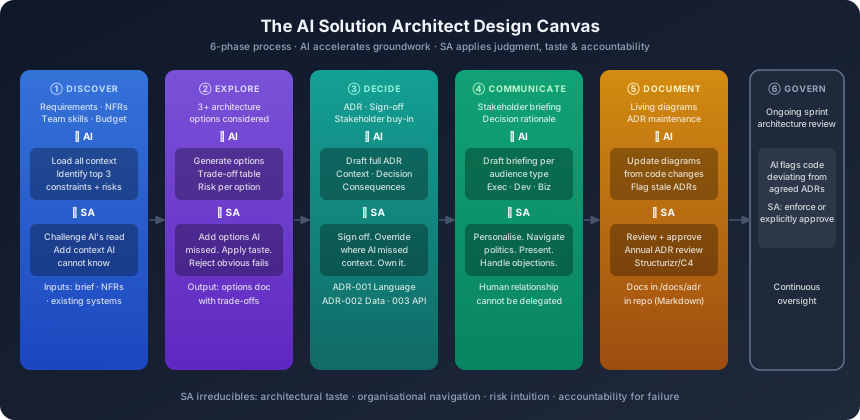
The SA’s working model for AI-augmented system design follows a structured canvas:
| Phase | Inputs | AI Role | SA Role |
|---|---|---|---|
| Discover | Requirements, NFRs, constraints | Load context, identify key constraints | Challenge AI’s constraint interpretation |
| Explore | Options brief | Generate initial options with trade-offs | Add options AI missed, apply judgment |
| Decide | Options document | Draft ADR, flag risks | Sign off, override where AI missed context |
| Communicate | Decision | Generate stakeholder briefing | Personalise for audience, present |
| Document | Approved ADR | Keep diagrams current from code | Review and approve documentation |
| Govern | Sprint architecture | Flag deviation from agreed decisions | Enforce or explicitly approve deviations |
ADR Best Practices for AI-Augmented Teams
Every ADR written in an AI-augmented team should include:
- AI Assistance Disclosure: Note if the ADR was AI-drafted (for accountability)
- SA Judgement Statement: A paragraph explaining what the SA specifically added or changed from the AI draft, and why
- Review Record: Who reviewed the ADR and any significant challenges or objections raised
- Review Date: ADRs should be reviewed annually or when major context changes occur
The three ADRs every team should write at project start:
- ADR-001: Language, Framework, and Runtime selection
- ADR-002: Data persistence strategy (database technology and access patterns)
- ADR-003: Integration and API design approach (REST vs GraphQL vs event bus)
Tools for the AI SA
| Tool | Purpose |
|---|---|
| Claude (with full context) | Options generation, ADR drafting, trade-off analysis |
| draw.io / Eraser.io | Architecture diagram creation (AI-assisted draft, SA refines) |
| Architecture Decision Records | /docs/adr/ folder in repo, Markdown format |
| Structurizr | Code-as-diagrams, C4 model, auto-updated from code |
| GitHub Copilot Chat | Quick tech stack research, code-level architecture questions |
Previous: Part 3 — The AI Product Owner & PM ←
Next: Part 5 — The AI Tech Lead →
This is Part 4 of the AI-Powered Software Teams series.