Software architecture used to be a craft driven by experience, intuition, and long whiteboard sessions. The best architects read the problem domain deeply and made high-stakes bets on structure that would survive years of growth.
That craft is not disappearing. But the tools available to it are changing faster than at any point in computing history.
In 2026, AI is not a feature you add to your architecture. It is a lens through which you make every architectural decision — from service boundaries to deployment topology to how you think about state. This post covers what that shift looks like in practice, with enough concrete detail that your team can start implementing it next sprint.
What “AI-Driven Architecture” Actually Means
The phrase is overloaded. Let me split it into two distinct concepts:
1. Architecture augmented by AI — you use AI tools to make better architectural decisions faster. Think: AI-powered performance prediction, automated code review for architectural adherence, pattern recommendation engines.
2. Architecture designed for AI workloads — your system is built to orchestrate LLMs, agents, and ML pipelines. The architecture itself treats models as first-class services.
Most teams in 2026 need both. The first improves how you design. The second defines what you design. This guide covers both.
Part 1 — The Five AI Technologies Reshaping Architecture
Before looking at patterns, you need to know what each technology does to your design constraints.
1. Machine Learning: Predictive Infrastructure
ML models can now predict system performance before you deploy. This changes the feedback loop from weeks-long production observation to hours-long offline simulation.
Practical impact on architecture:
- Resource allocation becomes prediction-driven, not reactive-autoscaling-driven
- Capacity planning moves from spreadsheet estimates to model forecasts
- Anomaly detection replaces threshold-based alerting
graph TD
    T[Traffic Model] --> |predicts load| R[Resource Planner]
    L[Latency Model] --> |forecasts p99| R
    C[Cost Model] --> |optimizes spend| R
    R --> |provisions ahead| K[Kubernetes / Cloud]
    K --> |actual metrics| D[Data Collector]
    D --> |retrains| T
    D --> |retrains| L
    D --> |retrains| C
2. Natural Language Processing: Requirements to Architecture
NLP models now parse product requirements documents and extract architectural constraints automatically — surfacing implicit non-functional requirements that engineers often miss.
Example: A requirements doc says “the checkout flow must work even during peak flash sales.” An NLP pipeline extracts: high availability requirement, bursty traffic pattern, transaction consistency constraint, queue-based decoupling recommendation.
3. Reinforcement Learning: Self-Tuning Systems
RL agents can dynamically adjust system configuration (thread pool sizes, cache TTLs, circuit breaker thresholds) based on real-time reward signals (latency, error rate, cost). This is already production-deployed at Netflix, Uber, and LinkedIn.
4. Genetic Algorithms: Exploring Architecture Space
When you have dozens of architectural variables (service granularity, communication protocols, data placement), genetic algorithms can explore far more combinations than human architects can evaluate manually — finding non-obvious optimal trade-offs.
5. Code Analysis AI: Continuous Architecture Validation
Static analysis models trained on millions of codebases now detect architectural drift — when code diverges from the intended design. This closes the gap between “architecture on the whiteboard” and “architecture in production.”
Part 2 — The Four Core Architecture Patterns
These are the patterns your team should understand and be able to implement.
Pattern 1: The AI Gateway
The AI Gateway is the single most important infrastructure pattern for teams building AI-powered products.
The problem it solves: Without a gateway, every service that needs AI calls the model API directly. You end up with prompt templates scattered across codebases, no centralized logging, no cost visibility, no way to swap providers, and no safety filters.
What the AI Gateway does:
- Centralizes all model calls behind a single internal service
- Manages prompt templates and versions
- Applies safety filters and content policies
- Logs every request and response for debugging and compliance
- Routes to different models (GPT-4o, Claude, Gemini) based on task type and cost
- Implements fallback logic when primary models fail
graph LR
    S1[Search Service] --> RL
    S2[Support Bot] --> RL
    S3[Code Reviewer] --> RL
    S4[Report Generator] --> RL

    subgraph GW[AI Gateway]
        RL[Rate Limiter] --> PM[Prompt Manager]
        PM --> SF[Safety Filter]
        SF --> CACHE[Semantic Cache]
        CACHE --> |cache miss| RT[Router]
        RT --> LOG[Audit Logger]
    end

    LOG --> M1[Claude 3.7]
    LOG --> M2[GPT-4o mini]
    LOG --> M3[Gemini 2.0]
    LOG --> M4[Llama 3]
Implementation skeleton (Node.js / TypeScript):
// ai-gateway/src/gateway.ts

interface GatewayRequest {
  promptId: string;        // references a versioned template
  variables: Record<string, string>;
  taskType: 'reasoning' | 'summarization' | 'code' | 'chat';
  maxCostCents?: number;   // budget constraint per call
}

interface GatewayResponse {
  content: string;
  model: string;
  latencyMs: number;
  costCents: number;
  cached: boolean;
}

class AIGateway {
  async complete(req: GatewayRequest): Promise<GatewayResponse> {
    // 1. Rate check
    await this.rateLimiter.check(req);

    // 2. Load versioned prompt template
    const prompt = await this.promptManager.render(req.promptId, req.variables);

    // 3. Safety filter (PII detection, policy check)
    await this.safetyFilter.validate(prompt);

    // 4. Semantic cache check (avoid duplicate calls)
    const cached = await this.cache.get(prompt);
    if (cached) return { ...cached, cached: true };

    // 5. Route to best model for task type + budget
    const model = this.router.select(req.taskType, req.maxCostCents);

    // 6. Call model
    const result = await model.complete(prompt);

    // 7. Log for audit / cost tracking
    await this.logger.log({ req, result, model: model.name });

    // 8. Cache and return
    await this.cache.set(prompt, result);
    return { ...result, cached: false };
  }
}
Key design decisions:
- The gateway is a service, not a library — it runs in its own container and owns its own DB for prompt versions and audit logs
- Semantic caching uses embedding similarity, not exact match — saves 30–40% on repeated or similar queries
- The router has a cost budget parameter so expensive models are used only when needed
Pattern 2: LLM as Orchestrator
In this pattern, the LLM is not the entire application. It is the brain — the component that understands intent, breaks work into steps, and calls downstream services.
When to use it: Any feature requiring multi-step reasoning across multiple data sources or services. Examples: complex customer support, code review, report generation, data pipeline orchestration.
sequenceDiagram
    actor User
    participant Orch as LLM Orchestrator
    participant DB as Database Service
    participant API as External API
    participant Summ as Summarizer

    User->>Orch: Analyze Q1 sales vs competitor pricing
    Orch->>DB: fetch_sales(quarter=Q1)
    DB-->>Orch: sales_data
    Orch->>API: fetch_competitor_pricing()
    API-->>Orch: competitor_data
    Orch->>Orch: compare and reason over data
    Orch->>Summ: summarize(analysis)
    Summ-->>Orch: summary_text
    Orch-->>User: executive summary with insights
Implementation with tool-calling:
// orchestrator/src/agent.ts
import Anthropic from "@anthropic-ai/sdk";

const client = new Anthropic();

const tools: Anthropic.Tool[] = [
  {
    name: "fetch_sales_data",
    description: "Fetch sales data from the internal database for a given quarter",
    input_schema: {
      type: "object",
      properties: {
        quarter: { type: "string", enum: ["Q1", "Q2", "Q3", "Q4"] },
        year: { type: "number" },
      },
      required: ["quarter", "year"],
    },
  },
  {
    name: "fetch_competitor_pricing",
    description: "Fetch competitor pricing from external market data API",
    input_schema: {
      type: "object",
      properties: {
        category: { type: "string" },
      },
      required: ["category"],
    },
  },
];

async function runOrchestrator(userRequest: string): Promise<string> {
  const messages: Anthropic.MessageParam[] = [
    { role: "user", content: userRequest },
  ];

  // Agentic loop — runs until model stops calling tools
  while (true) {
    const response = await client.messages.create({
      model: "claude-3-7-sonnet-20250219",
      max_tokens: 4096,
      tools,
      messages,
    });

    if (response.stop_reason === "end_turn") {
      const textBlock = response.content.find((b) => b.type === "text");
      return textBlock?.text ?? "";
    }

    if (response.stop_reason === "tool_use") {
      const toolResults: Anthropic.ToolResultBlockParam[] = [];

      for (const block of response.content) {
        if (block.type !== "tool_use") continue;

        let result: unknown;
        if (block.name === "fetch_sales_data") {
          result = await salesService.fetch(block.input as SalesQuery);
        } else if (block.name === "fetch_competitor_pricing") {
          result = await pricingService.fetch(block.input as PricingQuery);
        } else {
          result = { error: `Unknown tool: ${block.name}` };
        }

        toolResults.push({
          type: "tool_result",
          tool_use_id: block.id,
          content: JSON.stringify(result),
        });
      }

      messages.push({ role: "assistant", content: response.content });
      messages.push({ role: "user", content: toolResults });
    }
  }
}
Architectural guardrails:
- Set a max_iterations limit (e.g., 10) to prevent infinite loops
- All tool calls should be idempotent or wrapped in transactions — the orchestrator may retry
- Log every tool call and result to an observability store (not just the final output)
- Add a timeout at the orchestrator level — not just the model API call
Pattern 3: Event-Driven Agentic AI
This is the pattern that makes AI agents truly scalable: agents don’t block on HTTP calls — they react to events on a queue.
The model: When something significant happens in your system (order placed, document uploaded, user churned), an event is published to a message bus. AI agents subscribe to relevant events and act autonomously — no synchronous coupling, no single point of orchestration failure.
graph LR
    subgraph Sources[Event Sources]
        E1[Order Cancelled]
        E2[Document Uploaded]
        E3[Support Ticket]
        E4[Deploy Failed]
    end

    subgraph Bus[Message Bus]
        B1[orders-topic]
        B2[docs-topic]
        B3[support-topic]
        B4[ops-topic]
    end

    subgraph Agents[AI Agents]
        A1[Churn Agent]
        A2[Classifier Agent]
        A3[Triage Agent]
        A4[RCA Agent]
    end

    E1 --> B1 --> A1
    E2 --> B2 --> A2
    E3 --> B3 --> A3
    E4 --> B4 --> A4
Concrete example — Order Cancellation Agent:
// agents/order-cancellation-agent/src/handler.ts

interface OrderCancelledEvent {
  orderId: string;
  userId: string;
  cancelledAt: string;
  sessionEvents: UserSessionEvent[];
}

async function handleOrderCancelled(event: OrderCancelledEvent): Promise<void> {
  // 1. Build context for the LLM
  const sessionSummary = event.sessionEvents
    .slice(-20)
    .map((e) => `${e.type}: ${e.element ?? e.page}`)
    .join("\n");

  // 2. Ask LLM to infer the cancellation reason
  const response = await aiGateway.complete({
    promptId: "order-cancellation-analysis-v3",
    variables: {
      session_events: sessionSummary,
      order_id: event.orderId,
    },
    taskType: "reasoning",
  });

  const analysis = JSON.parse(response.content) as CancellationAnalysis;

  // 3. Act based on inferred reason
  if (analysis.reason === "price_shock" && analysis.confidence > 0.8) {
    await crmService.addNote(event.userId, `AI: likely price-shock cancellation`);
    await emailService.schedule({
      userId: event.userId,
      templateId: "winback-discount-offer",
      delayHours: 2,
    });
  } else if (analysis.reason === "ux_confusion" && analysis.confidence > 0.7) {
    await feedbackService.flag(event.orderId, "checkout_ux_issue");
  }

  // 4. Always log for model improvement
  await trainingDataStore.append({
    eventId: event.orderId,
    input: sessionSummary,
    prediction: analysis,
    label: null,
  });
}
Why this pattern scales:
- Agents are stateless — you can run 50 instances of the same agent with zero coordination
- The message bus provides backpressure — spikes in events don’t overwhelm agents
- Adding a new agent for a new event type requires zero changes to existing services
- Failed agent runs can be retried from the queue dead-letter topic
Pattern 4: Context Window as an Architecture Concern
This is the pattern most teams skip — and then regret.
Every LLM has a finite context window. How you spend those tokens is an architectural decision, not just a prompt engineering detail.
graph LR
    IN[User Request] --> CTX[Context Builder]

    SYS[System Instructions 2k] --> CTX
    HIST[Chat History 20k] --> CTX
    RAG[Retrieved Docs 60k] --> CTX

    CTX --> |128k total budget| LLM[LLM]
    LLM --> OUT[Response 36k reserved]
Context pipeline implementation:
// context-pipeline/src/builder.ts

interface ContextBudget {
  systemInstructions: number;
  conversationHistory: number;
  retrievedContext: number;
  userInput: number;
  outputReserve: number;
}

const DEFAULT_BUDGET: ContextBudget = {
  systemInstructions: 2_000,
  conversationHistory: 20_000,
  retrievedContext: 60_000,
  userInput: 10_000,
  outputReserve: 36_000,
};

class ContextBuilder {
  private tokenizer = new Tokenizer();

  async build(params: {
    systemPrompt: string;
    history: Message[];
    ragResults: Document[];
    userMessage: string;
    budget?: Partial<ContextBudget>;
  }): Promise<BuiltContext> {
    const budget = { ...DEFAULT_BUDGET, ...params.budget };

    // System instructions — hard limit
    const system = this.truncate(params.systemPrompt, budget.systemInstructions);

    // History — compress oldest turns first
    const history = await this.compressHistory(
      params.history,
      budget.conversationHistory,
    );

    // RAG — rank by relevance, fill remaining budget
    const context = await this.selectContext(
      params.ragResults,
      budget.retrievedContext,
    );

    return { system, history, context, userMessage: params.userMessage };
  }

  private async compressHistory(
    messages: Message[],
    tokenBudget: number,
  ): Promise<Message[]> {
    const recent = messages.slice(-10);
    const older = messages.slice(0, -10);

    if (older.length === 0) return recent;

    const olderTokens = this.tokenizer.count(JSON.stringify(older));
    if (olderTokens <= tokenBudget * 0.3) return [...older, ...recent];

    // Summarize older portion with a cheap model
    const summary = await aiGateway.complete({
      promptId: "conversation-summary-v1",
      variables: { messages: JSON.stringify(older) },
      taskType: "summarization",
      maxCostCents: 1,
    });

    return [
      { role: "system", content: `[Earlier conversation]: ${summary.content}` },
      ...recent,
    ];
  }
}
Part 3 — Full System Architecture
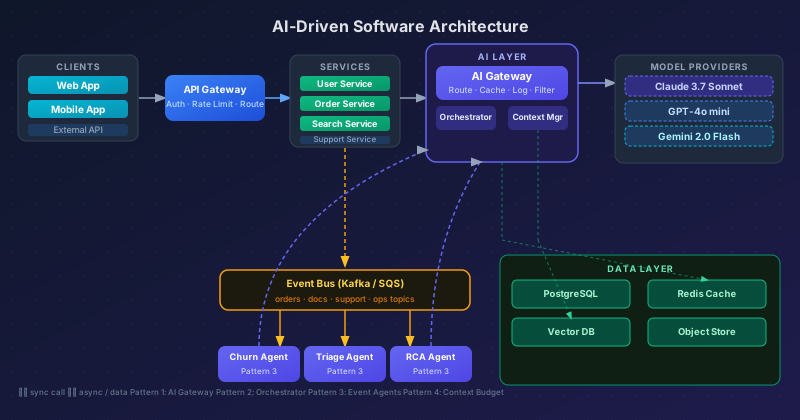
Here is how all four patterns combine in a production system:
graph TB
    WEB[Web App] --> APIGW[API Gateway]
    MOB[Mobile App] --> APIGW
    EXT[External API] --> APIGW

    APIGW --> SVC1[User Service]
    APIGW --> SVC2[Order Service]
    APIGW --> SVC3[Search Service]
    APIGW --> SVC4[Support Service]

    SVC3 --> ORCH[LLM Orchestrator]
    SVC4 --> ORCH
    ORCH --> CTX[Context Builder]
    CTX --> AIGW[AI Gateway]
    AIGW --> MODELS[Claude / GPT-4o / Gemini]

    SVC1 --> BUS[Event Bus]
    SVC2 --> BUS
    BUS --> AG1[Churn Agent]
    BUS --> AG2[Triage Agent]
    BUS --> AG3[RCA Agent]
    AG1 --> AIGW
    AG2 --> AIGW
    AG3 --> AIGW

    SVC1 --> PG[(PostgreSQL)]
    CTX --> VDB[(Vector DB)]
    AIGW --> CACHE[(Redis Cache)]
Part 4 — Team Implementation Roadmap
Here is a phased plan your team can execute sprint-by-sprint. Each phase has clear deliverables, not just directions.
Phase 1 — Foundation (Sprint 1–2)
Goal: Every AI call in your system goes through the gateway.
| Task | Owner | Done When |
|---|---|---|
| Stand up AI Gateway service | Backend | Gateway running, healthcheck passing |
| Move all existing AI calls behind gateway | Backend | Zero direct model API calls in other services |
| Add prompt versioning to gateway | Backend | Prompts stored in DB, not hardcoded |
| Add cost tracking dashboard | Platform | Daily cost by service visible |
| Add audit log | Security | Every AI call logged with input hash + output |
Definition of done: You can deploy a new prompt version without redeploying any consumer service.
Phase 2 — Observability (Sprint 3–4)
Goal: You can answer “why did the model do that?” for any production request.
| Task | Owner | Done When |
|---|---|---|
| Add request tracing through gateway | Platform | Every request has a trace ID visible in logs |
| Add response quality metrics | ML | Latency p50/p95/p99 and token usage tracked |
| Add semantic cache | Backend | Cache hit rate > 20% for common queries |
| Set up model fallback | Backend | Primary model failure triggers fallback automatically |
| Add alert: model error rate > 1% | Platform | Alert fires in staging test |
Phase 3 — Async Agents (Sprint 5–6)
Goal: At least one business process runs as an event-driven AI agent.
| Task | Owner | Done When |
|---|---|---|
| Identify top 3 event-driven candidate processes | Architect | Documented with event source and action |
| Implement first agent (support triage) | Backend + ML | Agent deployed, handling real events |
| Add dead-letter queue + retry logic | Backend | Failed agent runs auto-retry, then alert |
| Add human review loop for low-confidence decisions | Product | Decisions below 70% confidence queued for human |
| Load test agent at 10x normal volume | QA | Agent handles load without cascading failure |
Phase 4 — Feedback Loops (Sprint 7–8)
Goal: The models get better because of your production data.
| Task | Owner | Done When |
|---|---|---|
| Add outcome tracking to every AI decision | Backend | Order placed after AI recommendation = logged win |
| Build human label UI for low-confidence cases | Frontend | Labellers can review 50 cases/day |
| Set up weekly model evaluation pipeline | ML | Accuracy trend chart updates every Monday |
| Fine-tune first model on labelled data | ML | Fine-tuned model outperforms base in eval |
| A/B test new model against production | ML | Rollout gated on p-value < 0.05 |
Part 5 — Challenges and How to Handle Them
Data Quality
AI models are only as good as the data they learn from. Poor quality training data produces confident wrong answers — which are worse than uncertain correct answers.
Mitigation: Treat training data as a first-class engineering artifact with schema validation, versioning, and lineage tracking. Start with a small, high-quality labeled dataset rather than a large noisy one.
Model Interpretability
When a model makes a decision, you often cannot explain why. This is a regulatory risk in finance and healthcare, and a debugging nightmare everywhere.
Mitigation: Always log the input and output of every model call. For high-stakes decisions, use a “reasoning-first” prompt structure: force the model to explain before concluding.
Algorithmic Bias
Models trained on historical data perpetuate historical biases. In hiring, lending, or content moderation, this is not just a performance issue — it is a legal one.
Mitigation: Audit model outputs across demographic segments before production deployment. Add explicit fairness metrics to your evaluation pipeline.
Skill Gaps
Most engineering teams know how to build CRUD apps. Very few know how to debug a hallucinating LLM or tune a vector search index.
Mitigation: Dedicate one engineer as “AI Platform Lead.” Build internal runbooks for the most common failure modes (model timeout, context overflow, embedding drift).
Closing Thoughts
The future of software architecture is not AI replacing architects. It is architects who understand AI building systems that learn, adapt, and improve continuously.
The patterns in this guide — AI Gateway, LLM Orchestrator, Event-Driven Agents, Context Budget Management — are not experimental. They are in production at companies shipping real products today.
Start with the gateway. It costs almost nothing to add, and it pays dividends from day one. Build from there.
The article that inspired this post — AI-Driven Software Architecture by JavaScript Doctor — puts it simply: “The future isn’t just about building software; it’s about building intelligent software.”
That future is already here.
Further reading: