
JOURNAL
AI Workflow Mastery: Claude Skills, Gemini Gems & NotebookLM — The Complete Guide
A comprehensive guide to the 3 most powerful AI workflow tools available today. Whether you're a business owner, developer, writer, or content creator — here's how to work with AI 10x more effectively.
On this page
You’ve typed the same prompt ten times. You’ve copy-pasted context into every new conversation. You’ve re-explained your role, your style preferences, and your output requirements to AI every single day.
That’s how most people use AI — and that’s why most people are disappointed with it.
This article kicks off a 10-part series on AI Workflow Mastery — not teaching you prompt engineering, but teaching you how to design systems so AI works your way, every time, without being told twice.
Why Workflows Beat Prompts
Prompt engineering is writing a good question. Workflow engineering is building a system — where AI already knows who you are, what you want, and how to deliver.
Compare:
| Prompt Engineering | Workflow Engineering | |
|---|---|---|
| Each use | Rewrite context every time | AI has context ready |
| Quality | Depends on prompting skill | Consistent, templated |
| Speed | Slow — craft each prompt | Fast — just feed data |
| Team scaling | Everyone prompts differently | Whole team uses shared workflow |
| Results | Variable | Measurable, improvable |
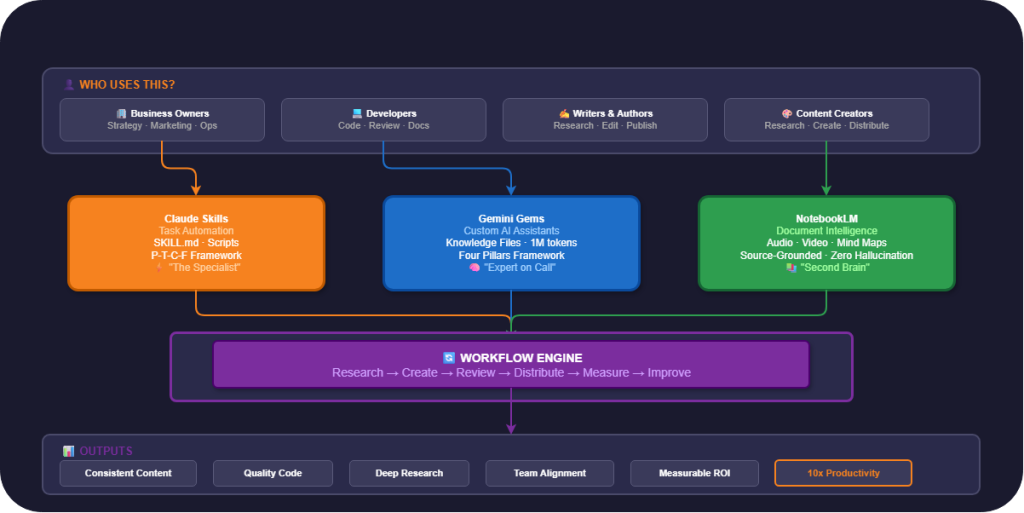
The three tools I’ll cover — Claude Skills, Gemini Gems, and NotebookLM — represent three different approaches to workflow design, each with unique strengths.
Claude Skills — “The Specialist”
Claude Skills let you teach Claude to perform specific tasks consistently and at high quality. Instead of prompting every time, you create a “skill package” that Claude can reuse.
Core Structure
A Claude Skill consists of:
- SKILL.md — the main instruction file (required)
- Scripts — helper scripts for automation
- Examples — sample outputs for Claude to learn from
- Resources — reference documents and templates
Quick Example
Say you need Claude to write professional emails daily. Instead of typing this every time:
“Write an email to the client, professional but friendly tone, end with regards…”
You create a Skill:
---
name: Professional Email Writer
description: Write business emails with consistent tone and format
---
## Role
You are an expert business email writer.

## Rules
- Tone: professional, warm, never distant
- Always open with context-appropriate greeting
- Close with "Best regards" + full name
- Maximum 200 words for body
- No slang, no abbreviations

## Output Format
Subject: [topic]
---
[Email body]
---
Best regards,
[Name]
Then you simply say: “Write a thank-you email to client ABC for signing the contract” — and Claude applies all rules automatically.
Who Should Use Claude Skills?
- Developers: Code review pipeline, documentation generator, test case creator
- Business owners: Email templates, proposal writer, report formatter
- Writers: Story editor, dialogue polisher, consistency checker
- Content creators: SEO writer, social media adapter, newsletter drafter
📖 Part 2 covers 5 ready-to-use Claude Skills with copy-paste code.
Gemini Gems — “The Expert on Call”
Gemini Gems let you create personalized AI assistants — each Gem is an “expert” with its own role, knowledge, and communication style.
The Biggest Differentiator
Gems support Knowledge Files (reference documents). With a context window of up to 1 million tokens, you can give your Gem:
- Your entire brand guideline
- 50 sample blog posts to learn your writing style
- Product technical documentation
- Style guides and tone of voice documents
The Gem references these documents in EVERY conversation — ensuring output is always consistent.
Quick Example
Create a “Brand Voice Writer” Gem:
Name: Brand Voice Writer
Instructions:
# Purpose
Create marketing content consistent with [Company Name]'s brand voice.

# Goals
- All content must reflect brand values
- Tone: [specific description]
- Always follow the uploaded brand guideline

# Behavior
- Read brand guideline thoroughly before writing
- Cite specific sections from guideline when explaining choices
- Suggest alternatives if request conflicts with brand voice
Knowledge Files: Upload brand guideline PDF, past content examples
Who Should Use Gemini Gems?
- Business owners: Brand voice consistency, meeting summarizer, customer support
- Developers: API explorer, documentation writer (upload API docs)
- Writers: Writing coach, character consistency checker (upload character bible)
- Content creators: Video script writer, SEO optimizer (upload keyword research)
📖 Part 3 covers 5 practical Gems with optimized knowledge files.
NotebookLM — “The Second Brain”
Google’s NotebookLM is an AI research assistant that only answers based on documents you provide. This is the most important difference: no hallucinations, no fabricated information.
Key Features
| Feature | Description |
|---|---|
| Audio Overviews | Turns documents into AI podcasts — you can join the conversation |
| Video Overviews | Creates explainer videos with narration and auto-generated visuals |
| Mind Maps | Visualizes relationships between concepts |
| Flashcards & Quizzes | Auto-generates tests from your documents |
| Deep Research | AI autonomously researches, analyzes, and synthesizes sources |
| Learning Guide | Personal tutor with probing questions to deepen understanding |
Quick Example
Say you need to research a market for a new product:
- Upload 10 industry reports (PDF) into a Notebook
- Ask: “What are the key trends for the next 3 years?” — get answers with source citations
- Generate Audio Overview — listen to summaries while commuting
- Create Mind Map — visualize opportunities and risks
- Export report to Google Docs to share with your team
The entire process takes 30 minutes instead of 3 days of manual reading.
Who Should Use NotebookLM?
- Business owners: Market report analysis, competitor analysis, strategy planning
- Developers: Learn new frameworks/APIs, synthesize documentation
- Writers: World-building research, historical research for novels
- Content creators: Content research, interview transcript analysis
📖 Part 4 deep-dives into 5 practical NotebookLM workflows.
Quick Comparison — Which Tool Should You Pick?
| Criteria | Claude Skills | Gemini Gems | NotebookLM |
|---|---|---|---|
| Strength | Complex task automation | Personalized AI assistant | Document-grounded research |
| Customization depth | Very deep (code, scripts) | Medium (instructions) | Low (source-based) |
| Knowledge upload | Via Projects | Knowledge Files (1M tokens) | Sources (multi-format) |
| Output types | Text, code, commands | Text, Google integration | Audio, video, mind map, quiz |
| Hallucination risk | Medium | Medium | Very low (grounded) |
| Best for | Developers, power users | Business, marketing | Research, learning |
| Pricing | Claude Pro/Team | Gemini Advanced | Free + Plus tier |
| Ecosystem | Claude Code, API, MCP | Google Workspace | Google Workspace |
Decision Matrix
What do you need? → Which tool to use:
- “I need AI to do a specific, repeatable task at high quality” → Claude Skills
- “I need an AI assistant that knows my company/project” → Gemini Gems
- “I need to analyze/synthesize documents without AI making things up” → NotebookLM
- “I need all three” → Read Part 5 on combined workflows!
Series Roadmap
| Part | Topic | Audience |
|---|---|---|
| 1 (this post) | Overview of all 3 tools | Everyone |
| 2 | Claude Skills — A-to-Z guide | Developers, power users |
| 3 | Gemini Gems — custom AI assistants | Business, marketing |
| 4 | NotebookLM — AI-powered research | Researchers, writers |
| 5 | Role-specific workflows | By profession |
| 6 | Enterprise workflow architecture | Enterprise, professional |
| 7 | Cross-tool comparison & combos | Everyone |
| 8 | Team Skill Libraries & governance | Team leads, managers |
| 9 | AI workflows for Agile teams | Scrum teams, PMs |
| 10 | Real-world case studies & playbooks | All practitioners |
Start Right Now
You don’t need to read all 10 posts before starting. Try these today:
- 5 minutes: Go to NotebookLM, upload a document you need to read, ask AI to summarize it
- 10 minutes: Go to Gemini, create a simple Gem for your daily work
- 15 minutes: Try Claude, set up Custom Instructions for your role
Once you feel the difference between “prompting every time” and “having a workflow ready” — you’ll never go back.
Next in this series: Part 2 — Claude Skills: The Complete A-to-Z Guide
Related reading
07 Oct 2026 · 4 min read
ai
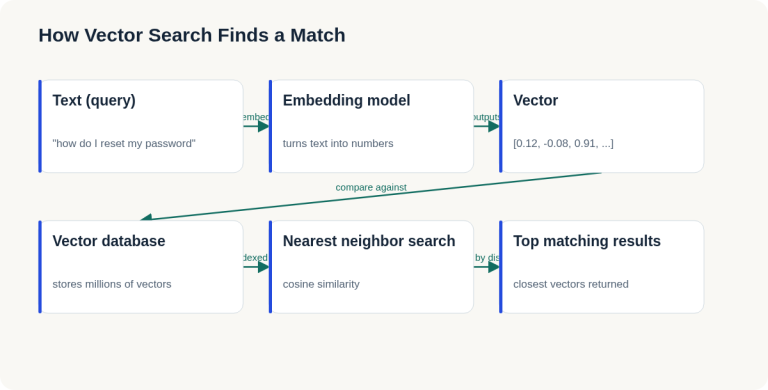
English Lesson — Tuesday Morning: Embeddings & Vector Search Vocabulary
Daily English practice for tech professionals: embed, vector database, and nearest neighbor search vocabulary with pronunciation and exercises.
Read more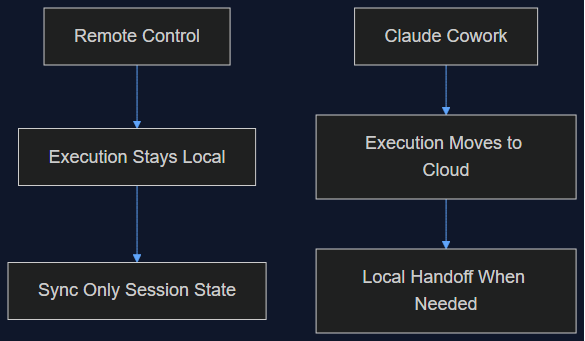
06 Oct 2026 · 5 min read
agentic coding
Claude Cowork Just Did the Thing I Said Remote Control Wasn't Doing
In August I wrote that Claude Code's Remote Control was a sync layer, not a cloud migration, and that keeping execution local was the point. This week Anthropic moved Cowork's execution to the cloud by default. Here's why both were the right call — for different products.
Read more
03 Oct 2026 · 4 min read
agents
950 Agents, 21 Hours, 210M Tokens: What Anthropic's CRISPR Search Actually Proves About Fan-Out
Anthropic's life-sciences lab ran 950 agents in parallel to surface a possible new CRISPR-like enzyme system. The funnel math is a genuinely useful fan-out pattern — but the scientist pushback is the part worth reading closely.
Read more
Discussion
Comments are reviewed before publication. Your email is kept private.