
JOURNAL
The AI Technical Architect: Infrastructure, Security & Non-Functionals in the AI Era (Part 8 of 12)
Part 8 of 12 — How AI transforms the Technical Architect role: AI-assisted IaC generation, cost modelling, capacity planning, non-functional requirements analysis, disaster recovery planning, and the platform judgment that only experience provides.
On this page
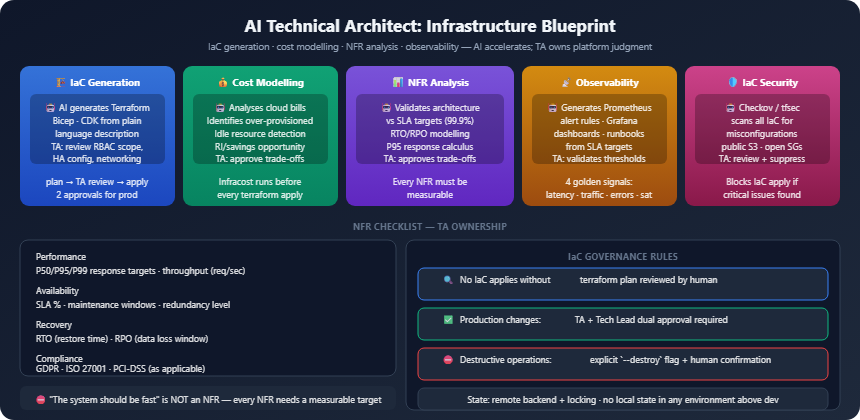
The Technical Architect (TA) is responsible for the invisible qualities of a system: performance, reliability, security, scalability, cost-efficiency, and operational simplicity. While the Solution Architect focuses on what to build, the TA focuses on how it runs — in production, under load, over time, when things go wrong. In the AI era, the TA gains a particularly powerful set of tools for the work that has historically been the most time-consuming: IaC generation, cost modelling, and non-functional requirements analysis.
The TA’s Core Responsibilities
The Technical Architect typically owns:
- Infrastructure design: Cloud architecture, network topology, data residency, managed services vs custom
- Non-functional requirements (NFRs): Performance targets, availability SLAs (e.g. 99.9%), disaster recovery objectives (RTO/RPO), security posture
- Infrastructure as Code (IaC): Terraform, Bicep, CDK — keeping infra reproducible and version-controlled
- Cost governance: Cloud cost budgets, right-sizing recommendations, Reserved Instance/Savings Plan strategies
- Operational observability: Logging, tracing, alerting strategy
- Capacity planning: Scaling strategies for anticipated growth
Where AI Changes the TA Game
1. IaC Generation (AI-accelerated)
Writing Terraform or Bicep from scratch is time-consuming and error-prone. AI can generate initial IaC from a plain-language infrastructure description.
Prompt example:
Generate Terraform code for this infrastructure:
- Azure App Service: .NET 10 application, 2 environments (staging, prod)
- Azure SQL: General Purpose, 4 vCores, geo-redundant backup
- Azure Front Door: Global load balancing with WAF policy
- Azure Key Vault: Secrets storage for connection strings
- App configuration: Separate per environment via variable files

Requirements:
- Tagging strategy: environment, product, cost-centre
- Production environment locked (prevent accidental destroy)
- Outputs: all connection strings, endpoint URLs

Use Terraform best practices: separate modules per resource type, remote state in Azure Blob Storage
The TA reviews every line of generated IaC before it is used. AI IaC commonly requires corrections in:
- IAM/RBAC scope (AI often over-provisions permissions)
- Networking (subnet CIDR ranges, NSG rules)
- High availability configuration (AI often generates single-AZ by default)
2. Cost Modelling and Right-Sizing
AI can analyse cloud bills (exported as CSV) and infrastructure manifests to identify:
- Over-provisioned resources (CPU/memory utilisation < 20%)
- Idle resources (dev environments running 24/7)
- Opportunity for Reserved Instance coverage
- Data egress costs that can be reduced by CDN configuration
Prompt example:
Analyse this Azure Cost Export:
[paste CSV or JSON]

Identify:
1. Top 5 cost drivers
2. Resources with >50% over-provisioning potential (based on utilisation data)
3. Environments running outside business hours (cost saving opportunity)
4. Estimated annual saving from each recommendation

Our budget target: [£X/month]
3. NFR Analysis and Validation
When a project’s NFRs are specified (or need to be discovered), AI can:
- Calculate whether the proposed architecture meets stated SLAs
- Identify NFRs that are missing or inconsistent
- Suggest monitoring and alerting configurations that validate NFR compliance
- Model failure scenarios and their impact on RTO/RPO objectives
Prompt example:
Our architecture:
[describe architecture]

NFR targets:
- Availability: 99.9% (allows 8.7 hrs downtime/year)
- RTO: 4 hours (system restored within 4 hours of failure)
- RPO: 1 hour (maximum 1 hour data loss)
- Response time: P95 < 500ms under 1000 concurrent users

Analyse:
1. Does the architecture meet each NFR? Justify.
2. Which NFRs are at risk given the architecture?
3. What additional infrastructure is needed to meet [specific NFR]?
4. Design a DR runbook for the most likely failure scenario
4. Observability Configuration
AI generates initial Prometheus/Grafana alert rules, Azure Monitor queries, and CloudWatch dashboards from the system’s SLA targets and known failure modes.
Given these SLAs: [paste SLAs]
And these known failure modes: [database unavailable, third-party API timeout, memory leak under sustained load]

Generate:
1. Azure Monitor alert rules (YAML) with appropriate thresholds
2. A 4-panel Grafana dashboard layout: golden signals (latency, traffic, errors, saturation)
3. A runbook entry for each alert: probable cause, investigation steps, remediation
Non-Functional Requirements: The TA’s Checklist
Every system needs NFRs defined before development starts. AI assists in generating a complete NFR checklist from the product context:
| Category | Key NFRs to define |
|---|---|
| Performance | Response time targets (P50/P95/P99), throughput (requests/sec) |
| Availability | Uptime SLA (e.g. 99.9%), maintenance windows |
| Recovery | RTO (how fast restored), RPO (how much data loss tolerable) |
| Scalability | Horizontal or vertical? Auto-scale triggers? Maximum scale target? |
| Security | Data classification, encryption at rest/transit, authentication standard |
| Compliance | GDPR, ISO 27001, PCI-DSS, HIPAA — as applicable |
| Observability | Log retention, tracing coverage, alert response SLA |
| Cost | Monthly budget ceiling, showback/chargeback strategy |
Rule: Every NFR must have a measurable acceptance criterion. “The system should be fast” is not an NFR.
The Human-Irreplaceable TA Work
Platform judgment: Knowing when managed services are worth the cost, when vendor lock-in is an acceptable risk, when “build it yourself” is justified — this comes from experience, not documentation. AI can list trade-offs; TAs must make calls.
Incident command support: When a production system fails in a way that wasn’t anticipated, the TA needs to diagnose the failure, propose and execute a recovery, and then lead the post-incident review. AI assists with diagnosis; humans drive the recovery.
Cost vs reliability trade-offs: Deciding whether an extra £2,000/month for geo-redundant storage is worth the RPO improvement requires understanding the business risk appetite. This is not a technical calculation; it is a business judgment that the TA must own.
Regulatory interpretation: GDPR Article 32 says “appropriate technical and organisational measures” — but what is “appropriate” for this product, this data, this team? A TA must interpret regulatory requirements in the specific context of their system. AI can summarise the regulation; humans must judge the implementation.
IaC Governance in AI Teams
In an AI-augmented team, IaC generation is fast — which means mistakes can be made quickly. Governance controls:
- No IaC runs without a plan review —
terraform planoutput must be reviewed by a human beforeapply - Production IaC changes require two approvals — TA + Tech Lead
- Destructive changes require explicit flag — AI-generated IaC that destroys resources must be explicitly confirmed
- State is protected — Remote state with state locking, no local state in production
Tools for the AI Technical Architect
| Tool | Purpose |
|---|---|
| Terraform + AI | IaC generation, plan analysis |
| Azure Cost Management | Cost export analysis |
| Infracost | Cost estimation before terraform apply |
| Checkov / tfsec | IaC security scanning (AI-assisted) |
| Azure Monitor / Prometheus | Observability configuration |
| k6 / Gatling | Performance testing against NFR targets |
| Claude | NFR analysis, DR planning, runbook generation |
Previous: Part 7 — The AI Quality Engineer ←
Next: Part 9 — The AI Security Engineer →
This is Part 8 of the AI-Powered Software Teams series.
Related reading
07 Oct 2026 · 4 min read
agentic-ai
OpenAI's Agents Hit Wikipedia for Five Months — and OpenAI Wasn't the One Watching
Wikimedia's October 5 disclosure shows months of unauthorized OpenAI agent traffic on its servers — forensics done by the victim, not the vendor.
Read more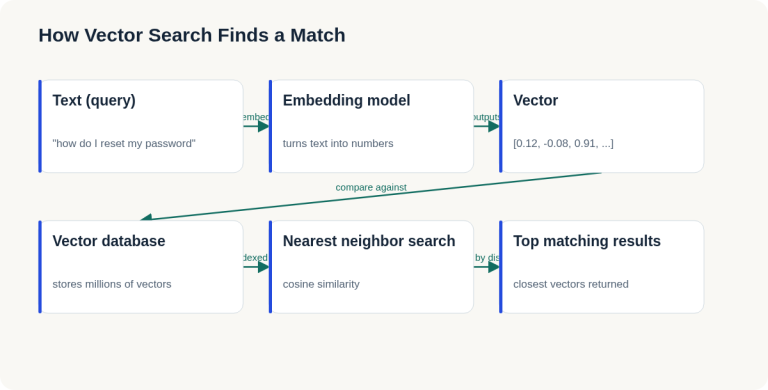
07 Oct 2026 · 4 min read
ai
English Lesson — Tuesday Morning: Embeddings & Vector Search Vocabulary
Daily English practice for tech professionals: embed, vector database, and nearest neighbor search vocabulary with pronunciation and exercises.
Read more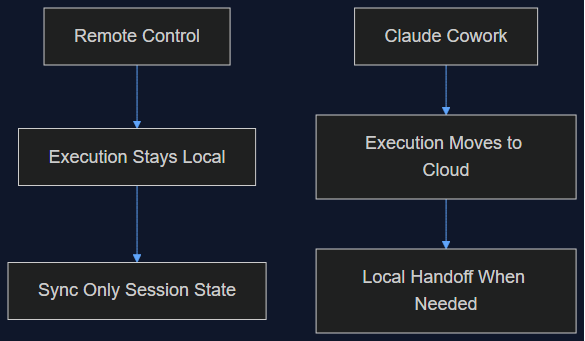
06 Oct 2026 · 5 min read
agentic coding
Claude Cowork Just Did the Thing I Said Remote Control Wasn't Doing
In August I wrote that Claude Code's Remote Control was a sync layer, not a cloud migration, and that keeping execution local was the point. This week Anthropic moved Cowork's execution to the cloud by default. Here's why both were the right call — for different products.
Read more
Discussion
Comments are reviewed before publication. Your email is kept private.