
JOURNAL
Read supplier quotation PDFs with Docling: prepare a comparison for review
A proposed workflow to turn quotation PDFs into a reviewable comparison with units, tax assumptions, delivery terms and source references.
On this page
The idea in one minute
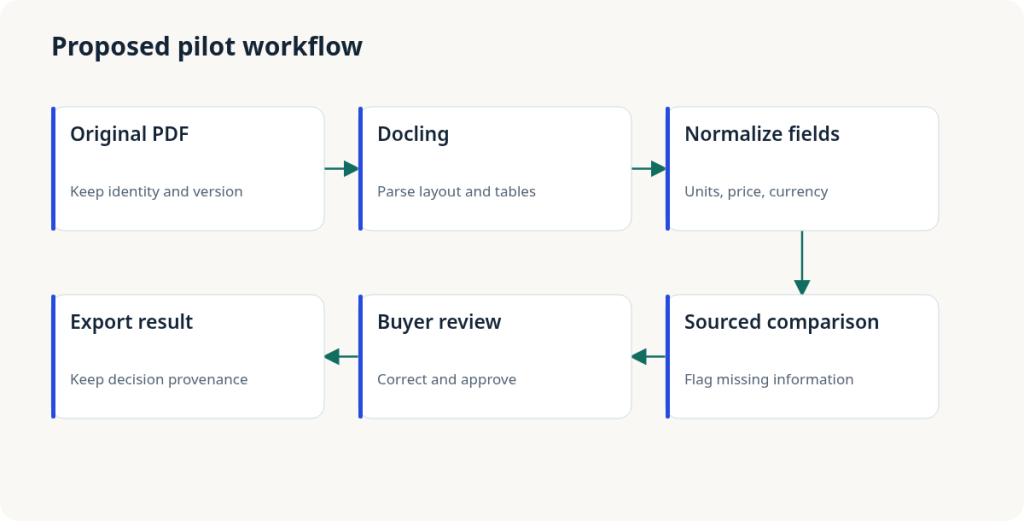
Copying three PDF quotations into a spreadsheet takes effort and can introduce unit errors. This proposed workflow uses Docling to prepare document structure, then builds a comparison for the buyer to review. Important cells should link back to the original page. The assistant does not select suppliers or issue purchase orders. This article describes a procurement experiment, not a measured run on real quotations.
Where Docling fits
The official repository describes PDF layout and table parsing, plus local execution. Treat Docling as document preparation. Recognizing a table does not guarantee understanding all commercial conditions. A tax exclusion in a page footer may change the comparison. Explicit rules and the reviewer must handle that distinction instead of treating extracted values as certified facts.
Pick a specific buying problem
Choose one recurring category, such as packaging boxes with defined specifications. Agree columns for item code, dimensions, unit, minimum quantity, price, currency, tax and delivery lead time. Similar names do not make two products equivalent. Put mismatched specifications into a review queue. When suppliers already provide clean spreadsheets, prefer direct import. AI is useful here only when document handling is the actual bottleneck.
Example: similar numbers, different units
Supplier A lists VND 120,000 per carton of ten boxes. B lists VND 11,500 per box, excluding tax. Keep the original unit, pack size and tax status. Calculate a unit price only with sufficient information; flag unknown tax instead of inventing a rate. These are synthetic figures. A lowest-price column can mislead the buyer when delivery terms or minimum quantities differ.
A small test with difficult cases
Prepare roughly ten permitted documents: text PDFs, scans, multi-page tables and a poor-quality page. Have a buyer create an answer sheet with source references first. Evaluate extraction errors separately for prices, quantities and units. An overall accuracy number can hide costly numeric mistakes. Include review and correction time. If total effort exceeds manual entry, the pilot has not succeeded. These suggested counts are not a Docling benchmark.
Implementation steps
Use an isolated environment and a checked Docling version. Follow the official quickstart to convert one file and inspect its Markdown or document representation. Map fields into a quotation schema and preserve unknown values. Add a side-by-side review screen with the original PDF and draft table. Export only the buyer-approved comparison into the existing workflow. These integration steps are proposals, not executed instructions in this article.
Technical view: schema and provenance
Keep supplier_id, document_id, page, item_code, raw_unit, quantity, currency, unit_price and tax_status for each row. Use decimal arithmetic or an appropriate integer currency representation. Preserve raw and normalized values. Send invalid fields to review rather than coercing them to zero. If an LLM maps column names, treat PDF contents as untrusted data and prevent them from changing rules or invoking external tools.
Hosting, licensing and cost
Docling’s code uses the MIT license; its README asks users to check model licenses separately. Map local processing and any external calls introduced by an optional LLM. Estimate processing time, CPU/GPU needs, storage, review-screen development and buyer effort. This article has no benchmark supporting a server specification or fixed cost. Measure representative files before purchasing hardware.
When to expand
Agree criteria first: decision-critical cells need sources and buyer review, failed documents must be held, and total effort should improve on the existing process. Track corrections by file type. Improve inputs when poor scans dominate errors. Once comparisons are useful, a creative next step is drafting missing-information questions for staff to send to suppliers, rather than automating purchasing decisions from incomplete prices.
Next step
For a similar process, start with an AI opportunity assessment to define scope and evaluation criteria. Once inputs, outputs and review are clear, explore AI MVP delivery for a prototype you can evaluate.
Sources and research boundary
Primary sources checked on 10 October 2026. Scenarios, sample sizes, architecture and business ideas are editorial proposals. No benchmark or customer outcome is claimed.
Related reading
· 4 min read
AI Ideas
Open WebUI and Ollama: test an internal AI workspace before buying a GPU
A scoped internal AI pilot: choose tasks, map data flow, measure quality and latency, then decide whether server investment makes sense.
Read more
· 4 min read
AI Ideas
An AI receptionist for appointment businesses: start with missed calls
A proposed startup pilot for service businesses: capture enquiries, prepare appointment requests and hand off to staff before building a larger product.
Read more
· 5 min read
AI Ideas
A document assistant with Dify: start with a reviewable pilot
A practical proposed pilot for internal document lookup: sources, human review, evaluation, self-hosting and license checks.
Read more
Discussion
Comments are reviewed before publication. Your email is kept private.