
JOURNAL
Multi-Agent Deep Dive Part 1: Designing the Orchestrator Agent — Brain Architecture, Routing Logic & Prompt Engineering
Implementation-ready guide to building the Brain agent in a multi-agent system. Covers LangGraph supervisor patterns, Command API routing, context injection, prompt engineering, state schema design, and cost-optimized model selection.
On this page
Introduction
In the main architecture guide, we established the 5-layer architecture for scalable multi-agent systems. This deep dive focuses on Layer 2 — the Orchestrator (Brain) Agent — the most critical component in the entire system.
The Brain agent is not a data executor. It is a planner and synthesiser. It receives natural-language questions, interprets business intent, plans query strategies, delegates to worker agents, validates results, and synthesises final answers.
Get this component wrong, and every downstream agent inherits the confusion. Get it right, and the system scales gracefully from 10 to 10,000 queries per day.
Table of Contents
- Why the Orchestrator Matters
- LangGraph Supervisor vs. Custom Orchestrator
- State Schema Design
- The Command API for Dynamic Routing
- Prompt Engineering for the Brain
- Context Injection Architecture
- Routing Logic Patterns
- Model Selection Strategy
- Error Handling in the Orchestrator
- Testing the Brain Agent
- Production Checklist
1. Why the Orchestrator Matters
In a multi-agent system, the Orchestrator is the single point of intelligence. Every architectural decision flows from this component:
| Decision | Impact |
|---|---|
| Which model to use for the Brain | Cost per query, reasoning quality |
| How the Brain routes to workers | Latency, correctness, cost |
| What context the Brain receives | Answer quality, hallucination rate |
| How the Brain validates results | Trust, reliability, error rate |
| When the Brain escalates to humans | Safety, compliance, user trust |
Key insight: The Brain is invoked 1-2 times per query (planning + synthesis). Workers are invoked 3-8 times. This means the Brain should use the best available model (Claude Sonnet) while workers use cheaper models (Haiku/DeepSeek). The cost ratio is typically 1:5 to 1:10 in favour of worker calls.
2. LangGraph Supervisor vs. Custom Orchestrator
LangGraph offers two approaches for building the Orchestrator:
2.1 Built-in Supervisor (create_supervisor)
The create_supervisor function handles orchestration logic automatically:
from langgraph_supervisor import create_supervisor
from langgraph.prebuilt import create_react_agent
from langchain_aws import ChatBedrock

# Create the Brain model
brain = ChatBedrock(
    model_id="anthropic.claude-sonnet-4-5-20250514-v1:0",
    region_name="us-east-1",
    model_kwargs=dict(max_tokens=4096, temperature=0)
)

# Create worker agents
sql_agent = create_react_agent(
    model=haiku_model,
    tools=[execute_athena_query],
    name="sql_writer",
    prompt="You are an Athena SQL specialist..."
)

formatter_agent = create_react_agent(
    model=haiku_model,
    tools=[format_output],
    name="formatter",
    prompt="You convert data to requested formats..."
)

# Create the supervisor (Brain)
workflow = create_supervisor(
    agents=[sql_agent, formatter_agent],
    model=brain,
    prompt=BRAIN_SYSTEM_PROMPT,
)

app = workflow.compile()
When to use: Prototyping, standard routing patterns, teams new to LangGraph.
2.2 Custom Orchestrator (StateGraph + Command)
For production systems, build a custom orchestrator using StateGraph and the Command API:
from langgraph.graph import StateGraph, START, END
from langgraph.types import Command
from typing import TypedDict, Annotated, Literal
from langgraph.graph import add_messages

class AgentState(TypedDict):
    messages: Annotated[list, add_messages]
    plan: str
    current_step: int
    total_steps: int
    worker_results: list
    confidence: float
    needs_human_review: bool

def brain_plan(state: AgentState) -> Command[Literal["sql_writer", "weight_applier", "__end__"]]:
    """Brain analyses the question and creates an execution plan."""
    result = brain_model.invoke(
        state["messages"],
        system=BRAIN_SYSTEM_PROMPT
    )

    # Parse the plan from the Brain's response
    plan = parse_execution_plan(result)
    first_worker = plan.steps[0].agent

    return Command(
        update=dict(
            messages=result.messages,
            plan=plan.to_json(),
            current_step=0,
            total_steps=len(plan.steps),
        ),
        goto=first_worker,
    )

def brain_synthesise(state: AgentState) -> Command[Literal["formatter", "brain_plan", "__end__"]]:
    """Brain reviews worker results and decides next action."""
    results = state["worker_results"]
    confidence = evaluate_confidence(results)

    if confidence <= 0.69:
        # Low confidence: retry with refined plan
        return Command(
            update=dict(confidence=confidence),
            goto="brain_plan",
        )

    if confidence <= 0.89:
        # Medium confidence: flag for human review
        return Command(
            update=dict(
                confidence=confidence,
                needs_human_review=True,
            ),
            goto="formatter",
        )

    # High confidence: proceed to formatting
    return Command(
        update=dict(confidence=confidence),
        goto="formatter",
    )

# Build the graph
graph = StateGraph(AgentState)
graph.add_node("brain_plan", brain_plan)
graph.add_node("brain_synthesise", brain_synthesise)
graph.add_node("sql_writer", sql_writer_node)
graph.add_node("weight_applier", weight_applier_node)
graph.add_node("formatter", formatter_node)

graph.add_edge(START, "brain_plan")
graph.add_edge("sql_writer", "brain_synthesise")
graph.add_edge("weight_applier", "brain_synthesise")
graph.add_edge("formatter", END)

app = graph.compile(checkpointer=dynamodb_checkpointer)
When to use: Production systems, custom routing logic, confidence-based branching, human-in-the-loop.
2.3 Decision Matrix
| Feature | create_supervisor | Custom StateGraph |
|---|---|---|
| Setup time | 30 minutes | 2-4 hours |
| Routing flexibility | Tool-call based | Full programmatic control |
| State schema | Fixed | Custom TypedDict |
| Confidence routing | Not built-in | Full control |
| Human-in-the-loop | Basic | Advanced (interrupt API) |
| Testing | Black box | Unit-testable nodes |
| Production readiness | Good for simple flows | Required for complex flows |
Recommendation: Start with create_supervisor for POC. Migrate to custom StateGraph when you need confidence routing, custom state, or human-in-the-loop.
3. State Schema Design
The state schema is the API contract between all agents. Design it first, before writing any agent logic.
3.1 Core State Fields
from typing import TypedDict, Annotated, Optional
from langgraph.graph import add_messages
from datetime import datetime

class AgentState(TypedDict):
    # Communication
    messages: Annotated[list, add_messages]

    # Planning
    plan: Optional[str]               # JSON execution plan
    current_step: int                  # Which step we're on
    total_steps: int                   # Total planned steps

    # Results
    worker_results: list               # Accumulated worker outputs
    final_answer: Optional[str]        # Synthesised answer

    # Quality Control
    confidence: float                  # 0.0 to 1.0
    needs_human_review: bool           # Flag for HITL
    retry_count: int                   # Circuit breaker

    # Metadata
    query_id: str                      # Unique query identifier
    started_at: str                    # ISO timestamp
    model_costs: list                  # Token usage tracking
3.2 State Design Principles
| Principle | Implementation |
|---|---|
| Immutable updates | Never mutate state directly; always return new state via Command |
| Reducer functions | Use add_messages for message lists to prevent overwrites |
| Flat structure | Avoid nested dicts (they don’t merge well across nodes) |
| Type safety | Use TypedDict with explicit types for every field |
| Cost tracking | Include model_costs to track token usage per node |
| Idempotency | Include query_id so retries don’t create duplicate work |
3.3 Anti-Patterns
- Storing raw LLM responses: Store parsed, structured data instead
- Using a single “context” string field: Use typed fields for each piece of context
- Forgetting retry_count: Without it, failed nodes retry forever
- Skipping timestamps: You cannot debug latency issues without timing data
4. The Command API for Dynamic Routing
The Command object is the key to flexible orchestration. It lets you update state AND route to the next node in a single return:
4.1 Basic Routing
def brain_node(state: AgentState) -> Command[Literal["sql_writer", "formatter", "__end__"]]:
    """Route based on the execution plan."""
    plan = json.loads(state["plan"])
    current = state["current_step"]

    if current >= state["total_steps"]:
        return Command(goto="__end__")

    next_worker = plan["steps"][current]["agent"]
    return Command(
        update=dict(current_step=current + 1),
        goto=next_worker,
    )
4.2 Confidence-Based Routing
def synthesise_node(state: AgentState) -> Command[Literal["formatter", "brain_plan", "human_review"]]:
    """Route based on result confidence."""
    confidence = state["confidence"]

    if confidence > 0.89:
        return Command(goto="formatter")
    elif confidence > 0.69:
        return Command(
            update=dict(needs_human_review=True),
            goto="human_review",
        )
    else:
        # Retry with refined plan (max 2 retries)
        if state["retry_count"] <= 1:
            return Command(
                update=dict(retry_count=state["retry_count"] + 1),
                goto="brain_plan",
            )
        else:
            # Give up gracefully
            return Command(
                update=dict(needs_human_review=True),
                goto="human_review",
            )
4.3 Parallel Fan-Out with Send
For tasks that can be parallelised (e.g., querying multiple data sources):
from langgraph.types import Send

def brain_parallel(state: AgentState) -> list[Send]:
    """Fan out to multiple workers simultaneously."""
    plan = json.loads(state["plan"])
    parallel_steps = plan.get("parallel", [])

    sends = []
    for step in parallel_steps:
        sends.append(
            Send(
                step["agent"],
                dict(
                    messages=state["messages"],
                    task=step["task"],
                    query_id=state["query_id"],
                )
            )
        )
    return sends
5. Prompt Engineering for the Brain
The Brain prompt is the most important piece of text in your entire system. It determines routing quality, cost efficiency, and answer accuracy.
5.1 Prompt Structure
BRAIN_SYSTEM_PROMPT = """You are the orchestrator of a data analytics system.
Your role is to PLAN and SYNTHESISE, never to execute queries directly.

## Your Capabilities
You have access to these worker agents:
- sql_writer: Translates query specs to Athena SQL (fast, cheap)
- weight_applier: Applies rim weighting to raw results (required for all metrics)
- formatter: Converts data to JSON/markdown/narrative

## Data Dictionary
[DATA_DICTIONARY]

## Business Rules
[BUSINESS_RULES]

## Decision Framework
For every user question:
1. CLASSIFY the question type (metric, comparison, trend, anomaly)
2. PLAN the execution steps (which workers, in what order)
3. SPECIFY structured instructions for each worker
4. VALIDATE results against expected schema
5. SYNTHESISE a final answer with confidence level

## Output Format
Always respond with a JSON plan:
- question_type: metric | comparison | trend | anomaly
- confidence_required: 0.7 | 0.8 | 0.9
- steps: list of worker calls with structured inputs
- expected_output: description of what the final answer looks like

## Critical Rules
- NEVER write SQL directly. Always delegate to sql_writer.
- EVERY metric output MUST pass through weight_applier.
- If confidence is below 0.7, FLAG for human review.
- Maximum 5 worker calls per query (cost control).
- Always include cost estimate in your plan.
"""
5.2 Context Injection vs. Fine-Tuning
| Approach | Cost | Flexibility | When to Use |
|---|---|---|---|
| System prompt injection | USD 0 upfront | Change instantly | Schema, business rules |
| RAG retrieval | USD 0.01/query | Dynamic context | Large knowledge bases |
| Few-shot examples | USD 0 upfront | Version-controlled | Complex output formats |
| Fine-tuning | USD 500-5000 | Requires retraining | Rare — only for style/tone |
Our recommendation: Use system prompt injection for everything that fits in the context window. Use RAG only when context exceeds 100K tokens. Never fine-tune unless you have exhausted prompt engineering.
5.3 Prompt Versioning
prompts/
  brain/
    v1.0.0.txt          # Initial production prompt
    v1.1.0.txt          # Added rim weighting rules
    v1.2.0.txt          # Improved routing logic
    CHANGELOG.md         # What changed and why
  workers/
    sql_writer/
      v1.0.0.txt
    weight_applier/
      v1.0.0.txt
Store prompts in git alongside code. Use semantic versioning. Deploy prompt updates through the same CI/CD pipeline as code changes.
6. Context Injection Architecture
The Brain’s intelligence comes from runtime context injection — loading schema knowledge, business rules, and examples at invocation time.
6.1 Three-Layer Context Stack
| Layer | Content | Size | Update Frequency |
|---|---|---|---|
| Static | Data dictionary, column descriptions | 2-5K tokens | Weekly |
| Dynamic | Current rim weighting coefficients | 500 tokens | Daily |
| Query-specific | User question, conversation history | 1-3K tokens | Per query |
6.2 Implementation Pattern
def build_brain_context(user_question: str, session_id: str) -> str:
    """Assemble the full context for the Brain agent."""

    # Layer 1: Static context (cached)
    data_dict = load_from_s3("prompts/data-dictionary.txt")
    business_rules = load_from_s3("prompts/business-rules.txt")

    # Layer 2: Dynamic context (refreshed daily)
    rim_weights = get_current_rim_weights()

    # Layer 3: Query-specific context
    conversation = get_conversation_history(session_id)

    # Assemble the prompt
    prompt = BRAIN_SYSTEM_PROMPT
    prompt = prompt.replace("[DATA_DICTIONARY]", data_dict)
    prompt = prompt.replace("[BUSINESS_RULES]", business_rules)

    return prompt
6.3 Token Budget Management
With Claude Sonnet’s 200K context window, budget tokens carefully:
| Component | Tokens | Percentage |
|---|---|---|
| System prompt (base) | 1,500 | 15% |
| Data dictionary | 3,000 | 30% |
| Business rules | 1,000 | 10% |
| Rim weights | 500 | 5% |
| Conversation history | 2,000 | 20% |
| Output budget | 2,000 | 20% |
| Total per query | 10,000 | 100% |
At Claude Sonnet pricing (USD 3/1M input tokens), this is approximately USD 0.03 per Brain invocation.
7. Routing Logic Patterns
7.1 Intent-Based Routing
The Brain classifies the user’s intent and routes to the appropriate worker pipeline:
| Intent | Pipeline | Example |
|---|---|---|
| Simple metric | sql_writer -> weight_applier -> formatter | “What is the reach for BBC One?” |
| Comparison | sql_writer (x2 parallel) -> weight_applier -> formatter | “Compare ITV vs Channel 4 reach” |
| Trend analysis | sql_writer (time series) -> weight_applier -> formatter | “Show BBC One reach trend over 12 months” |
| Anomaly detection | sql_writer -> weight_applier -> anomaly_detector -> formatter | “Flag any unusual viewing patterns” |
7.2 Multi-Step Planning
For complex queries, the Brain creates a multi-step execution plan:
# Example: "Compare BBC One vs ITV reach by age group, weighted"
plan = dict(
    question_type="comparison",
    confidence_required=0.8,
    steps=[
        dict(agent="sql_writer", task="Query BBC One reach by age_group"),
        dict(agent="sql_writer", task="Query ITV reach by age_group"),
        dict(agent="weight_applier", task="Apply rim weights to both result sets"),
        dict(agent="formatter", task="Create comparison table with weighted metrics"),
    ],
    estimated_cost="USD 0.05",
    estimated_latency="3-5 seconds",
)
7.3 Circuit Breaker Pattern
Prevent infinite loops and runaway costs:
MAX_WORKER_CALLS = 5
MAX_RETRIES = 2
MAX_COST_PER_QUERY = 0.50  # USD

def check_circuit_breaker(state: AgentState) -> bool:
    """Return True if we should stop execution."""
    total_calls = len(state["worker_results"])
    total_cost = sum(c["cost"] for c in state["model_costs"])

    if total_calls >= MAX_WORKER_CALLS:
        return True  # Too many worker calls
    if state["retry_count"] >= MAX_RETRIES:
        return True  # Too many retries
    if total_cost >= MAX_COST_PER_QUERY:
        return True  # Cost limit reached
    return False
8. Model Selection Strategy
8.1 The Brain/Worker Cost Split
| Role | Model | Cost (Input/Output per 1M) | Invocations per Query | Cost per Query |
|---|---|---|---|---|
| Brain (Plan) | Claude Sonnet 4 | USD 3 / USD 15 | 1 | ~USD 0.03 |
| Brain (Synthesise) | Claude Sonnet 4 | USD 3 / USD 15 | 1 | ~USD 0.02 |
| SQL Writer | Claude Haiku 3.5 | USD 0.80 / USD 4 | 1-3 | ~USD 0.005 |
| Weight Applier | Claude Haiku 3.5 | USD 0.80 / USD 4 | 1 | ~USD 0.003 |
| Formatter | Claude Haiku 3.5 | USD 0.80 / USD 4 | 1 | ~USD 0.002 |
| Total | 5-7 | ~USD 0.06 |
8.2 Prompt Caching (90% Savings)
Amazon Bedrock’s prompt caching is a game-changer for the Brain:
- The system prompt + data dictionary (~5K tokens) is cached across invocations
- Cache hit rate: 80-95% for production workloads
- Cost reduction: 90% on cached tokens (USD 0.30/1M instead of USD 3/1M)
- With caching, Brain cost drops from ~USD 0.03 to ~USD 0.005 per query
8.3 Cross-Region Inference
Enable cross-region inference for free high availability:
- No code changes required — just enable in Bedrock settings
- Automatic failover across regions
- Zero additional cost
- Recommended: us-east-1 (primary), us-west-2 (failover)
9. Error Handling in the Orchestrator
9.1 Error Categories
| Error Type | Example | Response |
|---|---|---|
| Worker timeout | SQL query takes over 30 seconds | Retry with simplified query |
| Low confidence | Weight applier reports convergence failure | Flag for human review |
| Schema mismatch | Worker returns unexpected format | Parse error, retry |
| Cost overrun | Query exceeds USD 0.50 budget | Stop execution, return partial results |
| Model error | Bedrock throttling or 5xx | Exponential backoff, failover to another region |
9.2 Graceful Degradation
from langgraph.types import RetryPolicy

# Configure retry policies per node
retry_policy = RetryPolicy(
    max_attempts=3,
    initial_interval=1.0,    # seconds
    backoff_factor=2.0,      # exponential
    max_interval=10.0,       # max wait
)

# Apply to the graph
graph.add_node("sql_writer", sql_writer_node, retry=retry_policy)
When all retries are exhausted, the Brain should:
- Return the best partial result available
- Clearly indicate what failed and why
- Suggest the user try a simpler query
- Log the full error context for debugging
10. Testing the Brain Agent
10.1 Unit Testing Individual Nodes
def test_brain_routes_to_sql_writer():
    """Test that metric questions route to sql_writer."""
    state = AgentState(
        messages=[HumanMessage(content="What is BBC One reach?")],
        plan="",
        current_step=0,
        total_steps=0,
        worker_results=[],
        confidence=0.0,
        needs_human_review=False,
        retry_count=0,
        query_id="test-001",
        started_at="2026-03-16T00:00:00Z",
        model_costs=[],
    )

    result = brain_plan(state)
    assert result.goto == "sql_writer"
    assert "plan" in result.update
10.2 Integration Testing with LangSmith
Use LangSmith datasets for systematic evaluation:
| Test Category | Examples | Pass Criteria |
|---|---|---|
| Routing accuracy | 50 questions with known routes | 95% correct routing |
| Cost compliance | 20 complex queries | No query exceeds USD 0.50 |
| Confidence calibration | 30 mixed-quality results | Confidence matches actual accuracy |
| Human escalation | 10 ambiguous queries | All flagged correctly |
10.3 Regression Testing in CI
# .github/workflows/agent-ci.yml
name: Agent Quality Gates
on:
  pull_request:

jobs:
  eval:
    runs-on: ubuntu-latest
    steps:
      - uses: actions/checkout@v4
      - name: Run LangSmith Evaluations
        run: python -m pytest tests/eval/ --langsmith-dataset=routing-accuracy
      - name: Check Cost Budgets
        run: python scripts/check_cost_budgets.py
      - name: Prompt Diff Report
        run: python scripts/prompt_diff.py --base main --head HEAD
11. Production Checklist
Before deploying the Orchestrator to production:
Architecture
- State schema defined with TypedDict and explicit types
- Command API used for all routing decisions
- Circuit breaker implemented (max calls, max retries, max cost)
- Graceful degradation for all error types
Prompts
- Brain prompt versioned in git
- Data dictionary injected at runtime (not hardcoded)
- Context budget calculated and within limits
- Few-shot examples included for complex output formats
Cost
- Prompt caching enabled on Bedrock
- Brain uses Sonnet, workers use Haiku (5-10x savings)
- Per-query cost limit enforced
- Cost tracking in state for monitoring
Testing
- Routing accuracy above 95% on test dataset
- Confidence calibration validated
- Human escalation tested end-to-end
- Regression tests in CI pipeline
Observability
- LangSmith tracing enabled for all invocations
- CloudWatch metrics: latency, cost, routing distribution
- Alerting on anomalous cost or error rates
- Dashboard for query volume and success rates
Next in the Series
- Part 2: Worker Agents and Tool Design — SQL Writer, Weight Applier, Formatter implementation
- Part 3: State Management and Data Layer — DynamoDB checkpointing, S3 state, Athena integration
- Part 4: Security Architecture — IAM, prompt injection defense, audit logging
- Part 5: CI/CD Pipeline for Agents — LangSmith eval, prompt versioning, canary deploys
- Part 6: Scaling Patterns and Production — Step Functions, auto-scaling, cost optimization
References
- LangGraph Documentation — Workflows and Agents: docs.langchain.com
- LangGraph Supervisor Pattern Tutorial: dev.to/programmingcentral
- AWS Multi-Agent Orchestration with LangGraph: github.com/aws-solutions-library-samples
- Mastering LangGraph State Management in 2025: sparkco.ai
- LangGraph Graph API Overview: docs.langchain.com
- Amazon Bedrock Pricing: aws.amazon.com/bedrock/pricing
Related reading
02 Oct 2026 · 6 min read
agents
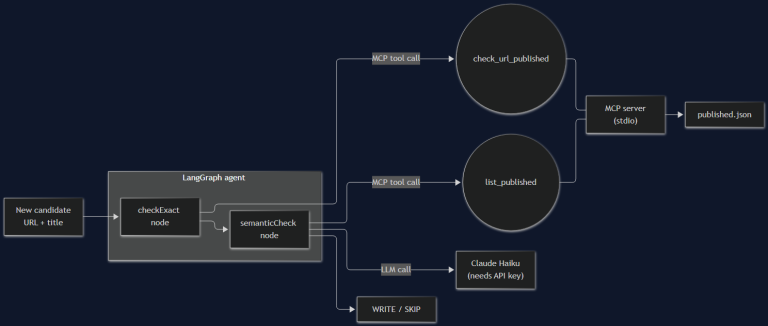
I Built the Agent From Part 1. It's 200 Lines and It Still Broke Once.
Part 2 of the AI agent architecture series: a real MCP server, a real LangGraph graph, and the actual bug — a blog-dedup agent that catches exact-match duplicates fine and faceplants on the semantic case, with a 401 to prove it.
Read more
10 Sep 2026 · 5 min read
agentic coding
10,000 Agents, 88 Hours, One Disputed Proof: What OpenAI's Navier-Stokes Claim Means for Engineering Teams
OpenAI says an internal model coordinated 10,000 agents for 88 hours to solve the Navier-Stokes Millennium Prize problem — then a mathematician accused it of building on unpublished work it had access to. A technical lead's take on the swarm-scale mechanics and the attribution problem every AI-assisted team will eventually hit.
Read more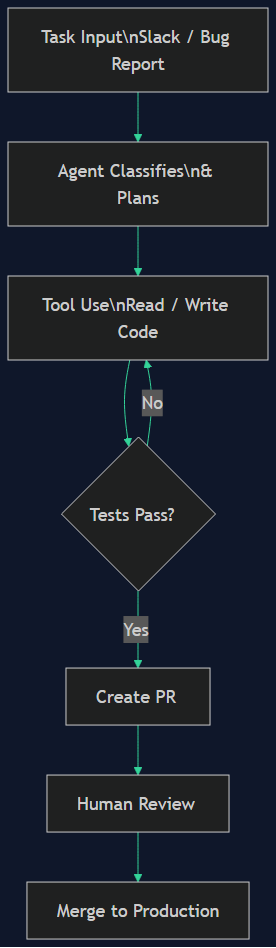
27 Aug 2026 · 4 min read
agent architecture
How xAI Builds Grok — and How I'd Build a Grok of My Own
Grok isn't a model, it's an agent system: tools trained into the reasoning, real-time X and web search on xAI's infra, a four-agent cross-verifying architecture, long-running agents. I break down its features, architecture, and safety harness — then map each piece to a component I can build self-hosted on a subscription I already pay for.
Read more
Discussion
Comments are reviewed before publication. Your email is kept private.