
JOURNAL
Typed Reactive Forms at Scale — Checkout, Validation, and Multi-Step Wizards
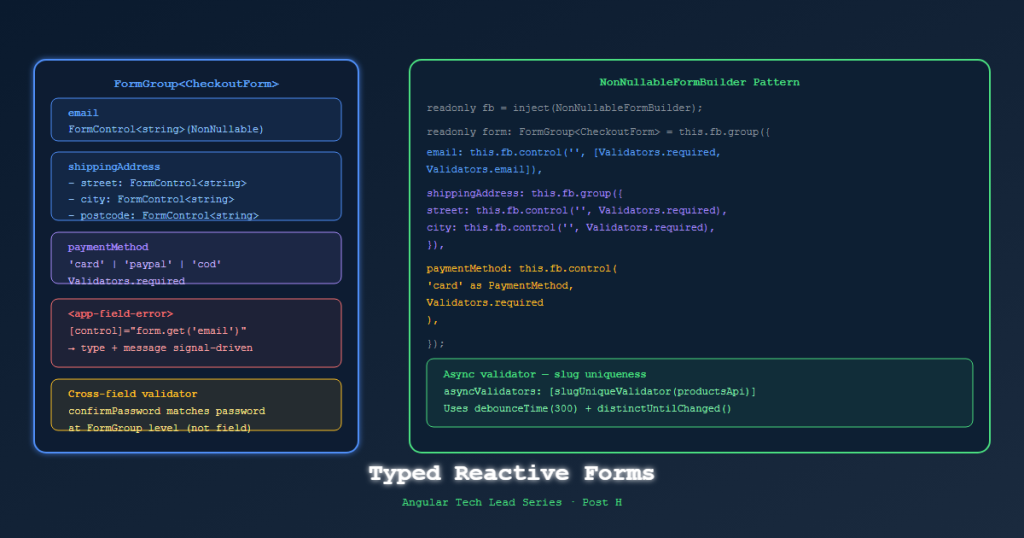
Post H — Angular 21 typed reactive forms in depth: FormGroup<T>, nonNullable, cross-field validators, async validators for slug uniqueness, and managing multi-step checkout flow with Signals.
On this page
Typed reactive forms were introduced in Angular 14 and most developers know they exist. Far fewer use them correctly. In an ecommerce context — checkout forms, address forms, payment flows — untyped forms are a runtime error waiting to happen.
This post covers the typed forms patterns that make checkout safe, testable, and maintainable.
Why Untyped Forms Are a Problem
// ❌ Old-style untyped form
const form = new FormGroup({
  email: new FormControl(''),
  address: new FormGroup({
    street: new FormControl(''),
    city: new FormControl(''),
  })
});

// TypeScript says this is fine — but it returns string | null
const email = form.value.email;         // type: string | null | undefined
const street = form.value.address?.street; // type: string | null | undefined

// This compiles with no error but will crash at runtime
const length = form.value.email.length; // ❌ possibly null!
Typed FormGroup<T> Pattern
import { FormControl, FormGroup, Validators } from '@angular/forms';

// Define the form shape as an interface
interface ShippingFormControls {
  fullName:    FormControl<string>;
  street:      FormControl<string>;
  city:        FormControl<string>;
  country:     FormControl<string>;
  postalCode:  FormControl<string>;
  saveAddress: FormControl<boolean>;
}

// FormGroup with full type parameter
type ShippingForm = FormGroup<ShippingFormControls>;
@Component({...})
export class ShippingStepComponent {
  private fb = inject(NonNullableFormBuilder);

  // nonNullable ensures .value is always string, never string | null
  shippingForm: ShippingForm = this.fb.group({
    fullName:    ['', [Validators.required, Validators.minLength(3)]],
    street:      ['', Validators.required],
    city:        ['', Validators.required],
    country:     ['SA', Validators.required],
    postalCode:  ['', [Validators.required, Validators.pattern(/^\d{5}$/)]],
    saveAddress: [false],
  });

  // Fully typed — TypeScript knows this is string, not string | null
  get fullName(): string {
    return this.shippingForm.controls.fullName.value; // ← type: string ✅
  }
}
NonNullableFormBuilder — The Default Choice
// ❌ FormBuilder — values are string | null
const fb = inject(FormBuilder);
const form = fb.group({ name: [''] });
form.value.name // type: string | null

// ✅ NonNullableFormBuilder — values are always the declared type
const fb = inject(NonNullableFormBuilder);
const form = fb.group({ name: [''] });
form.value.name // type: string
Use NonNullableFormBuilder for all forms in TechShop. The only time you want nullable is when a field is truly optional AND you need to distinguish between “not filled” and “empty string” — rare in practice.
Cross-Field Validators
// Validator function — receives the FormGroup, returns ValidationErrors | null
function passwordMatchValidator(group: AbstractControl): ValidationErrors | null {
  const password = group.get('password')?.value;
  const confirm = group.get('confirmPassword')?.value;

  return password === confirm ? null : { passwordMismatch: true };
}

// Apply at group level, not control level
this.fb.group({
  password:        ['', [Validators.required, Validators.minLength(8)]],
  confirmPassword: ['', Validators.required],
}, { validators: passwordMatchValidator });
Template to show the error:
@if (passwordForm.hasError('passwordMismatch') && passwordForm.touched) {
  <span class="error">Passwords do not match</span>
}
Date Range Validator (for promotions)
function dateRangeValidator(group: AbstractControl): ValidationErrors | null {
  const start = group.get('startDate')?.value as Date;
  const end = group.get('endDate')?.value as Date;

  if (!start || !end) return null;
  return start < end ? null : { invalidRange: { start, end } };
}
Async Validators — Slug Uniqueness Check
// Async validator — returns Observable<ValidationErrors | null>
function slugUniqueValidator(api: ProductsService): AsyncValidatorFn {
  return (control: AbstractControl): Observable<ValidationErrors | null> => {
    return timer(400).pipe(  // Debounce: wait 400ms before calling API
      switchMap(() =>
        api.checkSlugAvailability(control.value as string).pipe(
          map(isAvailable => isAvailable ? null : { slugTaken: true }),
          catchError(() => of(null))  // Network error → don't block form
        )
      )
    );
  };
}

// Usage
this.fb.group({
  slug: ['', {
    validators: [Validators.required, Validators.pattern(/^[a-z0-9-]+$/)],
    asyncValidators: [slugUniqueValidator(inject(ProductsService))],
    updateOn: 'blur'  // Only validate when user leaves the field
  }]
});
Multi-Step Checkout with Signals
The checkout wizard needs to track: current step, which steps are complete, and data from each step.
// libs/checkout/data-access/src/lib/checkout.store.ts
@Injectable({ providedIn: 'root' })
export class CheckoutStore {
  // State
  private _currentStep = signal<CheckoutStep>('shipping');
  private _shippingData = signal<ShippingData | null>(null);
  private _paymentData = signal<PaymentData | null>(null);

  // Selectors (public readonly)
  currentStep = this._currentStep.asReadonly();
  shippingData = this._shippingData.asReadonly();
  paymentData = this._paymentData.asReadonly();

  completedSteps = computed<CheckoutStep[]>(() => {
    const steps: CheckoutStep[] = [];
    if (this._shippingData()) steps.push('shipping');
    if (this._paymentData()) steps.push('payment');
    return steps;
  });

  canProceedToPayment = computed(() => this._shippingData() !== null);
  canProceedToReview = computed(() =>
    this._shippingData() !== null && this._paymentData() !== null
  );

  // Actions
  submitShipping(data: ShippingData) {
    this._shippingData.set(data);
    this._currentStep.set('payment');
  }

  submitPayment(data: PaymentData) {
    this._paymentData.set(data);
    this._currentStep.set('review');
  }

  goBack() {
    const prev: Record<CheckoutStep, CheckoutStep> = {
      payment: 'shipping',
      review: 'payment',
      shipping: 'shipping',
    };
    this._currentStep.update(current => prev[current]);
  }

  reset() {
    this._currentStep.set('shipping');
    this._shippingData.set(null);
    this._paymentData.set(null);
  }
}

type CheckoutStep = 'shipping' | 'payment' | 'review';
Checkout page:
<!-- checkout.component.html -->
@switch (store.currentStep()) {
  @case ('shipping') {
    <app-shipping-step (completed)="store.submitShipping($event)" />
  }
  @case ('payment') {
    <app-payment-step
      (completed)="store.submitPayment($event)"
      (back)="store.goBack()" />
  }
  @case ('review') {
    <app-order-review
      [shipping]="store.shippingData()!"
      [payment]="store.paymentData()!"
      (back)="store.goBack()"
      (confirm)="placeOrder()" />
  }
}

<app-checkout-progress
  [currentStep]="store.currentStep()"
  [completedSteps]="store.completedSteps()" />
Displaying Validation Errors Consistently
Create a shared utility component for error messages:
// libs/shared/ui/src/lib/form-error/form-error.component.ts
@Component({
  selector: 'app-form-error',
  changeDetection: ChangeDetectionStrategy.OnPush,
  template: `
    @if (control().invalid && (control().dirty || control().touched)) {
      @if (control().hasError('required')) {
        <span class="error">This field is required</span>
      }
      @if (control().hasError('minlength')) {
        <span class="error">
          Minimum {{ control().getError('minlength').requiredLength }} characters
        </span>
      }
      @if (control().hasError('pattern')) {
        <span class="error">{{ patternMessage() }}</span>
      }
      @if (control().hasError('slugTaken')) {
        <span class="error">This URL slug is already taken</span>
      }
    }
  `
})
export class FormErrorComponent {
  control = input.required<AbstractControl>();
  patternMessage = input('Invalid format');
}
Usage:
<input type="text" [formControl]="shippingForm.controls.fullName" />
<app-form-error [control]="shippingForm.controls.fullName" />
References
- Angular Typed Forms — angular.dev
- Reactive Forms Guide — angular.dev
- NonNullableFormBuilder — API
- AsyncValidatorFn — API
- AbstractControl — API
Part of the Angular Tech Lead Series — Back to main series overview
Related reading

02 Oct 2026 · 4 min read
agentic coding
Claude Code Mods: I Wrote Middleware for an AI Agent and It Felt Like 2014 Express.js Again
Anthropic shipped a TypeScript hook API for Claude Code — prompt.submit, tool.call, turn.complete. I wired up a cost-tracking mod in twenty minutes and it broke in a way that taught me more than the docs did.
Read more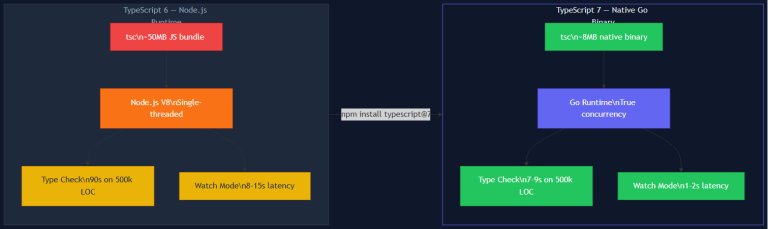
04 Aug 2026 · 8 min read
build-tools
TypeScript 7.0 and the Native Go Compiler: What 10x Build Speed Means for Your Team
TypeScript 7.0 ships a native Go compiler that delivers 8-12x build performance improvements. The benchmark numbers are real, but the deeper story is what this enables: faster CI/CD pipelines, more responsive local dev loops, and a changed calculation for monorepo architecture. Here's the engineering breakdown of what changed, what stays the same, and what your team should actually do.
Read more
22 Mar 2026 · 13 min read
ai
AI-Driven Software Architecture: A Hands-On Guide for Engineering Teams (2026)
How AI is reshaping software architecture from the inside — ML-powered pattern selection, LLM orchestration, AI gateways, event-driven agents, and a full team implementation roadmap with diagrams and production-ready code.
Read more
Discussion
Comments are reviewed before publication. Your email is kept private.